174
Graphical display
6
6.2.Graphical display
6.2. Graphical display
The screen is switched to the graphical display mode, and the display range of the vertical
axis (weighing value) and the horizontal axis (weighing time) of the graph is set.
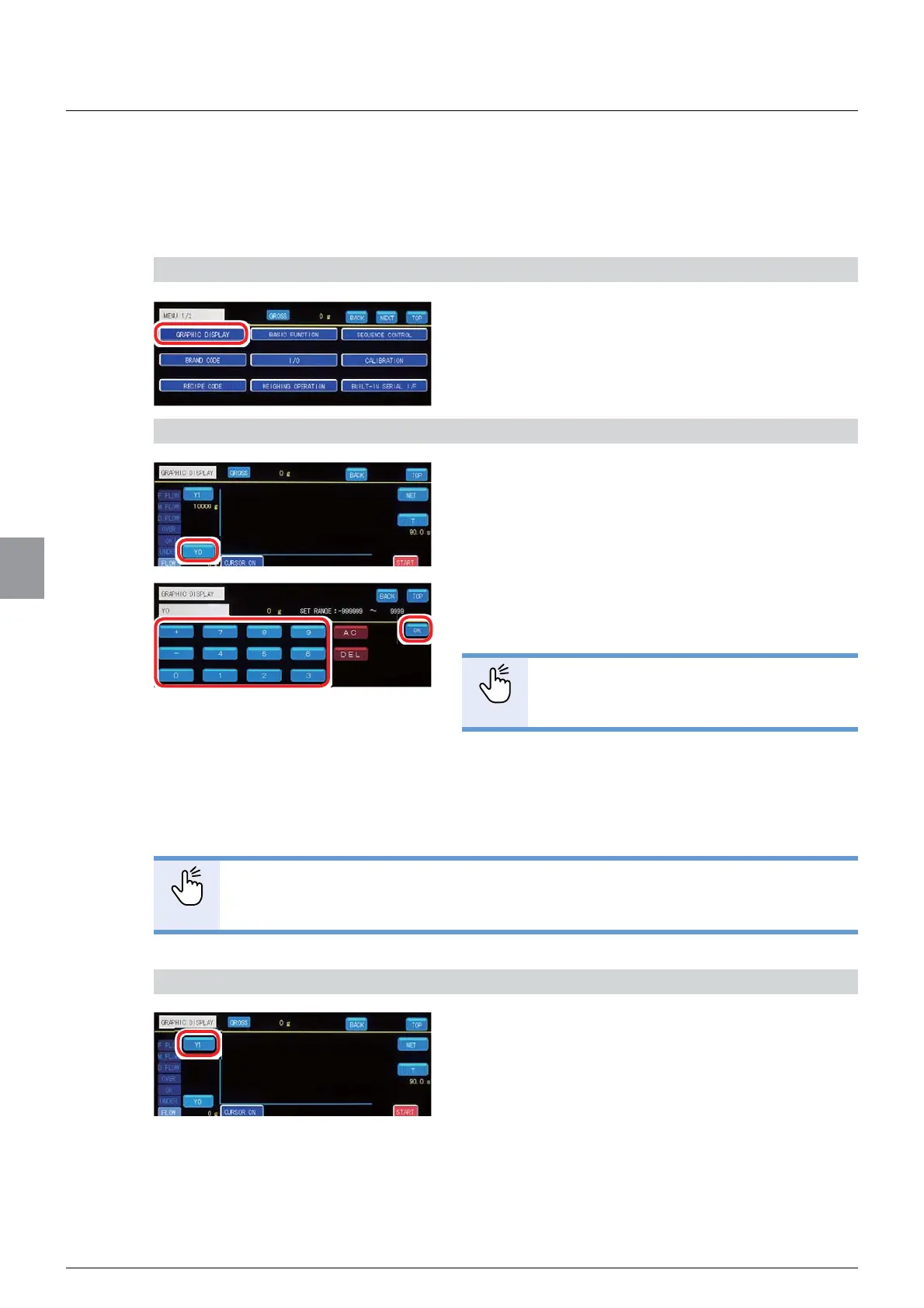
1) Display the graph
1. Tap [GRAPHIC DISPLAY] on [MENU 1/2].
The graph screen will be displayed.
2) Set a lower limit value of the weighing value
1. Tap [Y0].
The lower limit value setting screen will be
displayed.
2. Input a lower limit value of the weighing value.
6HWWDEOHUDQJHWR
POINT
- Refer to “3.5. Input of numerical values”
for more information about how to enter
numerical values.
3. Tap [OK].
The lower limit value of the weighing value will be
set, and the graph screen will be displayed.
POINT
- When the currently set lower limit value is higher than a current upper limit value
that has been set by using the [Y1] key, a value obtained by subtracting 1 from
the upper limit value will be set as the lower limit value.
3) Set an upper limit value of the weighing value
1. Tap [Y1].
The upper limit value setting screen will be
displayed.



 To Next Page