278
Troubleshooting
11
11.2. Error display and buzzer sound
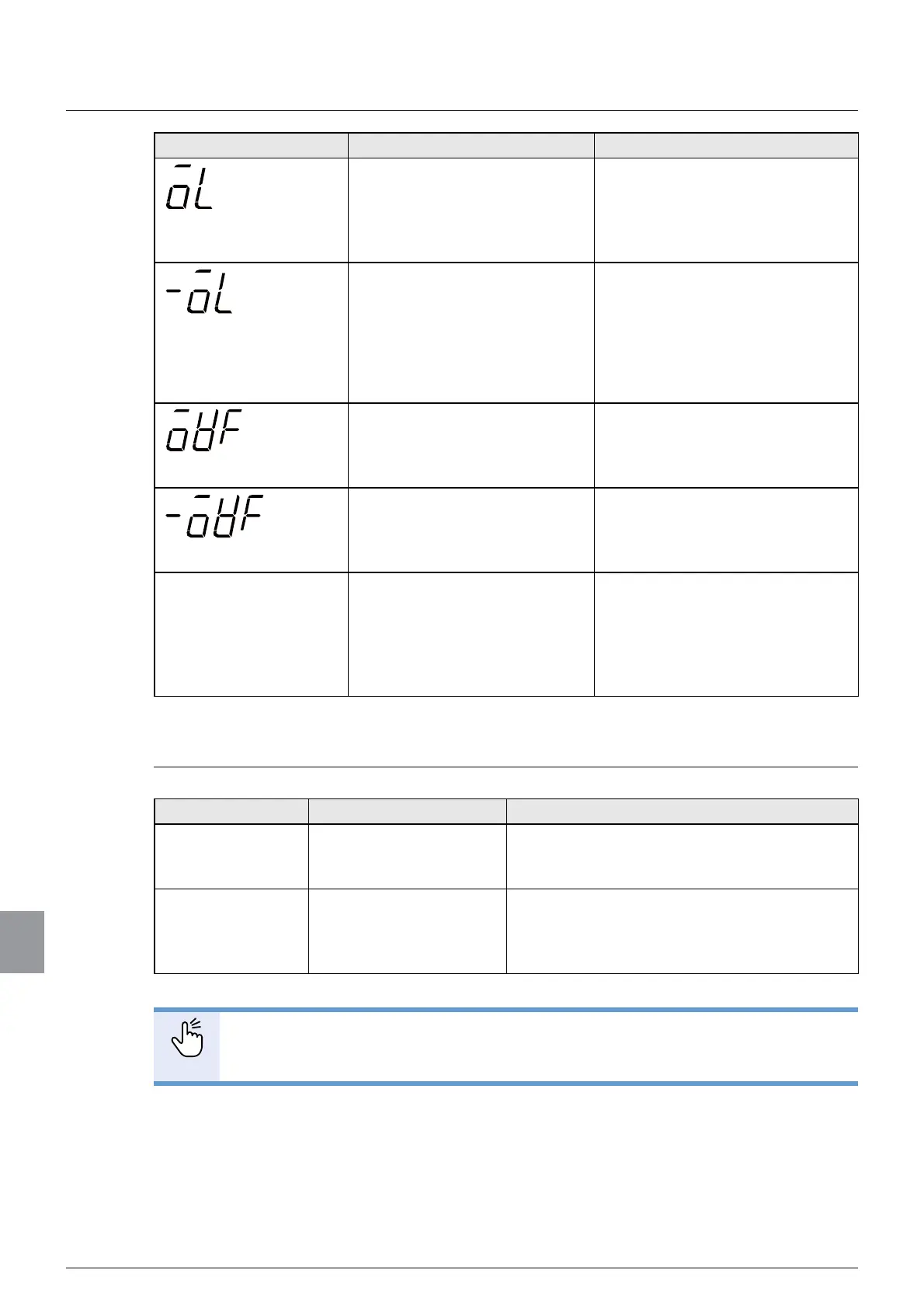
Error display Cause Action
Displayed when the displayed
load value exceeds:
ZHLJKLQJFDSDFLW\'
or
ZHLJKLQJFDSDFLW\[
Change the setting value of the
weighing capacity to a higher
YDOXHĺ6HWWKHZHLJKLQJ
FDSDFLW\
Displayed when the displayed
load value exceeds the
following values:
ZHLJKLQJFDSDFLW\'
ZHLJKLQJFDSDFLW\[
- -20D
Change the setting value of the
weighing capacity to a lower value
ĺ6HWWKHZHLJKLQJ
FDSDFLW\
Displayed when the A/D
transducer input is at plus over.
Change the setting value of the
weighing capacity to a higher
YDOXHĺ6HWWKHZHLJKLQJ
FDSDFLW\
Displayed when the A/D
transducer input is at minus
over.
Change the setting value of the
weighing capacity to a lower value
ĺ6HWWKHZHLJKLQJ
FDSDFLW\
The accumulation value
and the accumulation
times are displayed in
red.
Displayed in red when the
accumulation value and the
accumulation times exceed the
display range.
Delete the accumulation value
and the accumulation times
ĺ%UDQGVHWWLQJV
6HWWLQJVRIUHFLSHFRQWHQWV
DQG6HWWLQJVEHIRUH
PHDVXUHPHQW
11.2.2. Zero error display
Error code Cause Action
=(55=(52 =HURVHWZDVH[HFXWHG
beyond the zero set
effective range.
Check that the zero set effective range has
EHHQDSSURSULDWHO\VHWĺ
6HWWLQJVRI>5$1*(2)=(52@
=(55$= Tare weight cancellation
was executed beyond
the operational range of
tare weight cancellation.
Execute tare weight cancellation within the
operational range of tare weight cancellation
ĺ>5$1*(2)7$5(@
VHWWLQJV
POINT
- To release the zero error, tap [ERROR RESET] key, which is located at the
screen's upper left.



 To Next Page