Morgana DocuMaster MFC - Service Manual 167
4. Service Procedures - Replace Components - Gathering Area
4.11 Replace Components - Gathering Area
4.11.1 Replace the Tamper Solenoid
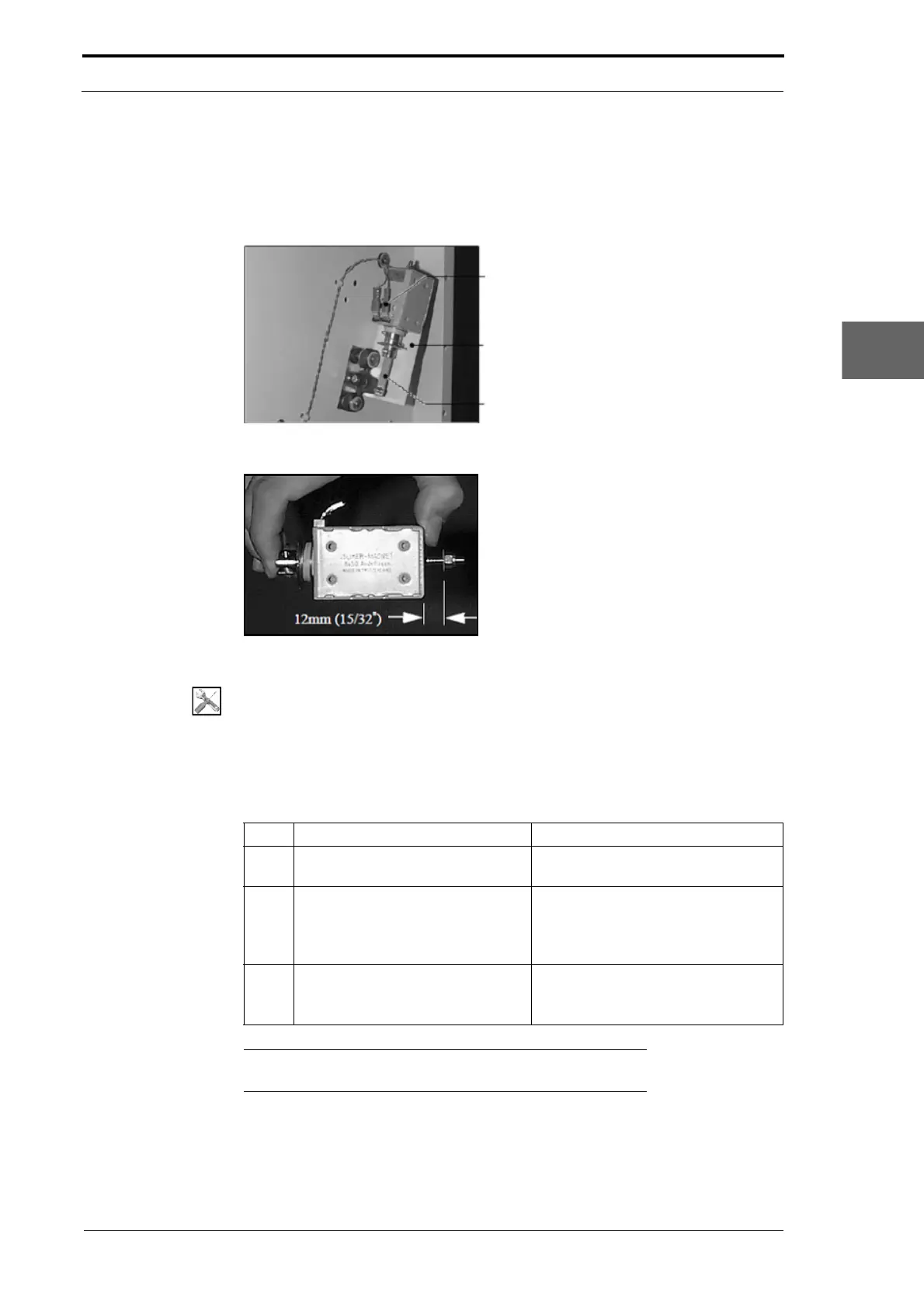
Power Cables
Mounting Bracket
Solenoid Link
Figure 4.177 Gathering Area Tamper Solenoid
Figure 4.178 Tamper Solenoid Travel Adjustment
Tools:
• Allen Key: 3mm
• Spanner: 8mm.
Before you start:
• Remove the RH bottom side cover (See Section 4.2.5).
Step Action Information
1 Disconnect the power cables from
the t
amper solenoid.
(See Figure 4.177)
2 Remove the solenoid link.
• Remove the screw and nut that
attach the solenoid link to the
tamper solenoid (see Figure
4.177).
3 Remove the tamper solenoid.
• Remove the four screw that
attach the tamper solenoid to the
mounting bracket.
Note:
Before you fit the replacement solenoid you must set the
solenoid travel (see below).
To set the solenoid travel:
(1) Push the solenoid plunger into the solenoid body until it stops.
(2) Adjust the locking nut until there is a measured gap of 12mm between the bottom
of the nut and the solenoid body (see Figure 4.178).



 To Next Page