DCS Command System User’s Guide
Menu Operations - Advanced
Create Lash-up
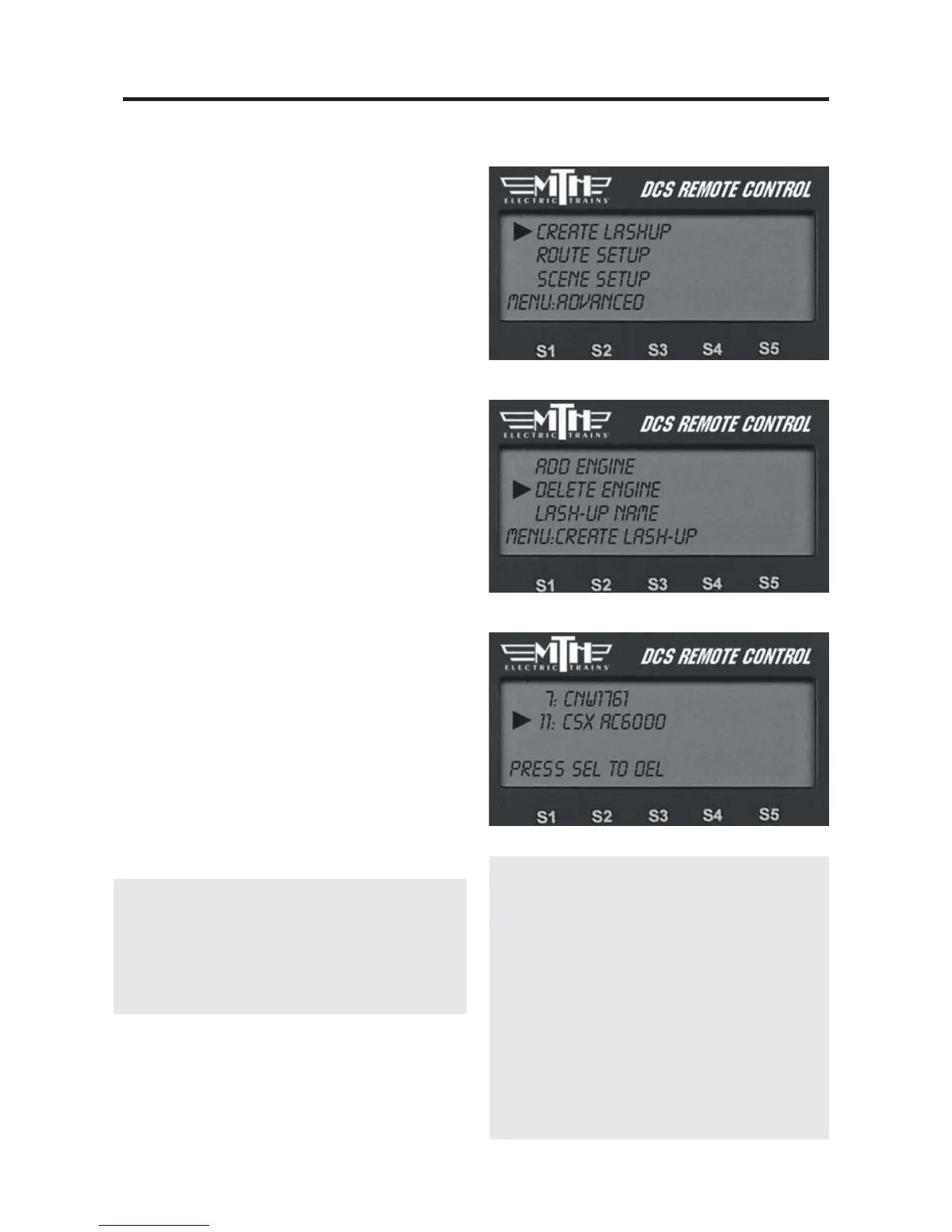
Delete Engine
Use to delete an engine from a Lash-up
during the creation process.
1. Scroll and press to select the lash-up
from which you want to delete an engine.
2. Scroll and press to select the engine to
be deleted.
3. When prompted to confirm the dele-
tion, press the thumbwheel.
To delete an entire Lash-up, see the System
Menu/Engine Setup/Delete Engine section in
this chapter.
The lash-up remains in DCS memory
until you delete it or any of the engines
that make up the lash-up. You can con-
tinue to operate your engines individually
or even as part of another lash-up by
placing that engine/lash-up on the active
engine list and operating it as normal.
Be careful not to attempt to run a single engine in
more than one lash-up or alone and as part of a
lash-up at the same time.
Note: If you select and attempt to operate a
lash-up when the engines are not coupled together,
they will each individually power up and follow
the lash-up commands, wherever they are on the
layout.
83
DCS Tip: If you want to separate one
engine from a lash-up during operations,
activate and operate (press the startup
button) the individual engine from the
engine screen. This will render the lash-
up inactive. To restore the engine to the
lash-up, re-couple it and reactivate the
lash-up from the engine list. Note that
any special non-default settings you
made to the lash-up will be lost when
you do this.



 To Next Page