5-13
5 Understanding Programming
CJ2 CPU Unit Software User’s Manual
5-2 Tasks
5
5-2-1 Overview of Tasks
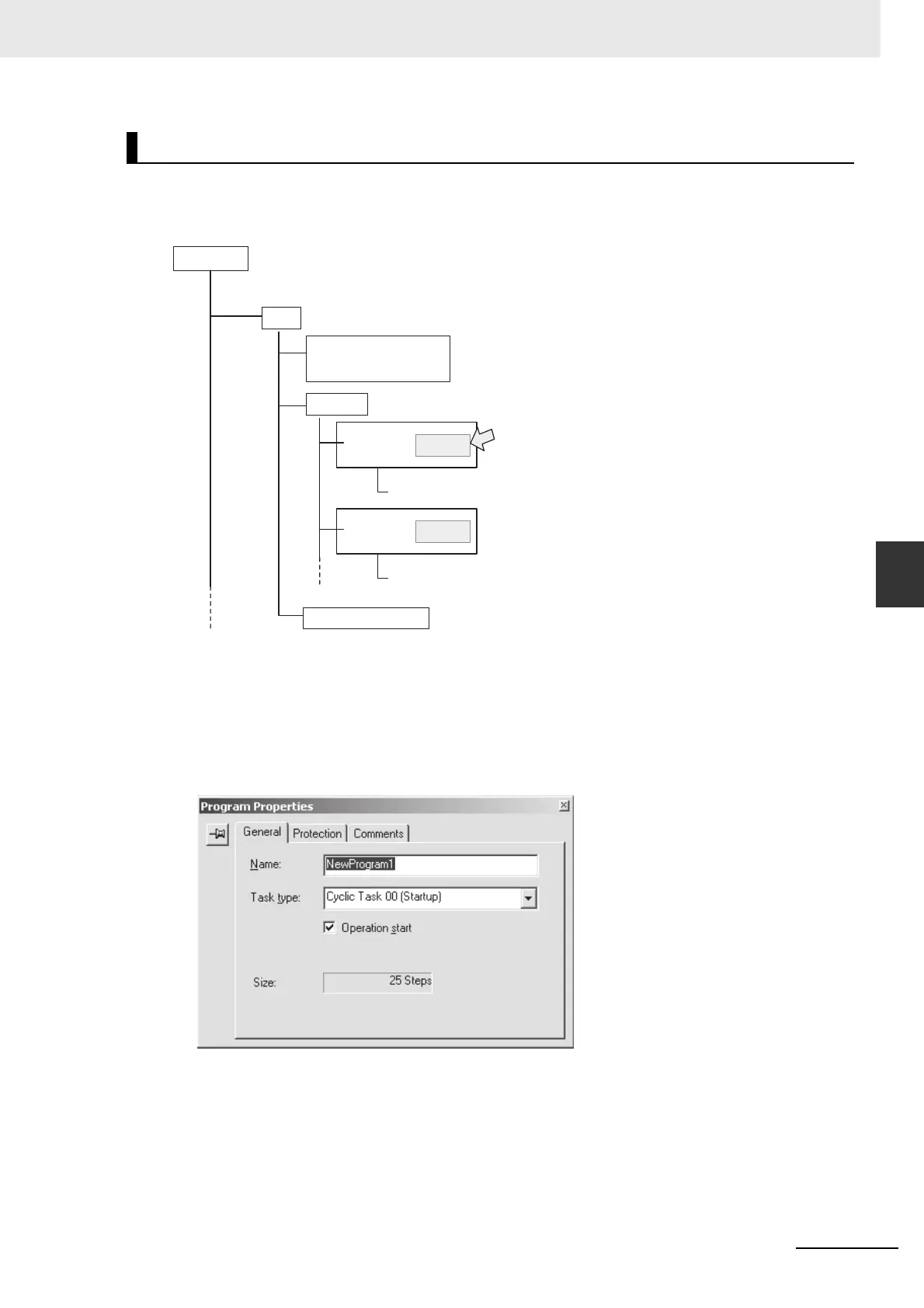
Set the task numbers for programs as program properties using the CX-Programmer.
z Settings for Task Numbers
Specify the task type and number as attributes for each program.
1 Select View/Properties, or click the right button and select Properties on the popup menu, to
display the program that will be allocated a task.
2 Select the General tab, and select the Task Type and Task No. For a cyclic task, select the
Operation start Check Box if you want to start executing the task when operation is started.
CX-Programmer Operations for Tasks
PLC1
Project
Global symbols, I/O
tables, PLC Setup, PLC
memory
Program
Program 1
Program 2
Task 00
Task 01
Specify the task number as a program property.
Local symbols
Local symbols
Function block







 To Next Page