Chapter F - ADJUSTMENTS
F-2 Planmeca Compact i
MECHANICAL ADJUSTMENTS
Technical Manual
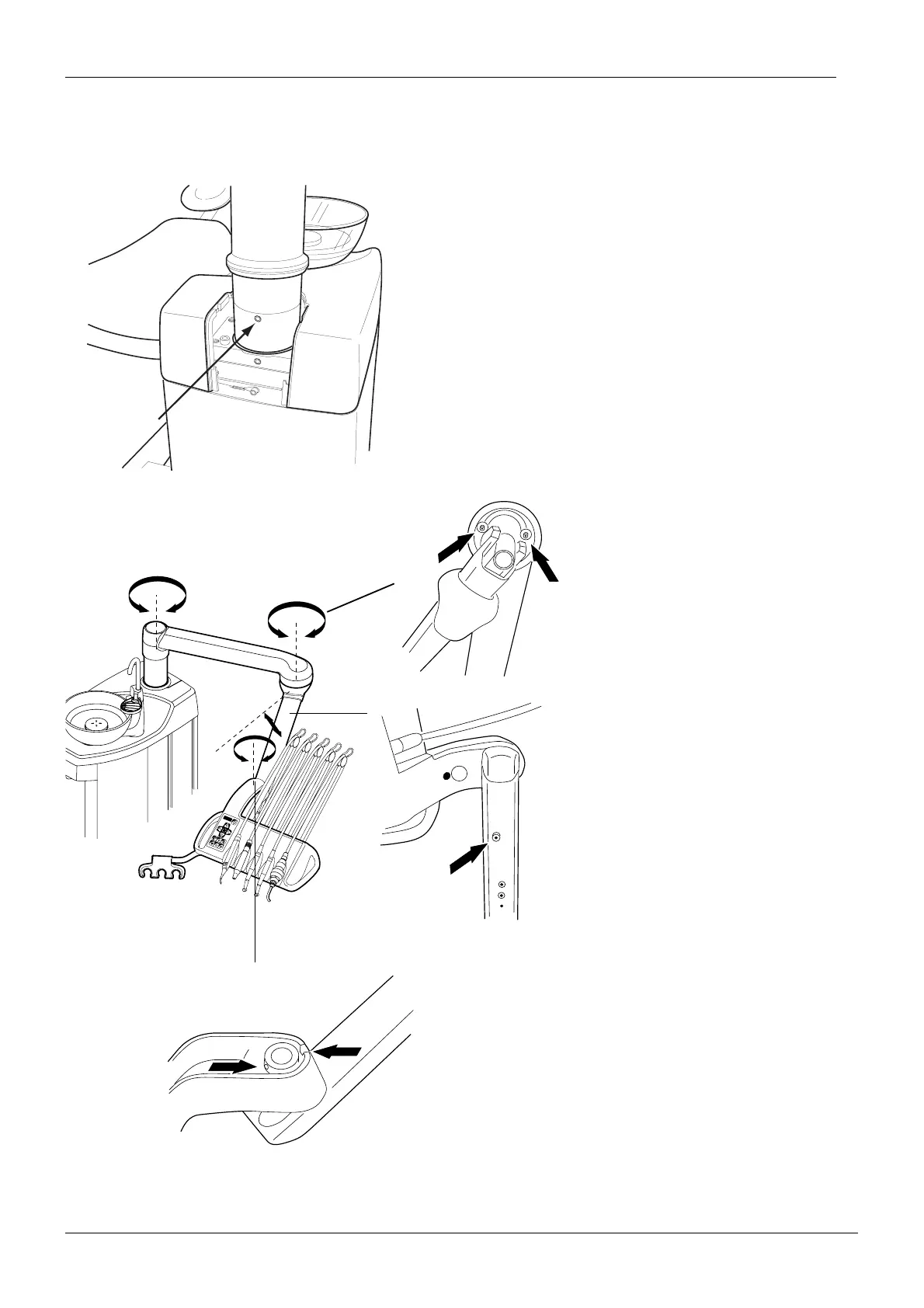
1.2 Adjusting friction of the OP delivery arm joints
S
C
D
A
B
8
8
88
light
EMS
rotaf.eps
To adjust the rotational friction of the console
arm column:
1. Remove the small cover plate from the cus-
pidor cover.
2. Unscrew the two M5x10 screws and
remove the holder plate.
3. Adjust the friction with the adjustment screw
located on the console arm column.
4. Reassemble in reverse order.
Adjust the rotational friction of
the console arm with the 4 mm
allen key. Adjust the two
screws equally to avoid wear-
ing. Tightening the screws
increases the friction.
Adjust the lifting friction of
the console arm with the 4
mm allen key. Tightening
the screw increases the
friction.
Adjust the rotational friction of the instrument
console with the 4 mm allen key. Adjust the
two screws equally to avoid wearing. Tight-
ening the screws increases the friction.















 To Next Page