EasyManua.ls Logo

SatLab SLT2 - Page 133

SatLab SLT2
201 pages
Print Icon
To Next Page IconTo Next Page
To Previous Page IconTo Previous Page
Loading...
Total Station Manual
-
132
-
Known
L1 Baseline
L2 Reference Line
P1 First point
P3 First reference point
P2 Second point
P4 Second reference point
d1 Offset
d2 Line
r+ Rotate
P0 STA
Unknown
p Measure point
d3 ΔLength
d4 Δtrav.
Reference Line
Steps
Key
Display
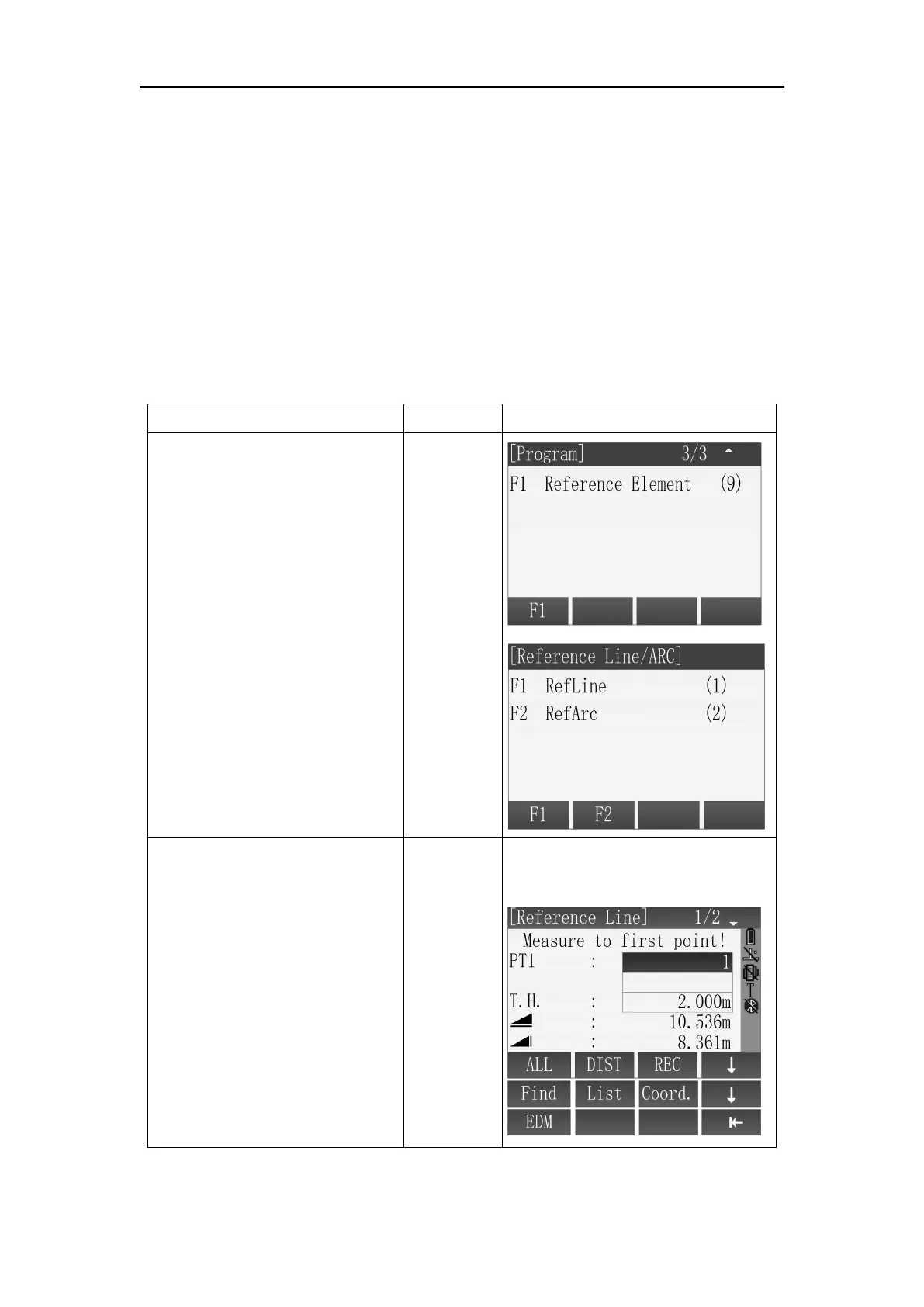
1
Press [F1] or numeric key
[9] in main menu, then set Job,
B.S and enter [Reference
Line/ARC] menu([F4]), press [F1]
or numeric key [1] to enter
RefLine function.
[F1]
or
[9]
[F1]
or
[1]
2 There're several methods
to obtain the first point for
baseline definition
A: Enter point name, then press
[F1](ALL) to define first point.
Input point
name
+
[F1]
A: Get the target point by
measure.

Table of Contents