EasyManua.ls Logo

SatLab SLT2 - RefSurface Definition

SatLab SLT2
201 pages
Print Icon
To Next Page IconTo Next Page
To Previous Page IconTo Previous Page
Loading...
Total Station Manual
-
148
-
press [F1](Find) to
check whether this
point was existed, if
not exist, then should
firstly input or
measuring this point's
coordinate.
[F1]
+
[F4]
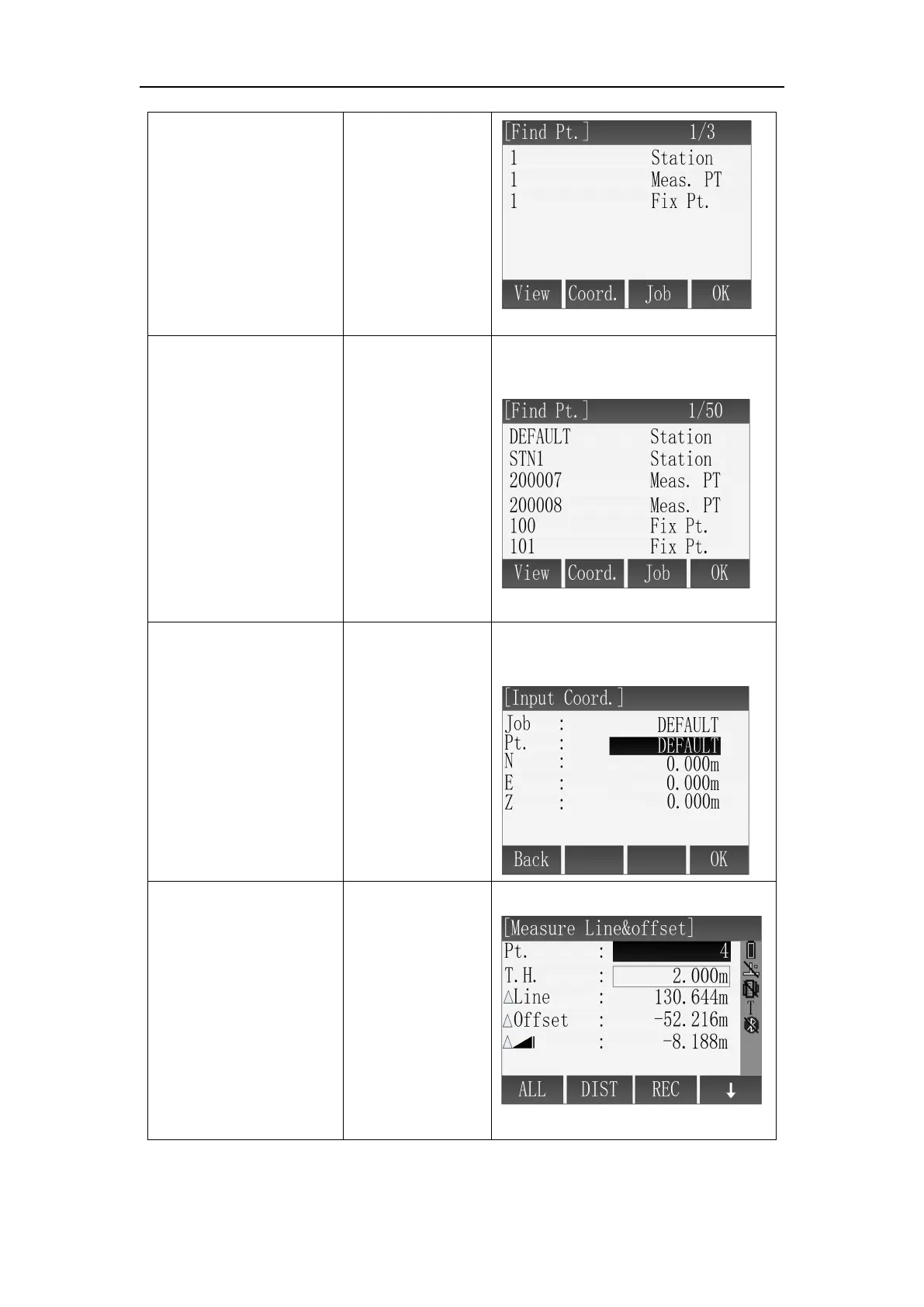
D: Press [F2](List) , in
[Find Pt.] screen,
search the known
points in job through
[ ]\[ ] and press
[F4](OK) to select.
[F2]
+
[F4]
D: Select the point by list in the
instrument.
E: Press [F3](Coord.),
Input point name,
coordinate's data, it
will indicate recover if
point name is
repeated, then press
[F4](OK) to save the
point.
[F3]
+
Input point name
coordinate
+
[F4]
E: Input the point through
keyboard.
After measuring
points in different
ways, we can see the
result of the high
deviation,
Line and
Offset.
1
1
Result of Line&Offset:
Line: Measuring point relative to the start point of arc , if it is beyond the reference

Table of Contents