EasyManua.ls Logo

SatLab SLT2 - Page 148

SatLab SLT2
201 pages
Print Icon
To Next Page IconTo Next Page
To Previous Page IconTo Previous Page
Loading...
Total Station Manual
-
147
-
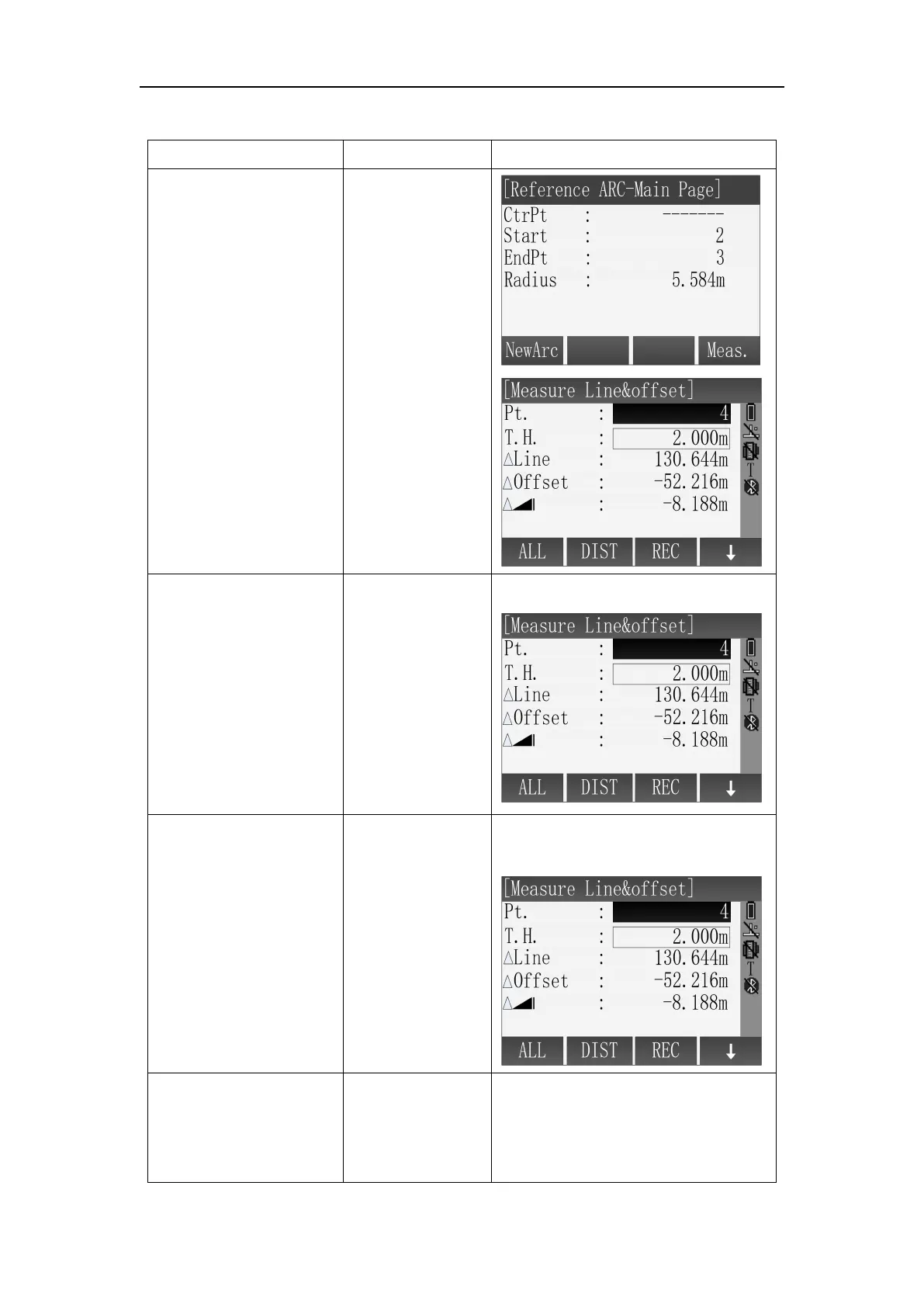
Measure Line&Offset
Steps
Key
Display
1
Using method of
the "Centre, Start
Point" or "Start&End
Pt, Angle" defines the
reference arc, entering
the [Reference
ARC-Main Page], and
press [F4] (Meas.) to
Measure Line&Offset
[F4]
There are several
methods to obtain the
Pt which is used for
Measure Line&Offset
A: Enter point name,
then press [F1](ALL) to
define the Pt.
Input point name
+
[F1]
A: Get the target point by measure.
B: Input point name,
Press [F2](DIST) +
[F3](REC) to save the
Pt, the saved result will
be directly put into
calculation.
[F2]
+
[F3]
B: Get the target point by
DIST+REC.
C: Input point name,
press [F4](
) to shift to
subscript function,
Input point name
+
[F4]
+
C: Input the name of the point and
find whether it is in memory.

Table of Contents