2. Parts Identification and Function
2-16
CBM-20A/20Alite
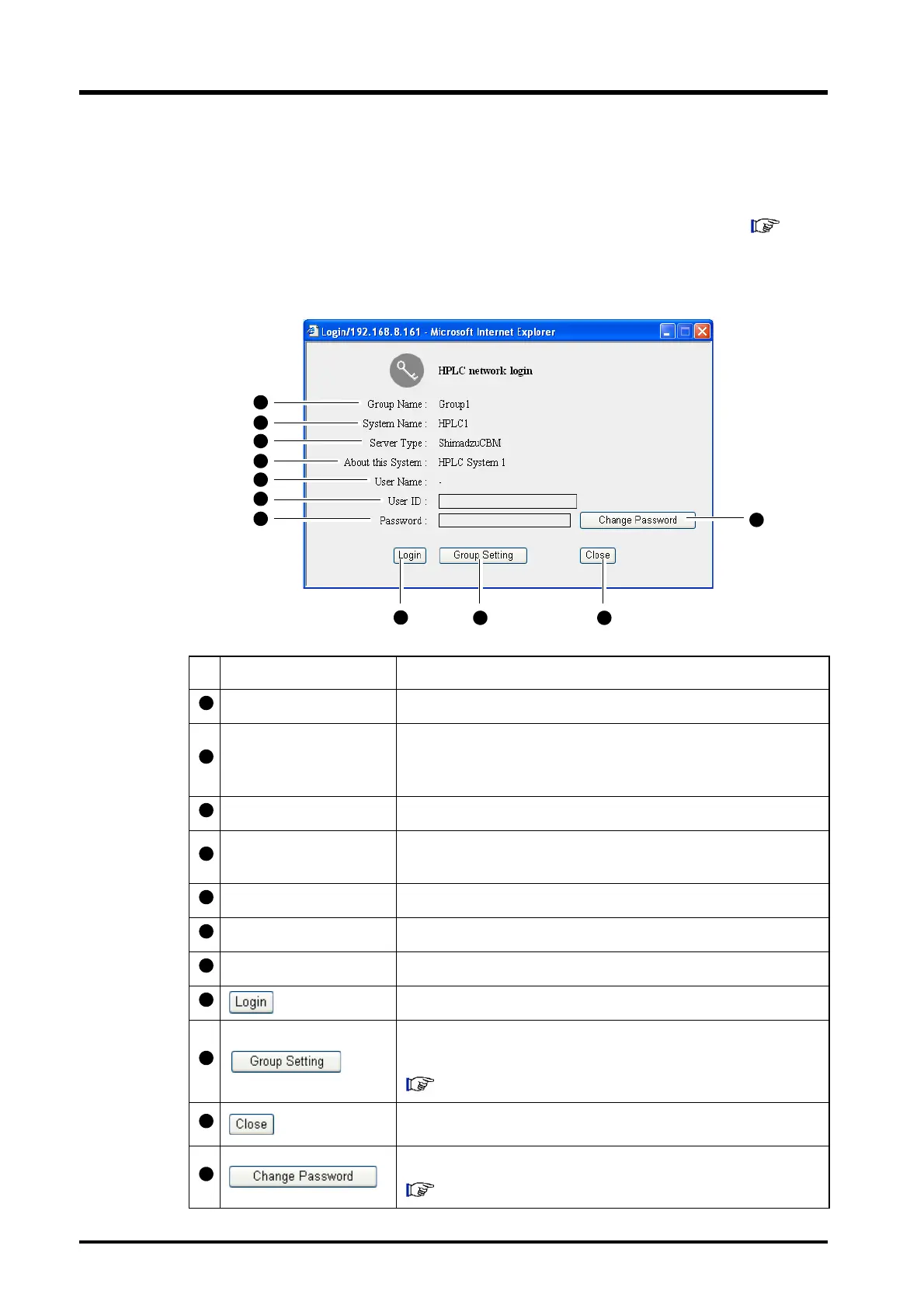
2.6 "Login" Window
The "Login" window is displayed when the system name on the "Status" tab page ( "2.5.2
"Status Summary" Section" P. 2-11 ) is clicked. It is possible to log into the "Analysis
Execution" application and the "Group Settings" application from this window. To log in, enter
a previously registered user ID and password.
Display item Description
Group Name Displays the name of the group to which the system belongs.
System Name
Displays the name of the system configured by the solvent delivery
module, autosampler, column oven, detector, and other
components. The system name is set by the administrator.
Server Type Displays the Web server type ([ShimadzuCBM] in this case).
About this System
Displays the description about the system. The description is set by
the administrator.
User Name Display the name of user if there is already a user logged in.
User ID Enter a user ID. (The initial setting for the user ID is "Admin".)
Password Enter a password. (The initial setting for the password is "Admin".)
Click to login to the "Analysis Execution" application.
Click to login to the system controller's "Group Settings"
application.
"5.9 Managing Groups" P. 5-39
Click to close the "Login" window without logging in.
Click to change the password.
"5.10 Changing Passwords" P. 5-55



 To Next Page