2.7 "Analysis Execution" Application
2-19
CBM-20A/20Alite
2
"Sequence" Section
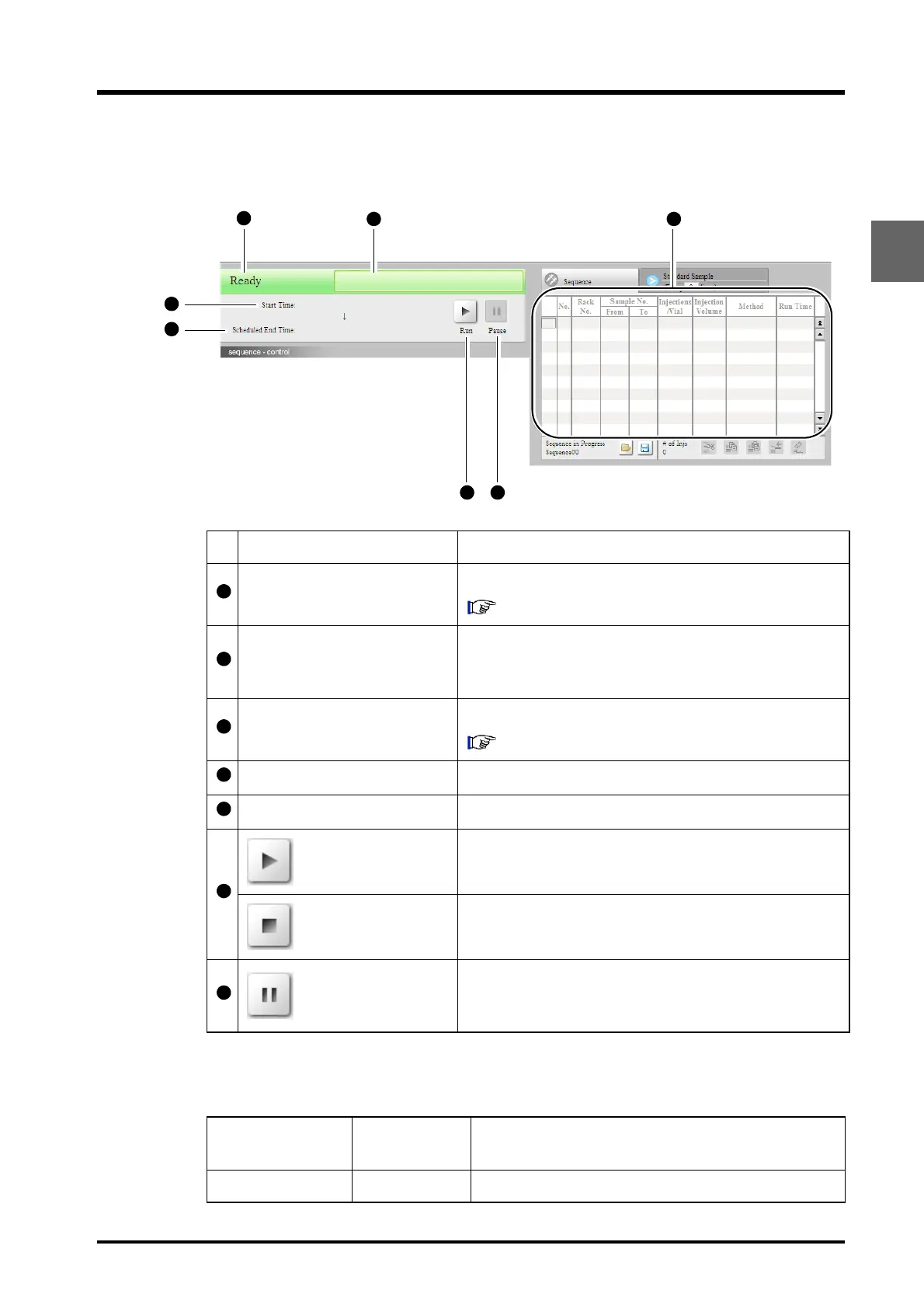
This section is used to edit the sequence file and start the analysis sequence.
Status Display
The system's status is displayed in the [Status Display] field.
Display item Description
Status
Displays the system's status information.
"Status Display" P. 2-19
Sequence Name and User
Name
Displays the name of the sequence file for the analysis and
the user name. Nothing is displayed if no sequence file has
been added to the analysis queue.
Sequence Table
Displays the settings of the sequence file.
"4.3 Creating Sequence Files" P. 4-22
Start Time Displays the time at which analysis was started.
Scheduled End Time Displays the scheduled end time for the current sequence.
Start button
Click to start analysis. The "run" symbol changes to the
"stop" symbol.
Stop button
Click to terminate analysis. The "stop" symbol changes to
the "run" symbol.
Pause button
Click to temporarily stop analysis. Analysis will temporarily
stop when the current injection is complete. Click again to
resume analysis.
"Sequence" section
display
"Status" tab
page display
Description
Ready Ready Analysis can be performed.



 To Next Page