Commissioning
5.5 Restoring the factory setting
Converter with the CU240B-2 and CU240E-2 Control Units
Operating Instructions, 01/2016, FW V4.7 SP6, A5E34259001B AC
167
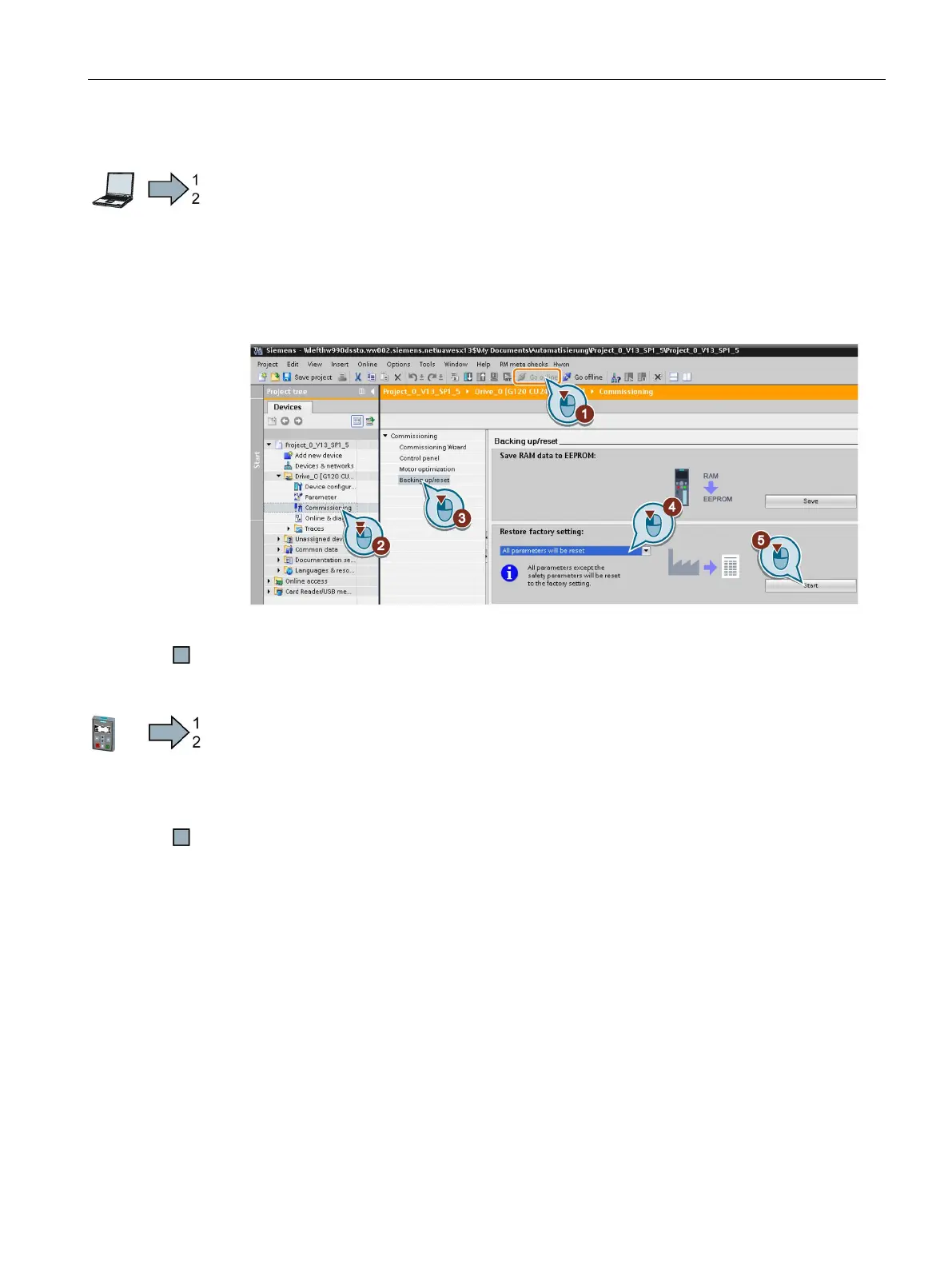
Procedure with Startdrive
Proceed as follows to reset the inverter to factory settings:
1. Go online.
2. Select "Commissioning".
3. Select "Backing up/reset".
4. Select "All parameters are reset".
5. Press the "Start" button.
6. Wait until the inverter has been reset to the factory setting.
You have reset the inverter to factory settings.
Procedure with the BOP-2 operator panel
Proceed as follows to reset the inverter to factory settings:
1. In the "Options" menu, select the "DRVRESET" entry
2. Confirm the reset using the OK key.
3. Wait until the inverter has been reset to the factory setting.
You have reset the inverter to factory settings.

















 To Next Page