Advanced commissioning
6.2 Inverter control
Converter with the CU240B-2 and CU240E-2 Control Units
218 Operating Instructions, 01/2016, FW V4.7 SP6, A5E34259001B AC
An overview of all the parameters that belong to the command data sets is provided in the
List Manual.
Note
It takes approximately 4 ms to toggle between command data sets.
To change the number of command data sets in STARTER, you must open your STARTER
project offline.
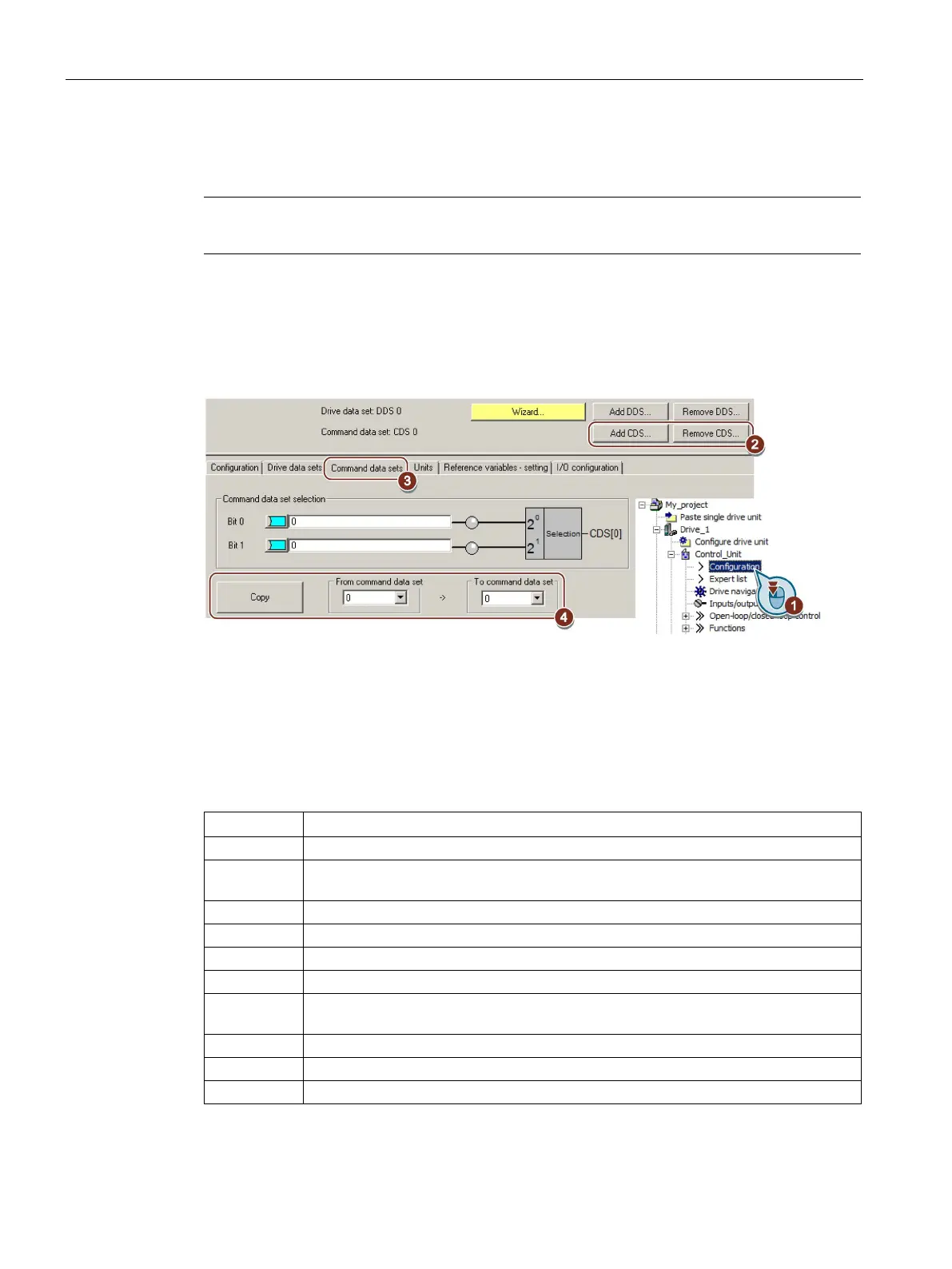
You can edit command data sets if, in the STARTER project tree, you select "Configuration".
If you require more than two command data sets, then add command data sets using this
,
To simplify commissioning several command data sets, under the "Command data sets" tab
there is a copy function.
Image 6-19 Editing command data sets in STARTER
Drive commissioning: Data sets
p0170
Number of command data sets
(factory setting: 2)
Drive commissioning: Ready
Displaying the number of the CDS that is currently active
Number of the command data set to be copied (source)
Number of the command data set to which the data is to be copied (target)
p0809[2] = 1
Copying is started
Once copying has been completed, the inverter sets p0809[2] to 0.
Command data set selection CDS bit 0
Command data set selection CDS bit 1
Displaying the number of the CDS that is currently active

















 To Next Page