Backing up data and series commissioning
7.1 Backing up and transferring settings using a memory card
Converter with the CU240B-2 and CU240E-2 Control Units
362 Operating Instructions, 01/2016, FW V4.7 SP6, A5E34259001B AC
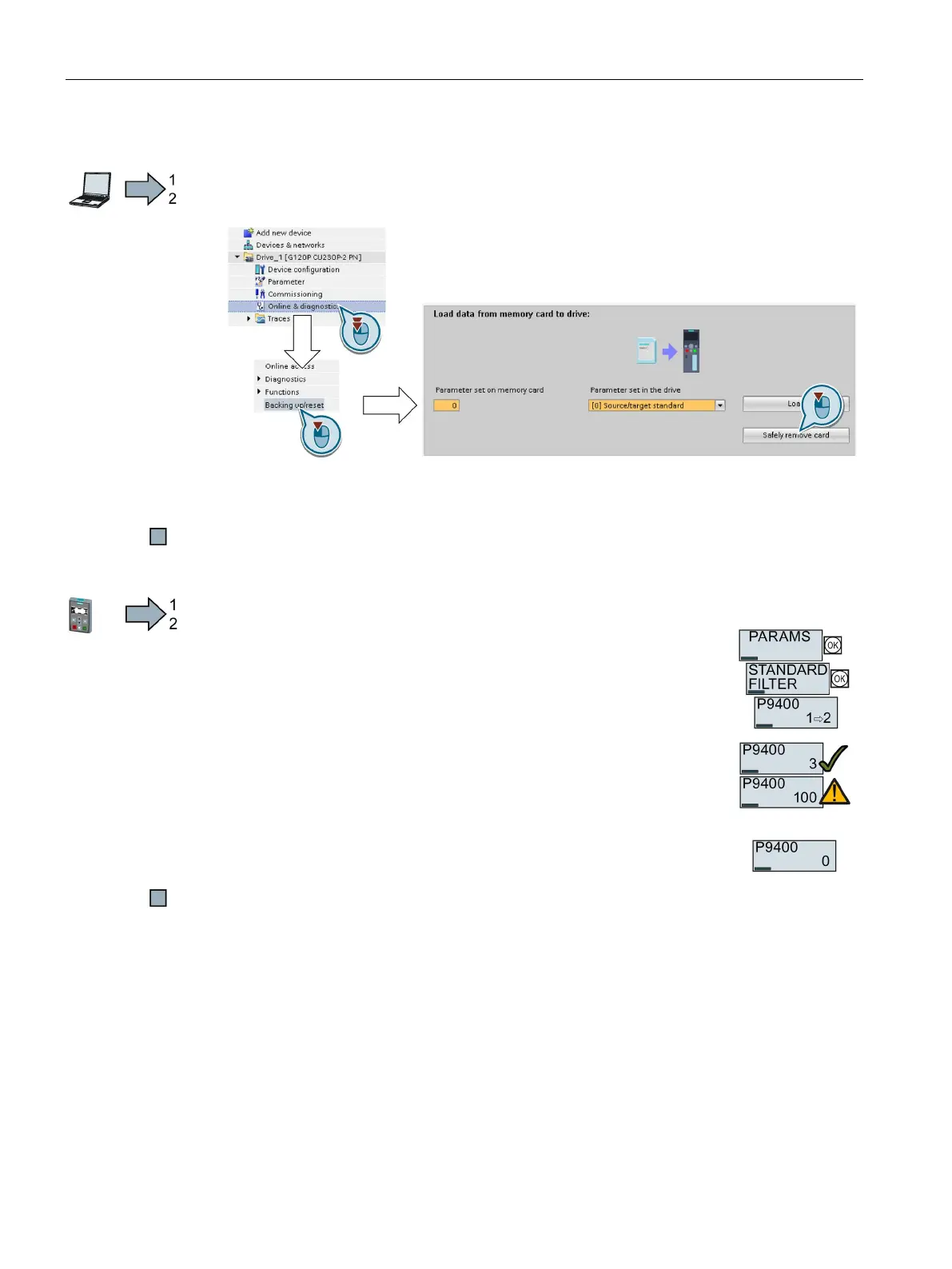
Procedure with Startdrive
To safely remove the memory card, proceed as follows:
1. In the Drive Navigatorselect the following screen form:
2. Click on the button to safely remove the memory card.
Startdrive will tell you whether you can remove the memory card from the inverter.
You have now safely removed the memory card from the inverter.
To safely remove the memory card using BOP-2, proceed as follows:
Go to parameter p9400. If a memory card is correctly inserte
d, then
= 2.
= 3 or p9400 = 100.
p9400 = 3: You may remove the memory card from the inverter.
p9400 = 100: It is not permissible that you remove the memory
card. Wait for several seconds and then set p9400 = 2 again.
Remove the memory card. After removing the memory
card,
= 0.
You have now safely removed the memory card using BOP-2.

















 To Next Page