Alarms5-2 SIMATIC PCS 7 OSx 4.1.2 Operator
5.1 Alarm Notification and Acknowledgment
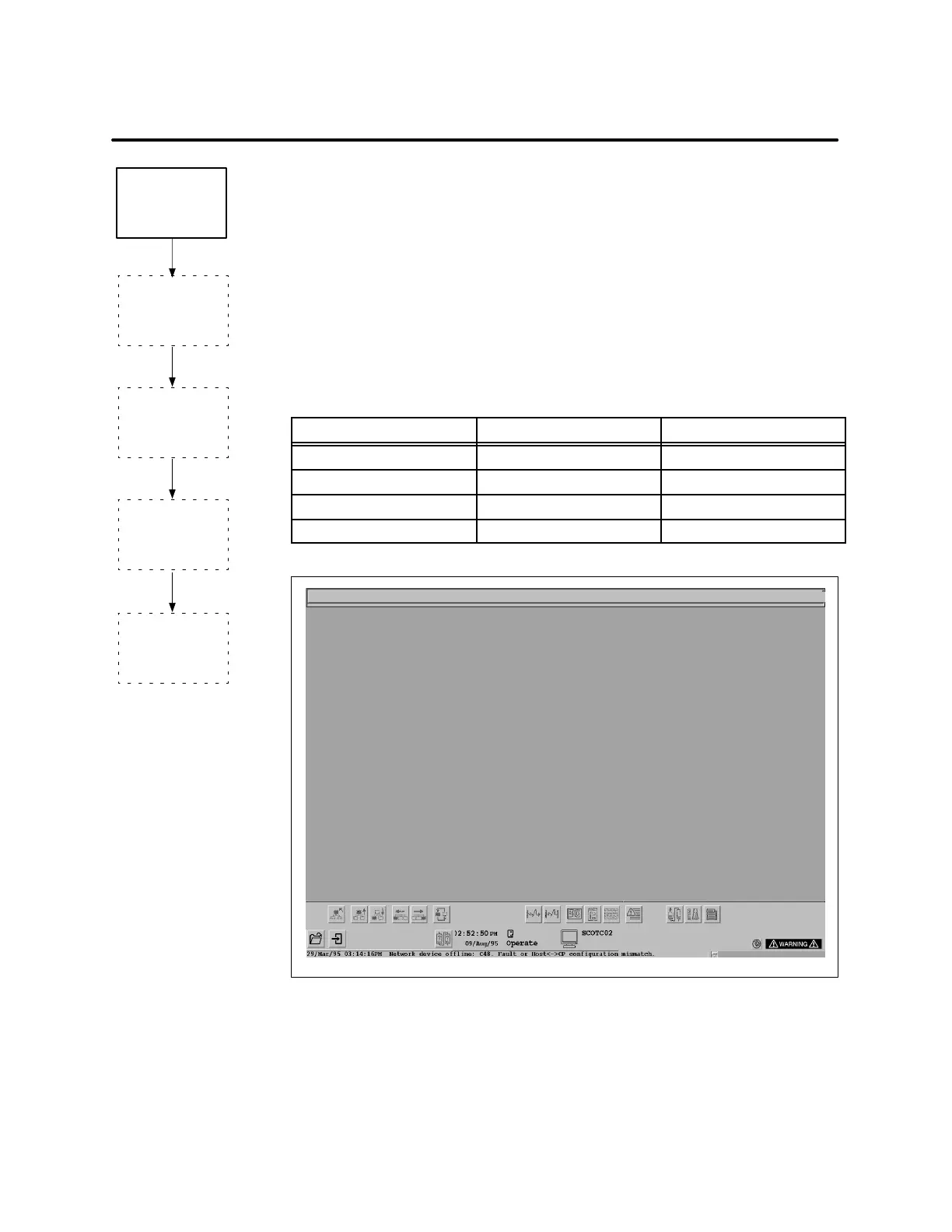
When a process upset occurs while the system is in the Operate state, the
operator receives both a visual and audible indication of the alarm at the
OSx station. A dual triangle symbol, an alarm icon, appears in the lower
rightpartofthescreen,asshowninFigure 5-1. At the same time, an
audible alarm sounds.
The color coding of the alarm icon and the tonal quality of the audible alarm
indicate alarm priority. Table 5-1 shows the default alarm priorities and the
abbreviations for each. Within the PCS 7 OSx system, critical is the highest
priority alarm, and maintenance is the lowest priority alarm.
Table 5-1 Alarm Priority Indic ators
Alarm Priority Color Code Alarm Tone
Critical (C) Black on Red Rapid; high-pitched
Warning (W) Black on Yellow Slow; low-pitched
Information (I) White on Blue None
Maintenance (M) Printed Only None
File Controls Startup Data Tags Editors Help
Figure 5-1 Location of Alarm Icon
Operator Checks
Alarm Group
Importance List
Operator
Silences
Alarm
Operator
Notified
of Alarm
Next Task:
Operator Checks
Alarm Summary
Next Task:
Operator
Acknowledges
Alarm
Next Task:
Current Task:
Next Task:



 To Next Page
 Loading...