LC700 – User’s Guide
3.12
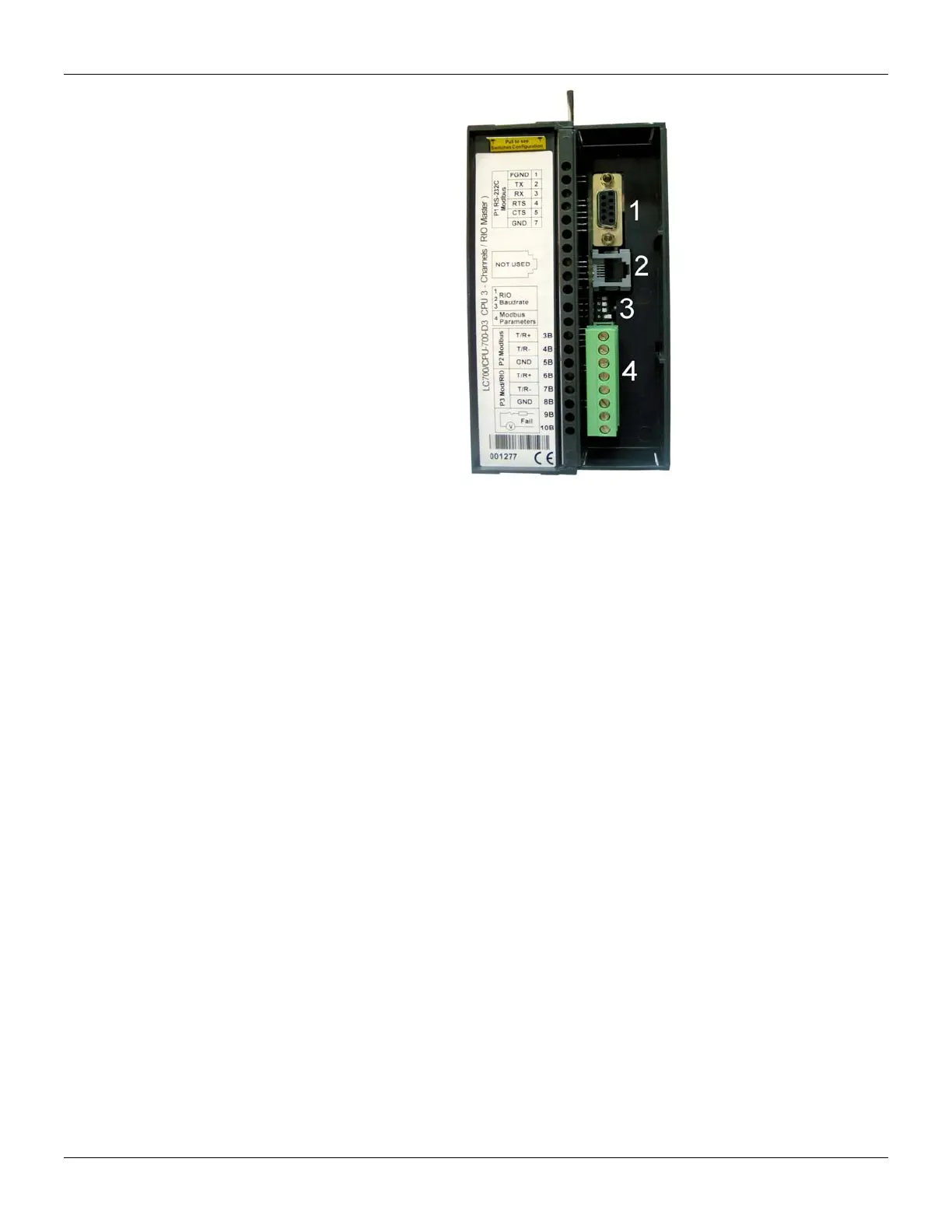
Figure 3.4 - Communication Channels of The CPU-700-D3.
In the picture above:
1- This the CPU-700 P1 port. It is the EIA-232-C channel.
2- This is the SSIO channel used by the redundant CPU-700. See “CPU-700 Redundant Module” for
further details.
3- These are the Dip-switches used to change the CPU communication parameters.
4- Ports P2 and P3 of the CPU-700. These are EIA EIA-485 channels.
There are 3 serial communication ports on the CPU700: one EIA-232 port (P1) and two EIA-485
ports (P2 and P3). The user should set to any of these ports: baud rate, parity and other specific
parameters.
Port P1
Baudrate: 9600 bps
Parity (Odd or Even)
RTS/CTS Timeout
CTS: Signal that indicates the device is ready for transmission.
RTS: Signal to request data transmission
The PC requests a connection with the CPU. The LC700 receives this request and processes it.
Next, the LC700 sends the RTS signal and it waits for the CTS signal during the time interval set on
the RTS/CTS Timeout parameter.
Off Duty
Available time for communication when the CPU is not running a ladder diagram. The bigger the
value set for Off Duty, the bigger the available time for communication.
Time Delay
The PC sends a frame to the CPU-700, i.e., makes a communication request. The CPU-700 waits
the amount of time set on Time Delay to process the frame request and send the answer.



 To Next Page