LC700 Architecture
2.5
Disconnecting racks
1. The adjacent cards to the joining part, between the racks, must be removed allowing access to
this operation.
2. Remove the flat cable of top connector (N) of the adjacent rack, at left.
3. Remove the power connections (L and M) of both sides of the rack that will be disconnected. For
that, with a screwdriver, release the screws (only the sufficient) and move the connection plates
to left until they are completely withdrawn, thus the rack is free to be removed.
4. If the DF91 (B) is connected to rack that will be removed, remove it until the rack to be free.
5. Remove the rear connector (E) after removing the rack from DIN rail.
Installing the expansion flat cables - DF101, DF102, DF103, DF104 and
DF105.
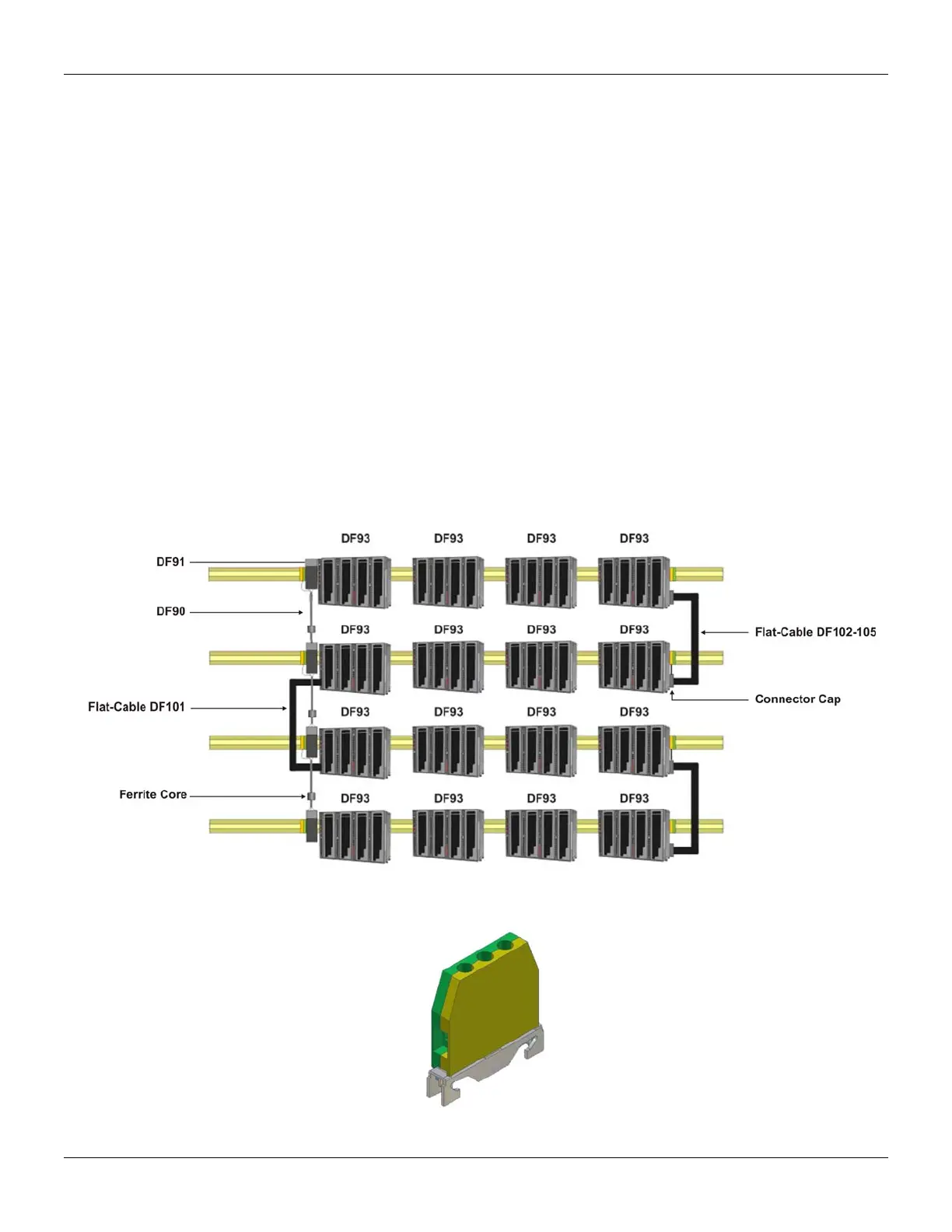
These flat cables are used when the LC700 is expanded in more than one row of racks, i.e., in
different DIN rail segments, one below the other.
DF101 - Flat cable to connect racks by left side
It is installed in the rack’s rear connectors (E) of the left extremity of each row of racks,
interconnecting the rows 2-3, 4-5 and 6-7 (if they exist).
To ground the flat cables shield, use the ground terminal (O) next to flat cables connection. The
available terminal, next to each DF91 (B), can be used.
DF102, DF103, DF104 and DF105 - Flat cable to connect racks by right side
They are installed on the upper connectors (N) of the right extremity rack of each row of racks,
interconnecting the rows 1-2, 3-4 and 5-6 (if they exist).
Figure 2.6 - Illustration - DF101 and DF102-105 Flat cables
To ground the flat cables shield, use the ground terminals (O) next to flat cables connection.
Figure 2.7 - Ground terminal



 To Next Page