DCR-PC101/PC101E
5-54
3-4. VIDEO SYSTEM ADJUSTMENTS
Before perform the video system adjustments, check that the speci-
fied values of “66MHz/54MHz Origin Oscillation Adjustment” of
“1-3. CAMERA SYSTEM ADJUSTMENTS” is satisfied.
Check that the data of page: 0, address: 10 is “00”.
If not, select page: 0, address: 10, and set the data “00”.
Adjusting Procedure:
1. Chroma BPF f
0
adjustment
2. S VIDEO OUT Y level adjustment
3. S VIDEO OUT chroma level adjustment
4. VIDEO OUT level check
1. Chroma BPF f
0
Adjustment (VC-284 board)
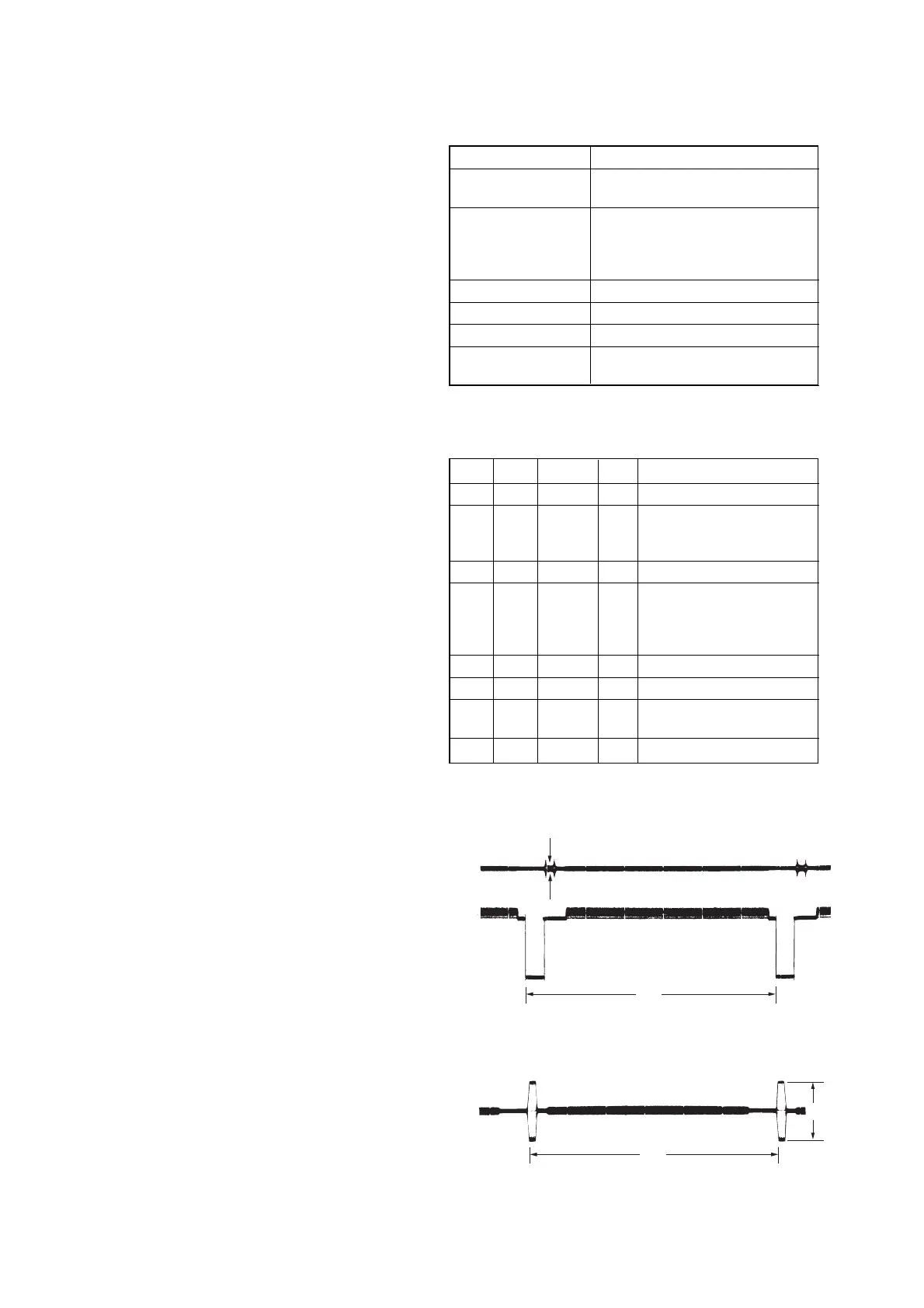
Set the center frequency of IC4101 chroma band-pass filter.
Mode CAMERA
Subject All black
(Cover the lens with the lens cap)
Measurement Point CH1: Chroma signal terminal of
S VIDEO jack (75 Ω terminated)
CH2: Y signal terminal of
S VIDEO jack (75 Ω terminated)
Measuring Instrument Oscilloscope
Adjustment Page C
Adjustment Address 28
Specified value A = 100 mVp-p or less
B = 200 mVp-p or more
Note: Check that the data of page: 0, address: 10 is “00”.
Adjusting method:
Order Page Address Data Procedure
1 0 01 01
2
Check the that the burst
signal (B) is output to the
chroma signal terminal.
3 3 0C 04 Press PAUSE button.
4C 28
Change the data and for
minimum amplitude of the
burst signal level (A). (The
data should be “00” to “0F”)
5 C 28 Press PAUSE button.
6 3 0C 00 Press PAUSE button.
7
Check the burst signal (B) to
the specified value.
8 0 01 00
Fig. 5-3-6
When the data of page: 3, address: 0C, is 00:
When the data of page: 3, address: 0C, is 04:
CH1
CH2
A
H
CH1
H
B















 To Next Page