DCR-PC101/PC101E
5-30
13. Auto White Balance Adjustment
RadarW
RadarW
RadarW
Adjust to the proper auto white balance output data.
If it is not correct, auto white balance and color reproducibility
will be poor.
Subject Clear chart
(Color reproduction adjustment
frame)
Filter Filter C14 for color temperature
correction
Measurement Point Displayed data of page: 1 (Note 4)
Measuring Instrument Adjusting remote commander
Adjustment Page F
Adjustment Address 34, 35, 44 to 47
Specified value R ratio: 2B90 to 2C90
B ratio: 59D0 to 5AD0
Note 1: Perform “AWB & LV Standard Data Input” before this
adjustment.
Note 2: “Auto White Balance Adjustment” is available only once
after the power is turned on. Turn the power off, then on
again if the adjustment is retried.
Note 3: Check that the data of page: 0, address: 10 is “00”.
Note 4: The right four digits of the page: 1 displayed data of the
adjusting remote commander.
1 : XX : XX
Displayed data
Switch setting
1) POWER.................................................................. CAMERA
2) NIGHT SHOT.................................................................. OFF
3) DIGITAL ZOOM (Menu setting) .................................... OFF
4) STEADY SHOT (Menu setting) ..................................... OFF
Adjusting method:
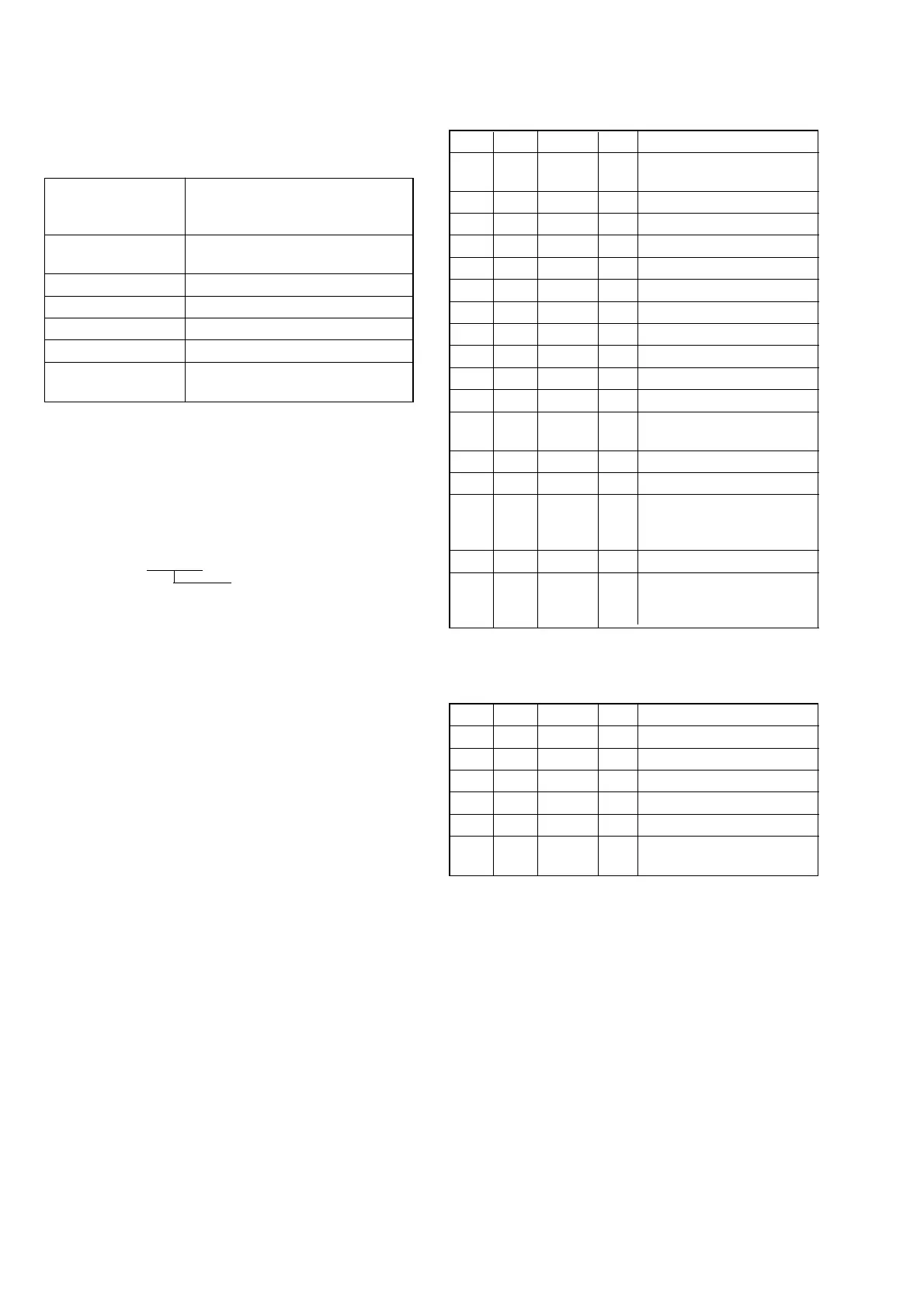
Order Page Address Data Procedure
1
Place the C14 filter on the
lens.
2 0 01 01
3 F 44 2C Press PAUSE button.
4 F 45 10 Press PAUSE button.
5 F 46 5A Press PAUSE button.
6 F 47 50 Press PAUSE button.
7 6 13 80
8 6 10 08
9 6 01 83 Press PAUSE button.
10 Wait for 2 seconds.
11 6 01 81 Press PAUSE button. (Note 5)
12 6 02
Check the data changes to
“01”.
13 6 01 3F Press PAUSE button.
14 0 03 04
15 1
Check that the displayed data
(Note 4) satisfied the R ratio
specified value.
16 0 03 05
17 1
Check that the displayed data
(Note 4) satisfied the B ratio
specified value.
Note 5: The adjustment data will be automatically input to page:
F, address: 34, 35, 44 to 47.
Processing after Completing Adjustment:
Order Page Address Data Procedure
1 6 01 00 Press PAUSE button.
2 6 10 00
3 6 13 00
4 0 03 00
5 0 01 00
6
Remove the C14 filter on the
lens.















 To Next Page