DCR-PC101/PC101E
5-57
3-5. AUDIO SYSTEM ADJUSTMENTS
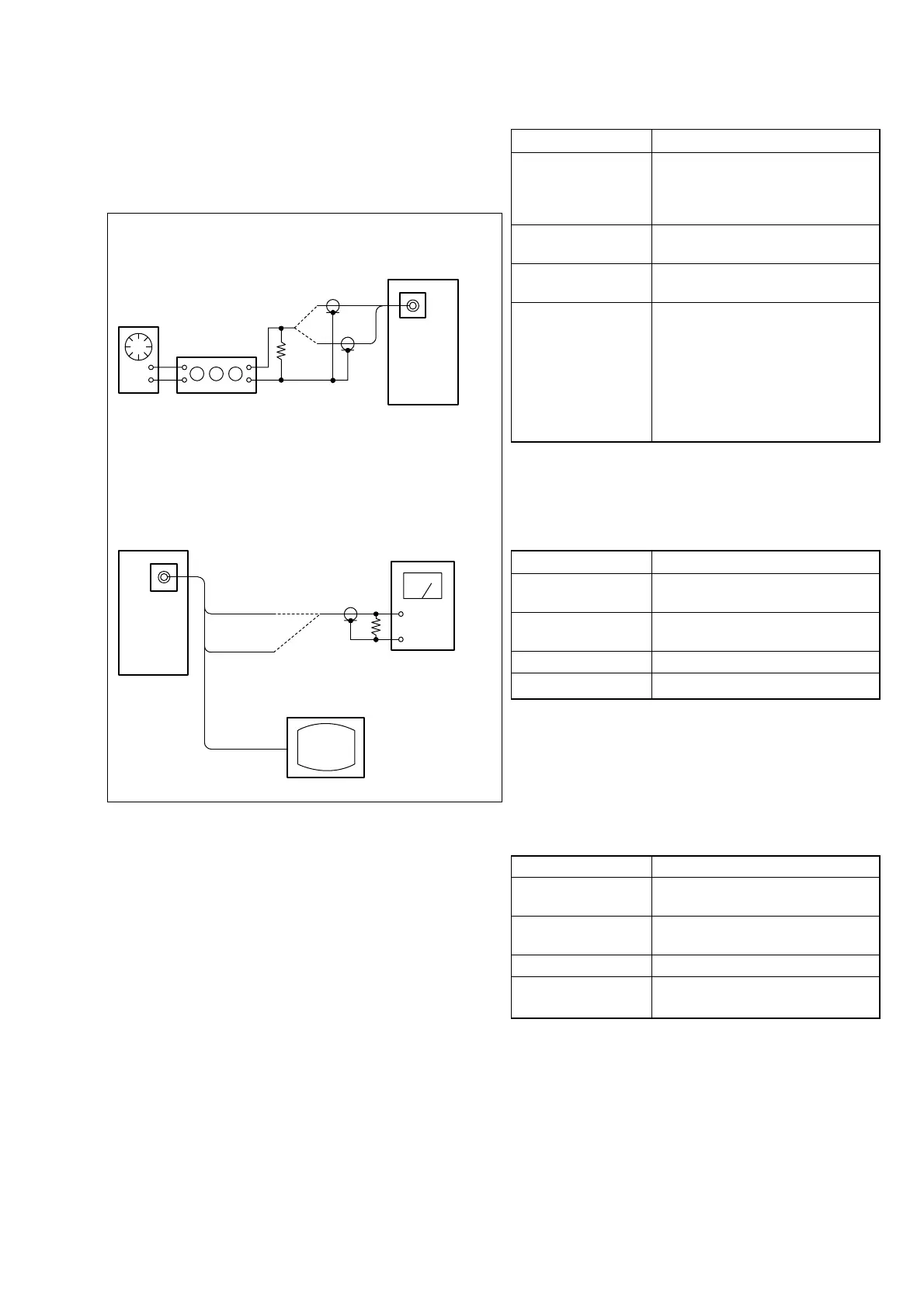
[Connecting the measuring instruments for the audio]
Connect the audio system measuring instruments in addition to
the video system measuring instruments as shown in Fig. 5-3-10.
Fig. 5-3-10
Audio
oscillator
Attenuator
600 Ω
600 Ω (270 Ω (1-249-410-11) +330 Ω (1-249-411-11))
Main unit
Main unit
47 k Ω
47 k Ω: 1-249-437-11
Audio level meter or
distortion meter
TV monitor
MIC jack
A/V jack
L
R
Video
Audio (L)
Audio (R)
In Recording
In Playback
1. Playback Level Check
Mode VTR playback
Signal
Alignment tape:
For audio operation check
(XH5-3 (NTSC))
(XH5-3P (PAL))
Measurement Point
Audio left or right terminal of A/V
jack
Measuring Instrument
Audio level meter and frequency
counter
Specified Value
32 kHz mode: 1 kHz, + 3.0 ± 2.0 dBs
48 kHz mode: 1 kHz, + 3.0 ± 2.0 dBs
44.1 kHz mode:
The 7.35 kHz signal level during EMP
OFF is +2.0 ± 2.0 dBs.
The 7.35 kHz signal level during EMP
ON is –6 ± 2 dB from the signal level
during EMP OFF.
Checking Method:
1) Check that the playback signal level is the specified value.
2. Overall Level Characteristics Check
Mode Camera recording and playback
Signal 400 Hz, –66 dBs signal: MIC jack left
and right
Measurement Point Audio left or right terminal of A/V
jack
Measuring Instrument Audio level meter
Specified Value –7.5 ± 3.0 dBs
Checking Method:
1) Input the 400 Hz, –66 dBs signal in the MIC jack.
2) Record in the camera mode.
3) Playback the recorded section.
4) Check that the 400 Hz signal level is the specified value.
3. Overall Distortion Check
Mode Camera recording and playback
Signal 400 Hz, –66 dBs signal: MIC jack left
and right
Measurement Point Audio left or right terminal of A/V
jack
Measuring Instrument Audio distortion meter
Specified Value Below 0.4%
(200 Hz to 6 kHz BPF ON)
Checking Method:
1) Input the 400 Hz, –66 dBs signal in the MIC jack.
2) Record in the camera mode.
3) Playback the recorded section.
4) Check that the distortion is the specified value.















 To Next Page