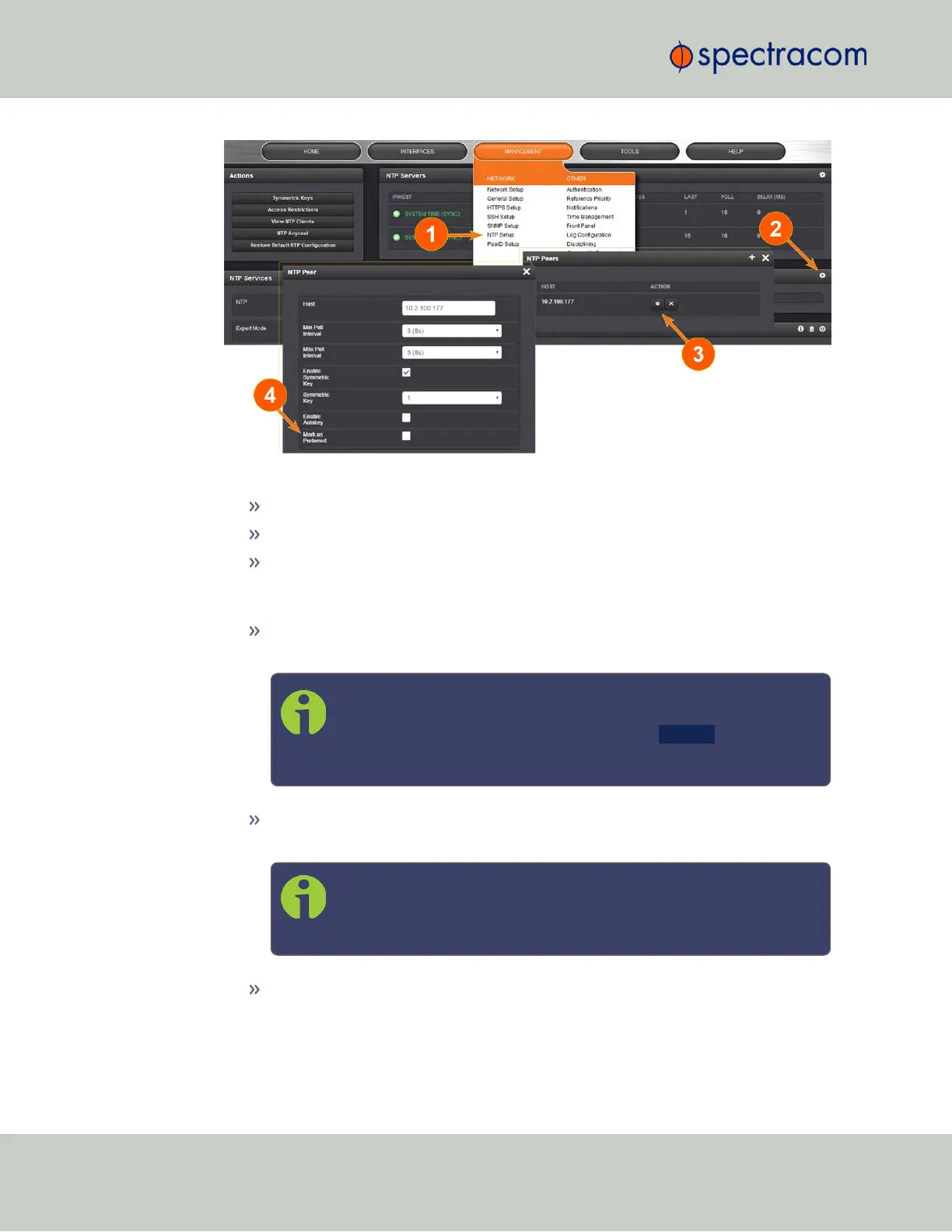
4.
Enter the required information into the fields:
Host: The IPaddress for the server to be used as host.
Min Poll Interval: Select a value from the drop down (the default is 3 (8s).
Max Poll Interval: Select a value from the drop down (the default is 3 (8s).
For both NTP Peers, and NTP Servers the Minimum and Maximum Poll rate for
NTP packets can be configured.
Enable Symmetric Key: Click the checkbox to enable/disable Symmetric Key. See
also: "Configuring NTP Symmetric Keys" on page98.
Note: Before you can edit the Key field, you must set up Symmetric
Keys through the Actions Panel. See "NTP: Symmetric Keys (MD5) "
on page98. Conversely, you may check the Autokey box below the
Key field.
Enable Autokey: Click the check box to enable/disable Autokey. See "NTP
Autokey" on the facing page for more information on Autokey.
Note: When you configure NTP Autokey, you must first disable the
NTP service in the NTP Services panel, then re- enable it after
Autokey configuration is completed.
Mark as Preferred: Check this box to prefer this NTP Peer over other NTP Peers
("NTP Peer Preference"). This will result in VersaSync synchronizing more fre-
quently with this Peer. For additional information on NTP Preferences, see
92
CHAPTER 2 • VersaSync User Manual Rev. 6.0
2.7 Configuring Network Settings



 To Next Page