48 Installation and Setup
2006792 Rev B – 200228
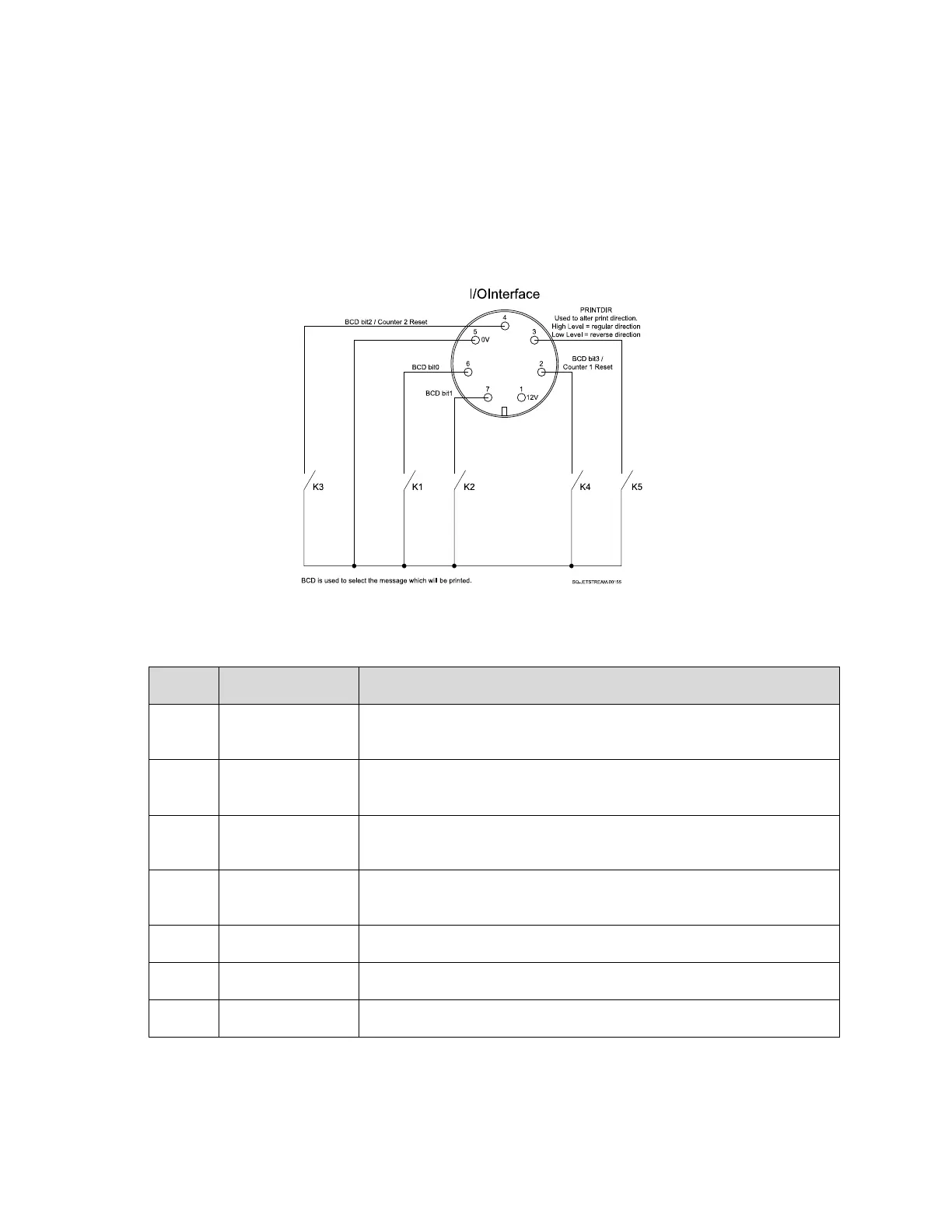
I/O Connection
I/O functionality allows users to connect an external device, such as a Programmable Logic
Controller (PLC) to remotely control the JetStream rather than controlling it from the
Touchscreen.
I/O Connection Notes:
Mating Connector: 7-Pin Female (Part Number 2006915)
Isolated 12 VDC voltage supply for encoder circuit. 300 mA
maximum current available.
Counter 1 reset or else BCD Bit 3 when in BCD mode. Note 5.
Note 6.
Input to control the print direction. “High” input for normal direction,
“Low” input for reverse direction. Note 7.
Counter 2 reset or else BCD Bit 2 when in BCD mode. Note 5.
Note 6.
Ground signal for 12 V+ voltage supply and BCD input circuitry.
BCD Bit 0 when in BCD mode. Note 5.
BCD Bit 1 when in BCD mode. Note 5.
Note 5: For BCD mode, Maximum “Low” input resistance is 10 Ω and Minimum “High” input
resistance is 1 MΩ.
Note 6: For Counter reset input control, the Minimum “High” input voltage is 10 VDC and the
maximum “Low” input voltage is 2 VDC.
Note 7: Minimum “High” input voltage is 10 VDC and maximum “Low” input voltage is 2 VDC.



 To Next Page