Installation and Setup 47
2006792 Rev B – 200228
Mounting the Printhead
The Printhead must be mounted in position so that it will consistently print in the same location
on passing products. Squid Ink’s Printhead Mounting Stand (Part Number 2006650) provides
stable and sturdy positioning of the Printhead, isolating it from the movement and vibration of
the conveyor (see “Mounting Equipment” on page 20).
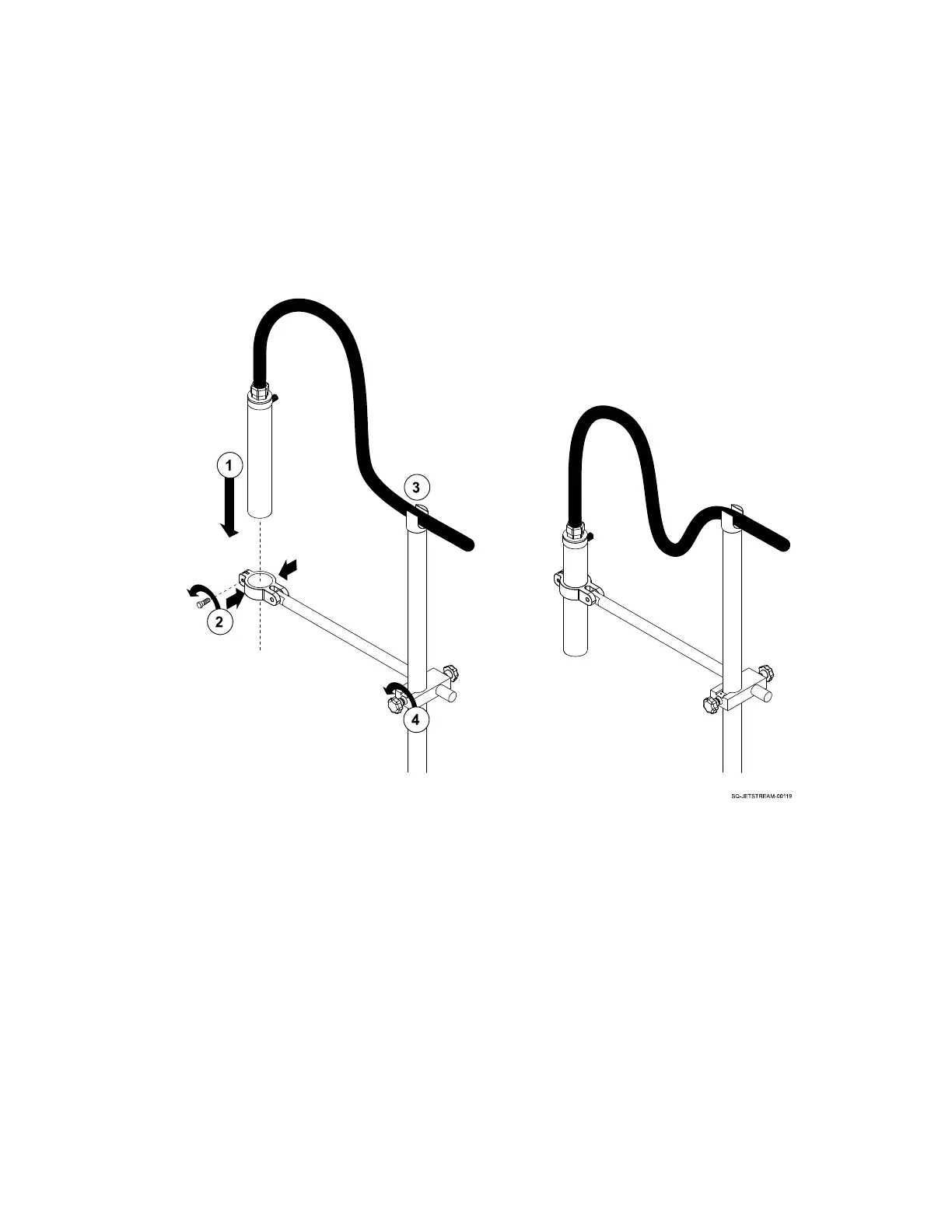
To mount the Printhead to the Printhead Mounting Stand:
3. With the Printhead Mounting Stand in the desired location and its arm in the desired
position, insert the Printhead through the clamps at the end of the arm.
4. When the clamps are halfway up the length of the Printhead, secure them around the
Printhead by tightening the bolt at the end of the clamps.
5. Rest the Umbilical Tube securely in the cradle at the top of the Printhead Mounting
Stand.
6. Make any minor adjustments to the arm position to ensure that the Printhead Orifice
will be 1.2" (30 mm) or less from the passing product. Be sure that the Printhead will
not be bumped by passing product.



 To Next Page