Troubleshooting 187
2006792 Rev B – 200228
Troubleshooting
This section describes possible solutions to some of the most simple and common problems
with the JetStream. For any other problems, or if the solutions provided below do not resolve the
problem, contact your trained and qualified Squid Ink distributor.
WARNING: When working with inks and fluids, always wear gloves, safety
glasses, and protective clothing. Avoid skin contact with inks and fluids. Never look
directly into the Printhead Nozzle. Ensure proper ventilation to minimize fumes.
WARNING: Do not attempt to perform troubleshooting or repairs beyond what is
described below. Doing so can result in serious injury, damage the system, and
void the warranty.
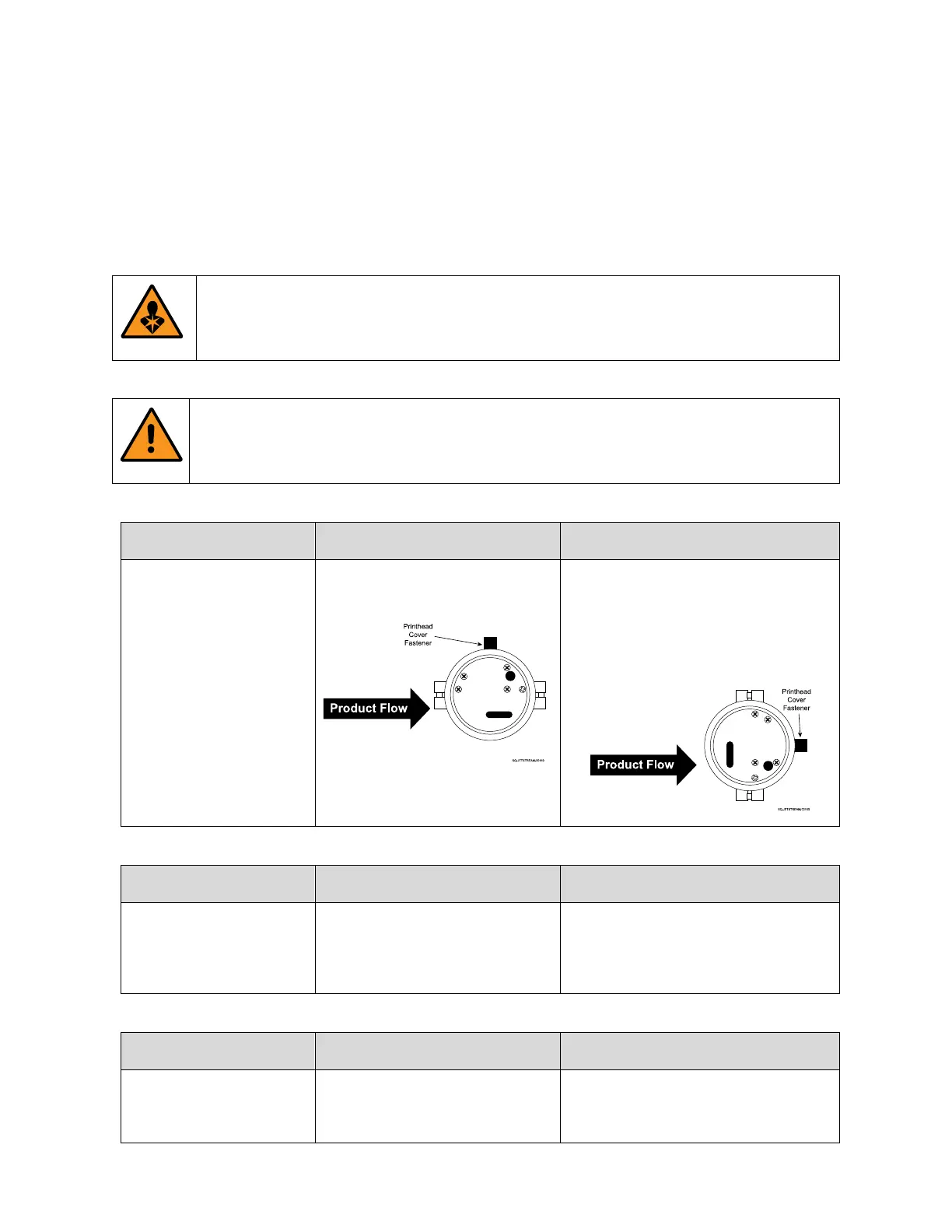
Printhead prints a straight
line instead of printing
desired message.
Printhead is incorrectly oriented.
Turn the Printhead 90° clockwise or
counter-clockwise so that slot of
Printhead Orifice is perpendicular to
the direction of product flow. The
Printhead Cover Fastener should be
parallel to the product flow.
Keyboard in Message
screen is inputting
different characters than
the ones selected.
Touchscreen needs to be
recalibrated.
Recalibrate the Touchscreen (see
“Screen Setting” on page 126)
Photocell is not triggering
printing.
Photocell is not properly
connected.
Verify that Photocell printing mode is
enabled. Turn jetting off. Turn the
power off. Reconnect the Photocell.



 To Next Page