Operating the Equipment Locally
Instruction Manual: evolution 5000 E5710 and E5720 Encoder Page 4-55
ST.TM.E10074.1
This option indicates the input level of the left audio channel. It is for
status only and cannot be changed.
Input Level R Option
NOTE…
This option is not shown when the Coding Standard is MPEG Layer 2 (mono) or Dolby Digital (AC-3)
(1/0).
This option indicates the input level of the right audio channel. It is for
status only and cannot be changed.
Coding Mode Option
NOTE…
This option is only shown when the Coding Standard is MPEG Layer 2, Linear PCM or Dolby Digital
(AC-3).
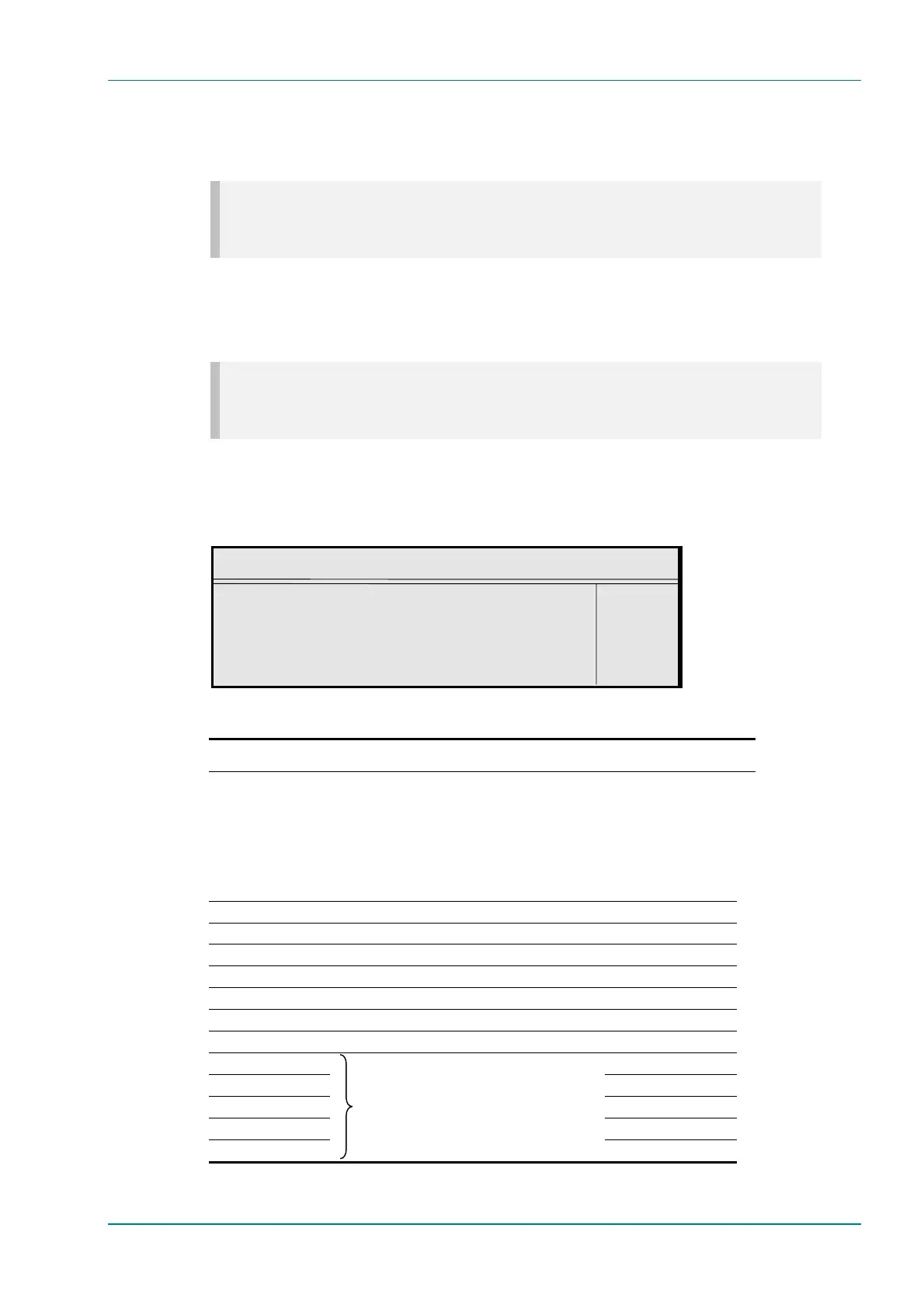
To access the Coding Mode option, press the Coding Mode softkey in the
Audio A Menu. If the current audio bit-rate is outside the bit-rate range
supported by the new coding mode, the bit-rate is changed automatically
to the lowest value within the supported range.
Coding Mode
Audio Coding Mode : +
2/0(L,R) —
Enter l
Update using softkeys Quit l
Table 4.44: Coding Mode Options
Selected Option Description Coding Standard
MPEG Layer 2
Linear PCM
Dolby Digital (AC-3)
Mono Single channel mono audio coding. 466
Stereo Dual channel stereo audio coding. 446
Joint Stereo Dual channel joint (intensity) stereo audio coding. 466
Dual Mono Dual channel mono audio coding. 446
Audio Description 466
1/0(C) Single channel mono audio coding. 664
2/0(L,R) Dual channel stereo audio coding. 664
3/0(L,C,R) 666
2/1(L,R,S) 666
3/1(L,C,R,S) 666
2/2(L,R,Ls,Rs) 666
3/2(L,C,R,Ls,Rs)
These modes are passed through the
Encoder as part of the AC-3 Pass-through
transport stream.
666



 To Next Page