Chapter 10
175
UM10350_PCNC770_Manual_0916A
Troubleshooting
10.2 Tips and Tools for Troubleshooting (equipment and procedures)
10.2.1 Safety
During troubleshoong, the operator is exposed to more hazards than during normal operaon:
electrical tests may have to be done on live circuits; guards may have to be removed; a safety switch
may have to be overridden in order to make an observaon. Take things slow and be extra cauous.
IMPORTANT! For complete safety informaon, refer to the Safety Overview starng on page 2.
10.2.2 Tips on Controller Diagnostics
The PathPilot
®
operang system provides a status screen that is useful for troubleshoong. If calling
Tormach Technical Support, make sure you know what version of the operang system you are
running and you have recorded informaon from the Status screen and the error line.
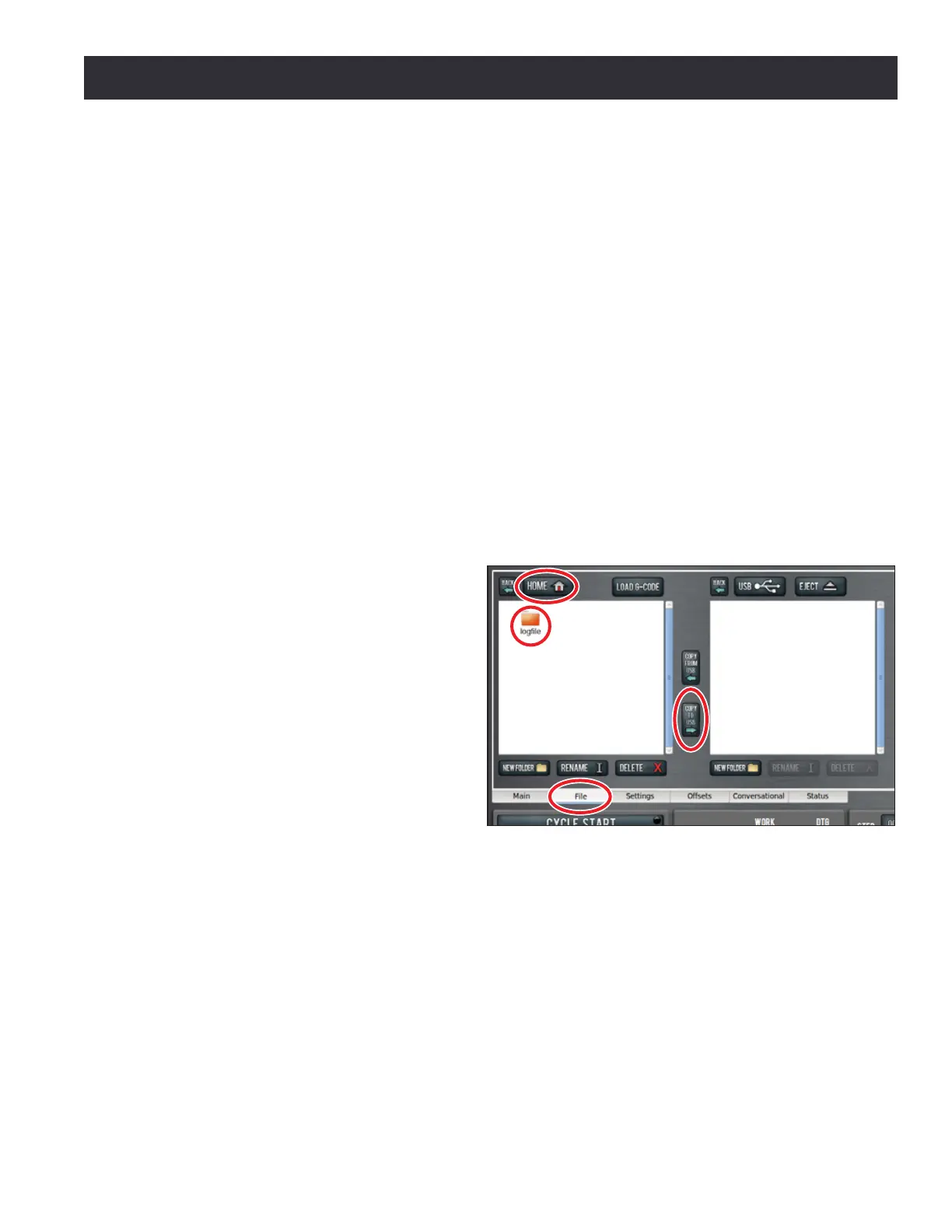
To email the log le to Tormach Technical Support, use the File tab in the PathPilot interface to
transfer the relevant informaon to a USB ash drive.
1. Insert a USB ash drive into controller.
2. In the PathPilot interface, click the
File tab (see Figure 10.2).
3. Click the Home buon in the upper
right-hand corner (see Figure 10.2).
4. Locate and click the logle folder
(see Figure 10.2); inside this
folder, locate and highlight the
pathpilotlog.txt le.
5. Click the Copy to USB buon (see
Figure 10.2).
6. Aer the le transfers, remove the
USB ash drive from controller and
email the le to Technical Support.
10.2.3 Troubleshooting Tools
The following are some basic tools to have on hand for troubleshoong:
• Good lighng such as a trouble light, headlamp or ashlight
• A digital mulmeter that can test for AC volts up to 300V, DC volts up to 100V and resistance
from 0 to 1M ohms (Ω)
• Assorted screwdrivers: #2 and #3 Phillips, 1/8” and 3/16” at blade
• A wire stripper
• Measuring tools like a tape measure, calipers or dial indicator with magnec base
Figure 10.2



 To Next Page