Chapter 5
49
UM10350_PCNC770_Manual_0916A
Intro to PathPilot
Figure 5.9
7. Type 2 in the tool DRO and click the
M6 G43 buon (see Figure 5.5).
8. Repeat steps 3-6 to measure the
tool length for Tool 2.
5.1.5 Writing the G-code
Now use Conversaonal programming
capabilies of the PathPilot interface to
generate G-code to produce our part (see
Figure 5.1). This will be broken down into
two operaons:
1. Mill a 0.100” deep, 3.25” diameter
pocket in the face of the workpiece.
2. Engrave the leers PCNC in the pocket.
5.1.5.1 Operation 1
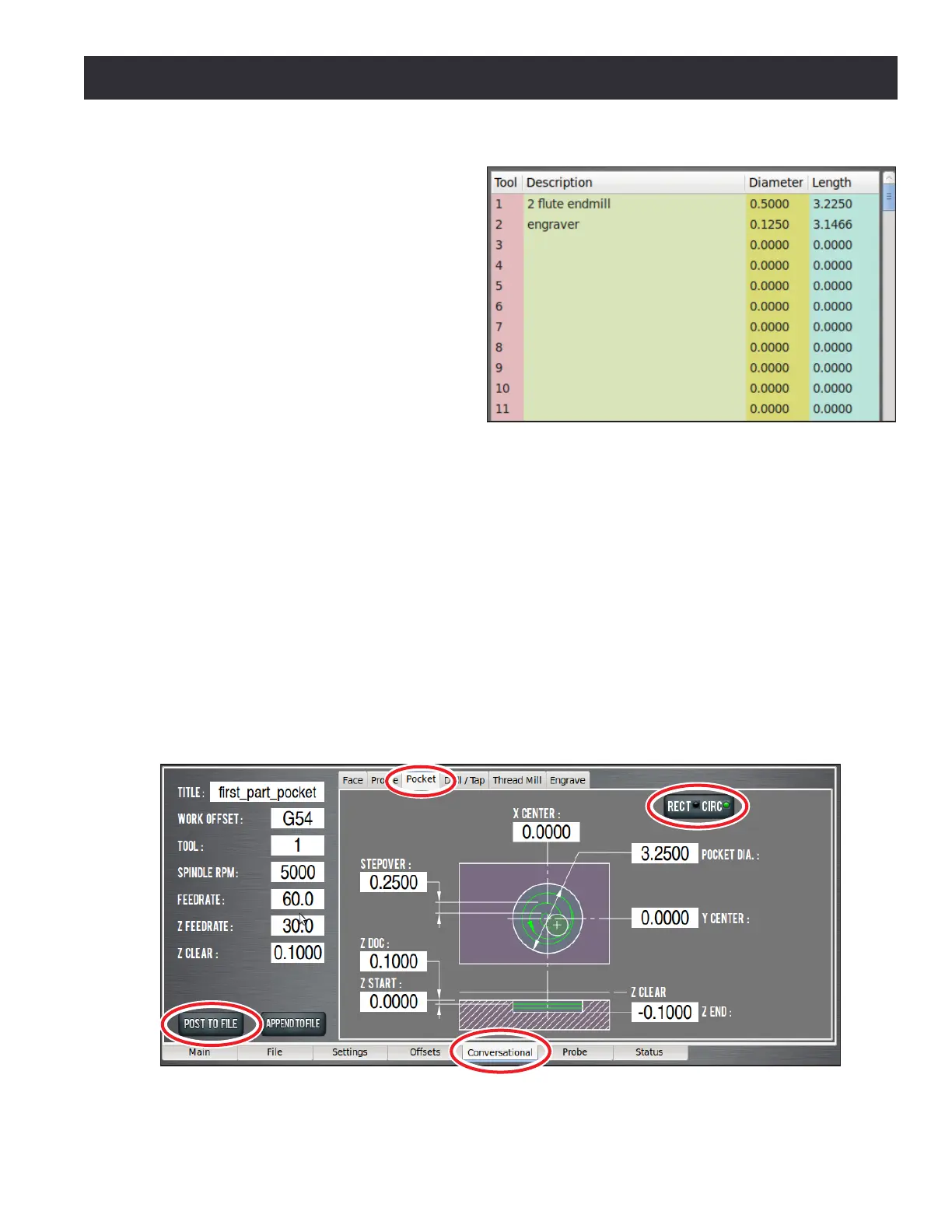
To write code for the rst operaon, click the Conversaonal tab (see Figure 5.10). The Conversaonal
screen is divided into two secons: parameters common to most operaons are displayed on the
le and operaon-specic parameters (including part geometry) are displayed on the right.
Click the Pocket tab to bring up the pockeng screen. Click the Rect/CircI buon to bring up the
circular pocket screen (see Figure 5.10). Use this screen to generate code to create a shallow pocket
(0.1000” deep and 3.250” in diameter). The conversaonal DRO elds should be self-explanatory
and are covered in detail in chapter 6, PathPilot Interface, but for now, enter the values seen in
Figure 5.10.
Figure 5.10



 To Next Page