Chapter 6
84
UM10350_PCNC770_Manual_0916A
PathPilot Interface
6.8 Probe Tab
The Probe tab of the notebook contains automated funcons to nd X/Y/Z locaons, set work
osets, probe pockets, slots or bosses, as well as instrucons on probe and toolseer setup and
calibraon. The Probe tab contains a separate, smaller notebook that consists of three tabs:
• X/Y/Z Probe
• Rect/Circ Probe
• Probe/ETS Setup
Tool 99 (the probe tool) must be the current tool in spindle before using any of the probing funcons.
All probing moves occur at a feed rate specied by the current F command. This can be viewed and
modied in the feed rate DRO. For more informaon, see Feed Rate DRO earlier in this chapter.
Disable the spindle (Spindle Lockout Key o) to prevent accidental spindle start with probe in spindle.
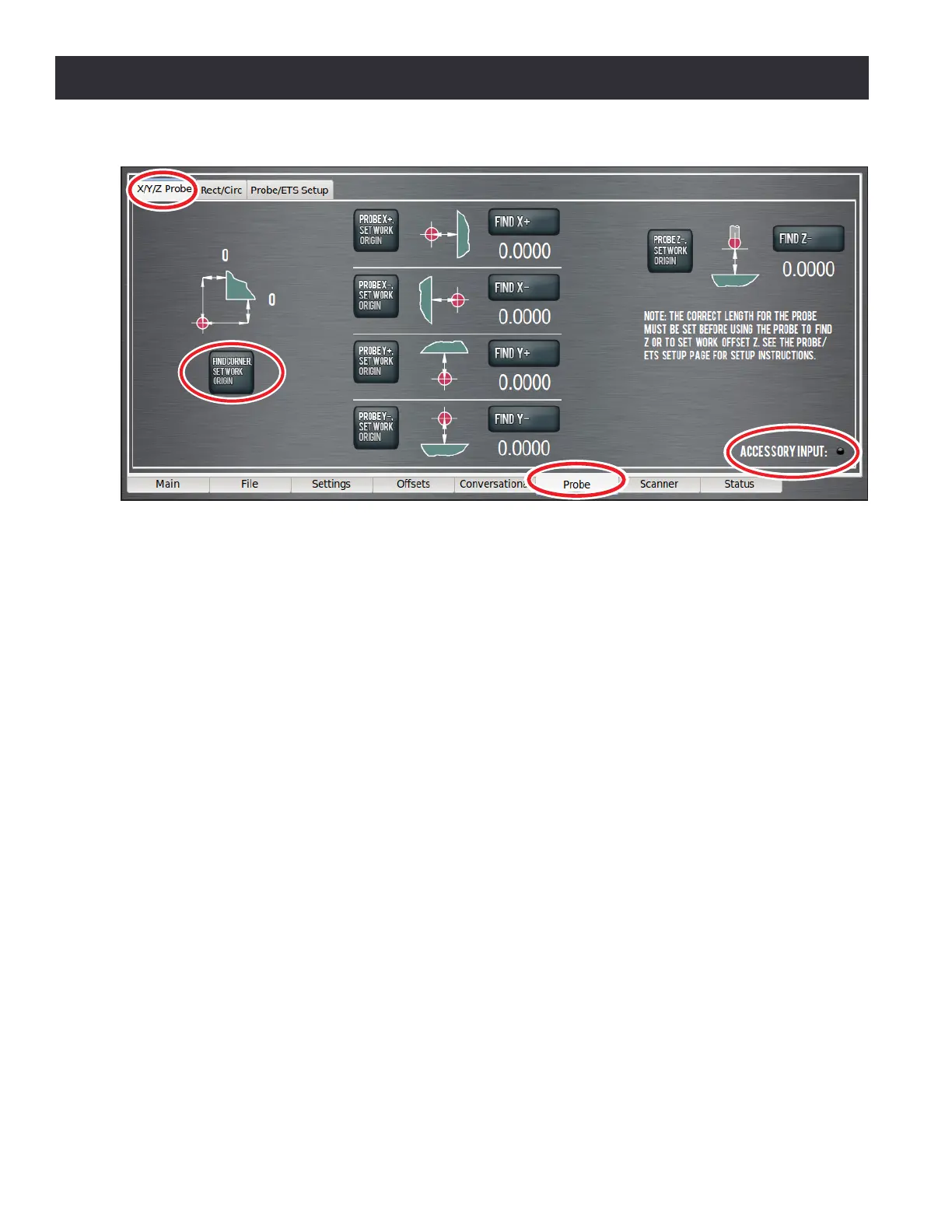
NOTE: Check that probe polarity is set correctly on Sengs screen (before using the probing buons) by
pressing probe p while looking at Accessory Input LED on Probe screen (see Figure 6.32).
6.8.1 XYZ Probe Tab
The X/Y/Z Probe tab of the Probe notebook allows the user to quickly touch o a workpiece or vise
jaw to nd that feature’s locaon in current work oset coordinates, or to touch o that feature
and set the work oset zero to the feature’s surface (see Figure 6.32). The Find Corner, Set Work
Origin buon is used to probe the lower le corner of a vise jaw or rectangular workpiece and set
that corner to X/Y zero. To use this buon, rst posion the probe below the surface of the vise jaw
and roughly 1” away from the vice jaw corner in X and Y (see Figure 6.33). Upon compleon of the
probing moves, the current acve work oset system (e.g. G54) is set such that the vise jaw corner
is 0, 0 (the X/Y origin).
Figure 6.32



 To Next Page