Chapter 6
58
UM10350_PCNC770_Manual_0916A
PathPilot Interface
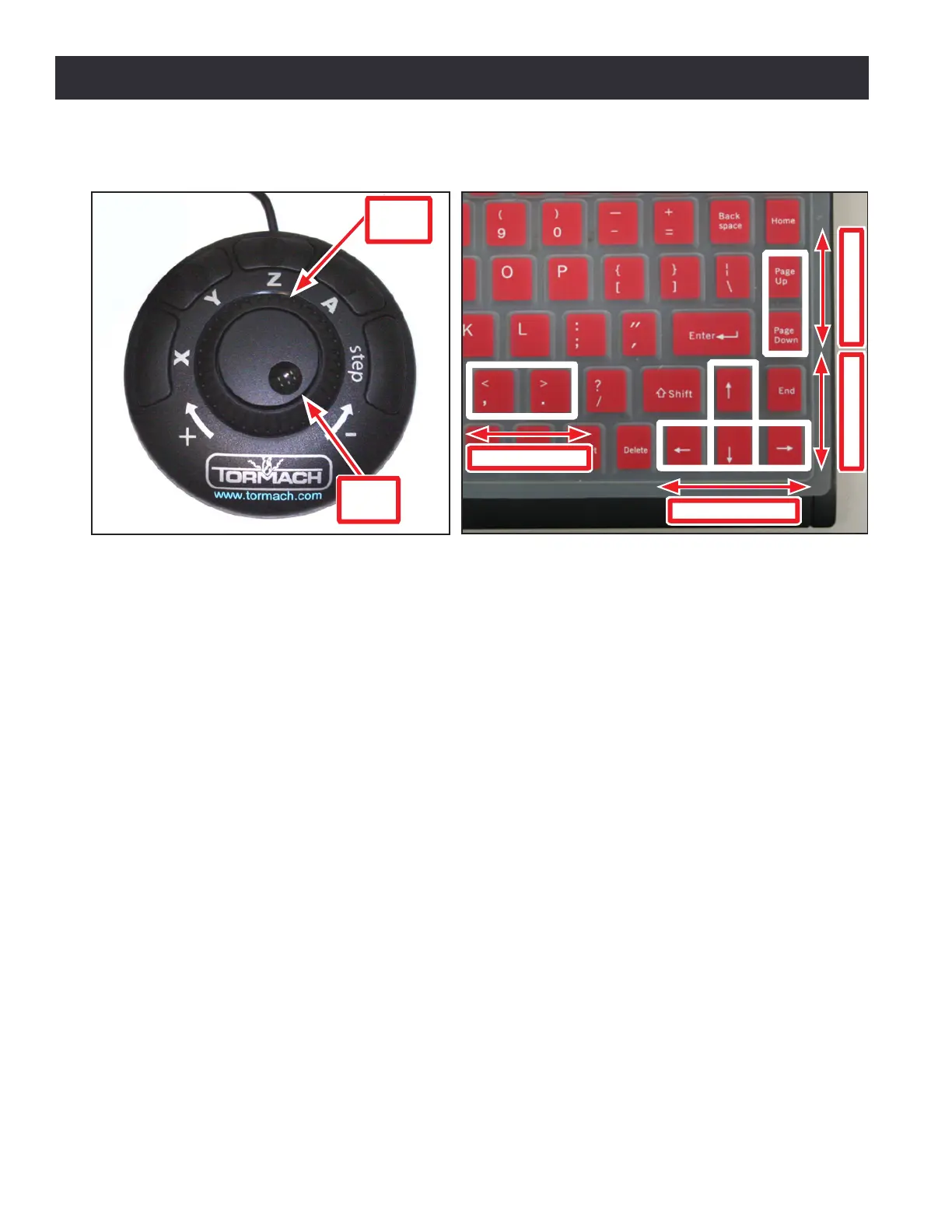
Tormach mills can be jogged with either the Jog Shule shown in Figure 6.5 or with the keyboard’s
arrow keys (see Figure 6.6):
• The right arrow jogs X-axis in the posive X direcon (moves table le of operator)
• The le arrow jogs X-axis in the negave X direcon (moves table right of operator)
• The up arrow jogs Y-axis in the posive Y direcon (moves table toward operator)
• The down arrow jogs Y-axis in the negave Y direcon (moves table away from operator)
• The Page Up key jogs the Z-axis in the posive Z direcon (moves spindle up)
• The Page Down key moves the Z-axis in the negave Z direcon (moves spindle down)
NOTE: Jogging is not permied during G-code program execuon or during MDI moves.
The Jog Shule is an oponal accessory (see Figure 6.5) that may increase producvity, especially
on short-run jobs requiring extensive seng up of the workpiece and tooling.
The X, Y, Z and A buons are used to jog axes X, Y, Z and A respecvely (the LED light beside an axis
DRO in the PathPilot interface indicates which axis is selected for jogging). The Step buon cycles
through the available jog step sizes (the LED on a Step Size Buon in the PathPilot interface indicates
which size is acve). Connuous jogging is done with the Shule Ring by turning it counterclockwise
(minus) and clockwise (plus). There are seven speeds to posion any axis with speed and precision.
Step jogging is done with the Jog Wheel (with nger dimple) by turning it counterclockwise in the
minus direcon and clockwise in the plus direcon. The move will be made at the current feed rate.
Figure 6.5
Jog Shuttle
Shuttle
Ring
Jog
Wheel
Figure 6.6
Z-Axis Motion Y-Axis Motion
X-Axis Motion
A-Axis Motion
Jogging with Keyboard Keys



 To Next Page