IT2200 Reader System with Multimode Capability Installation & Maintenance/Service Guide
5-10
1. Remove any tag from the read/write zone.
2. From the Reader menu, select Check Tag Control. When the Check Tag
Control screen appears, select IT-2000 Check Tag Enabled, then click Apply.
3. From the Reader menu, select RF Attenuation. When the RF Attenuation
Parameters screen appears, set the downlink and uplink attenuation to 6, then
click Apply.
4. From the Tag Requests menu, select Read. When the Read Request screen
appears, set Execution Mode to Continuous.
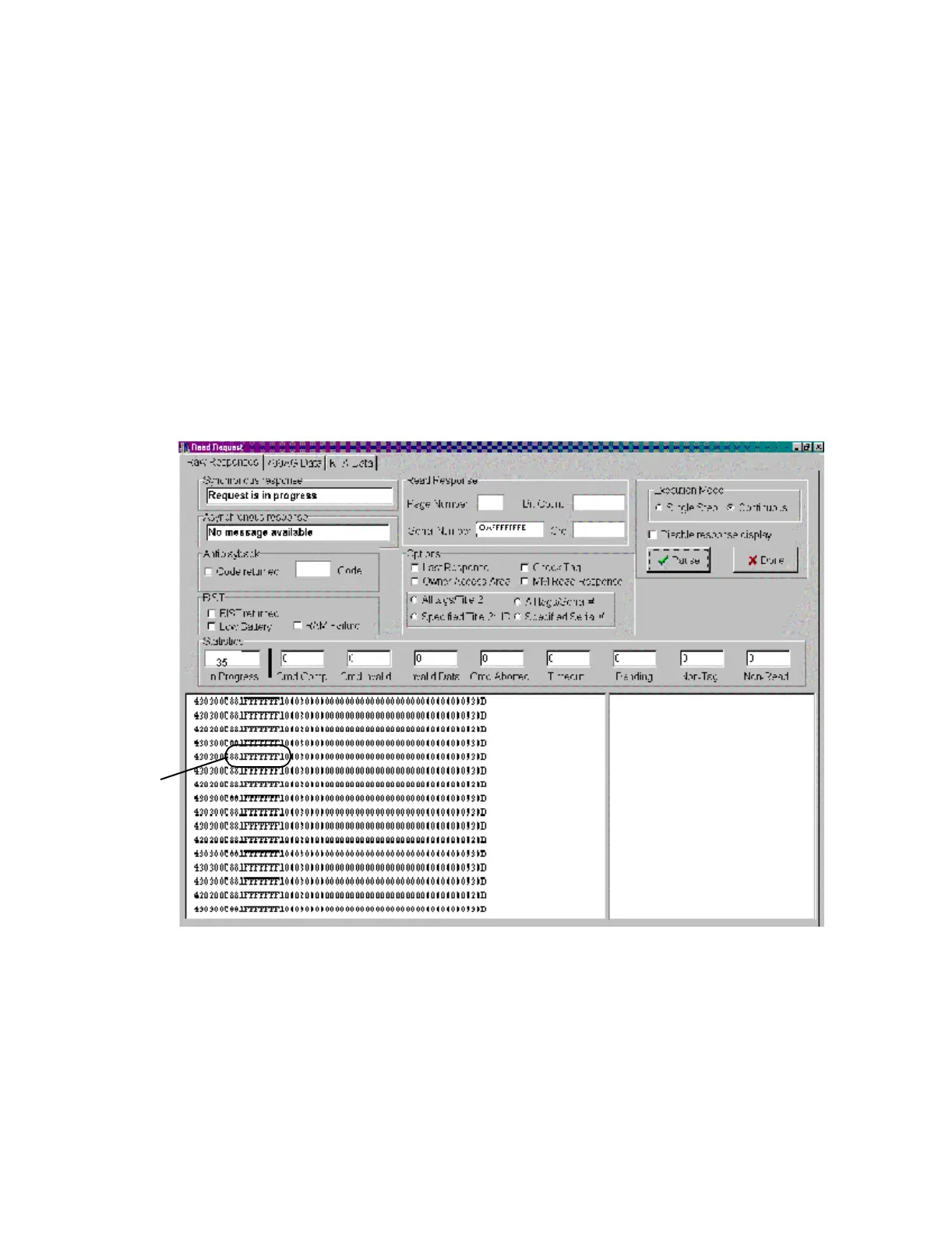
5. Click Run. Click the Raw Responses tab, if necessary. The tag read counter
should increment fast and steady, and the tag serial number should be
0xFFFFFFFE, the check tag signature as shown in Figure 5-5.
Figure 5-5 Sample Continuous Check Tag Read Request Display
6. In Execution Mode, select Continuous.
7. Rotate the check tag antenna to find the high-angle and low-angle points where
the check tag begins to get continuous reads. Note the high- and low-angle
positions of the check tag antenna.
If the check tag test fails, check that the check tag antenna is correctly positioned and
connected. If it is, replace the check tag antenna. See "Check Tag Antenna" on page
6-19.
Check Tag
Signature



 To Next Page