UTT Technologies Firewall Menu
http://www.uttglobal.com Page 155
1) MAC Address Filtering List
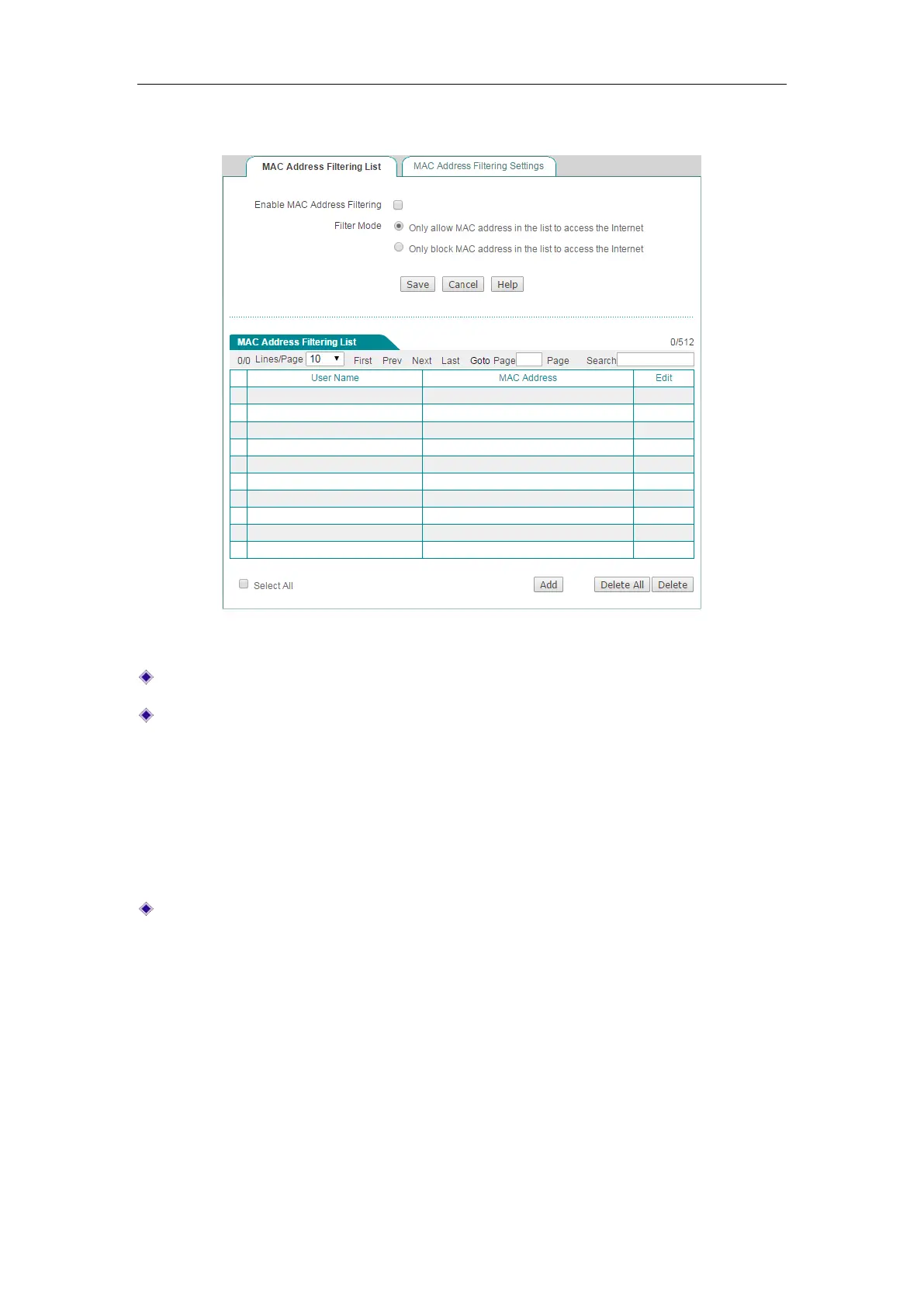
Figure 12-16 MAC Address Filtering List
Enable MAC Filter: Select to enable MAC address filtering.
Filtering Mode: Select the mode of MAC address filtering.
Only allow MAC address in the list to access the Internet: Choose to allow
the wireless clients with MAC address listed in
MAC Address Filtering List to
connect to the Device, but block all other wireless clients.
Only block MAC address in the list to access the Internet: Choose to block
the wireless clients with MAC address listed in
MAC Address Filtering List
from connecting to the Device, but allow all other wireless clients.
MAC Address Filtering List: Displays the MAC address filtering entries. You can
add or delete them by clicking the
Add button or the Delete button
2) MAC Address Filtering Settings
You can add more than one MAC address once into the MAC Address Filtering List in
Firewall > MAC Address Filtering > MAC Address Filtering Settings page.
Input or paste the MAC address entries into the textbox on the below figure and click
the Add button to save the settings. The format is" MAC address [space] username".
For example 0022aaafcdb3 David; Please notice that there is one or more spaces
between MAC address and username.



 To Next Page