UTT Technologies Network Menu
http://www.uttglobal.com Page 21
On Demand: If selected, the Device will establish a PPPoE session only
when there are packets requesting to access the Internet (i.e., when a
program on your computer attempts to access the Internet).
Manual: If selected, you can dial or hang up a PPPoE session manually.
Dial Mode: If the PPPoE connection isn’t established successfully even using
correct username and password, you may try to use other modes.
Idle Timeout: Specify the during time the Device keeps the Internet connection
active after no traffic. Which means not terminate Internet connection when the
value is zero.
MTU: When dialing, the Device will automatically negotiate MTU (maximum
transmission unit) with the peer device. Please leave the default value of 1480
bytes, unless you have a special application.
Advanced Options: Click to configure advanced parameters. In most case, you
need not configure them.
4.1.2 Static IP Connection
Some infrastructure situations have to use a static address, such as finding the
Domain Name System (DNS) host where it is, the Device will translate domain names
to IP addresses. Static addresses are convenient, but not absolutely necessary, to
locate servers inside an enterprise.
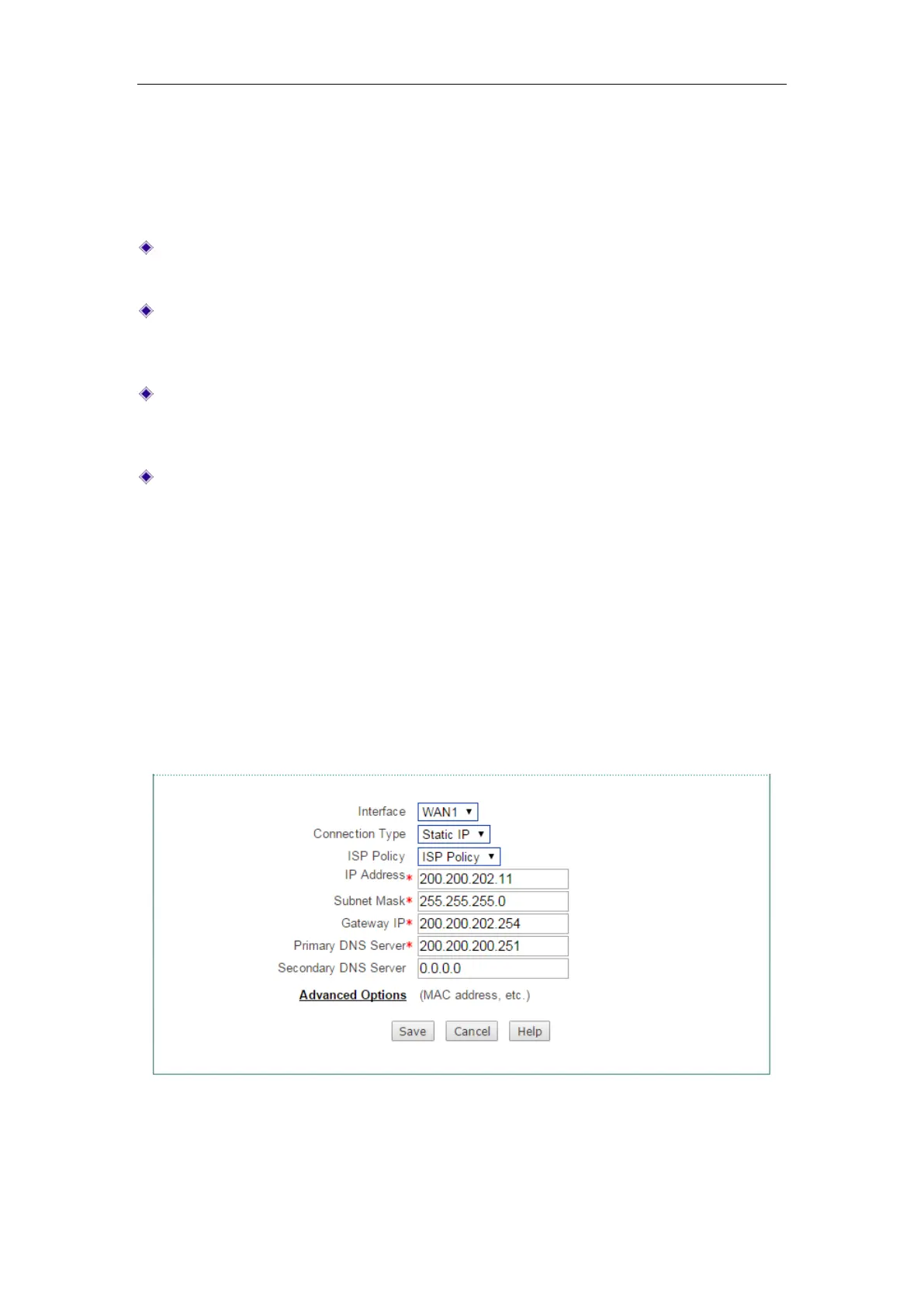
If you are required to use a permanent IP address, select
Static IP.
Figure 4-3 Static IP Connection Setup



 To Next Page