UTT Technologies Network Sharing Menu
http://www.uttglobal.com Page 84
Chapter 8. Network Sharing Menu
This section describes the function on the Network Sharing menu. Network Sharing is
a model of data storage where the digital data is stored in USB disk/SD card. The
USB disk/SD card is owned and managed by Administrator who is responsible for
keeping the data available and accessible. Users access to USB disk/SD card for
digital data.
8.1 Sharing Management
After plugging a USB/SD card into the Device, the administrator could share the Data
on the USB/SD card to LAN users through the FTP function. Before you enable
network sharing, please first setup the account for users on the
Network Sharing >
Shared Account page.
Click
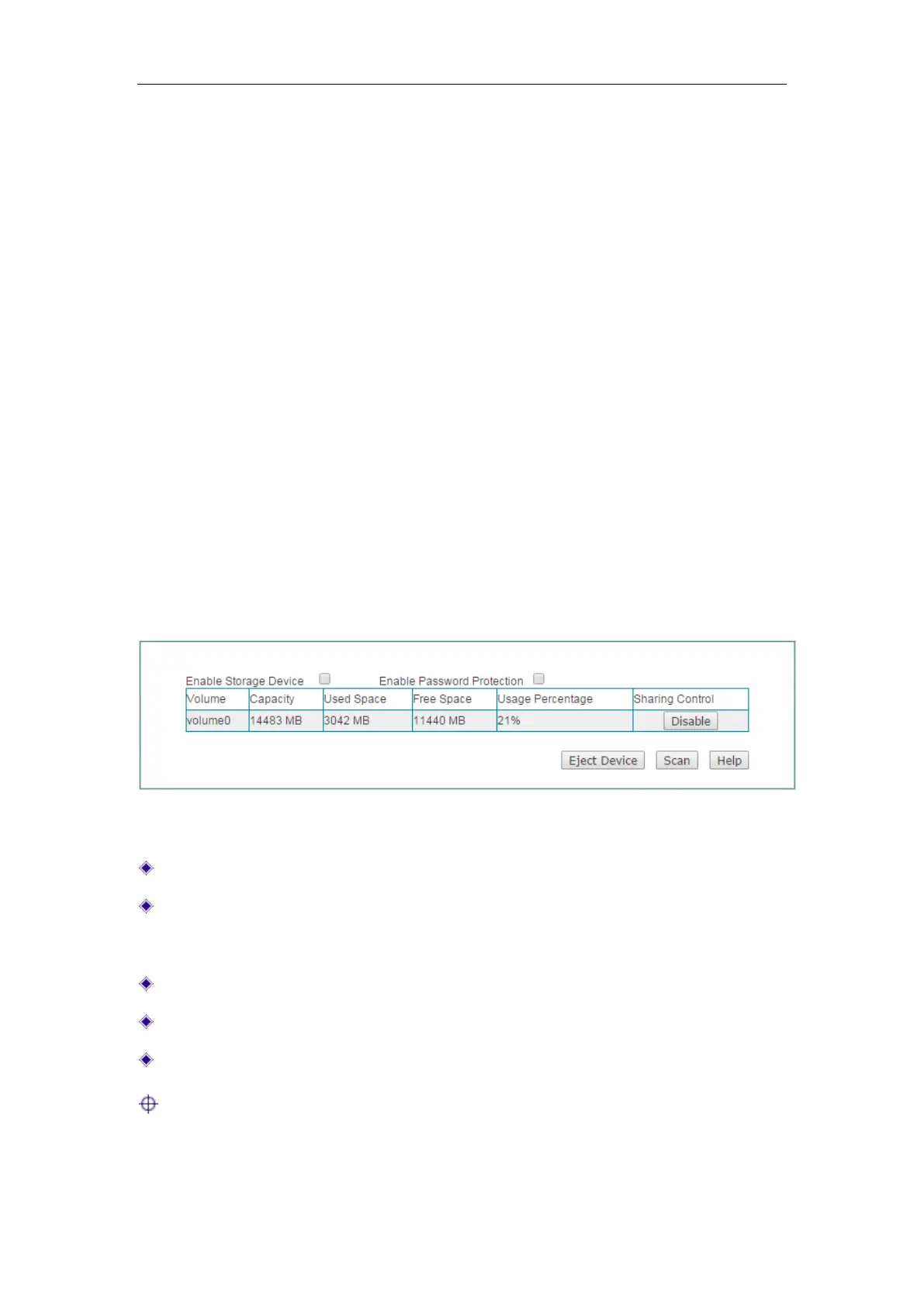
Network Sharing > Sharing Management, you will see the following figure.
Figure 8-1 Network Sharing
Enable Storage Device: Select to enable network sharing.
Enable Password Protection: If selected, LAN users must use the account which
is set on the
Network Sharing > Shared Account page to access the storage
device.
Disable: Click to disable the storage device.
Eject Device: Click to eject the storage device.
Scan: Click to scan the available storage device.
Notes:
1) Before you eject the USB/SD card from the Device, please click the Eject Device
button first, in case of unexpected error or irreparable hardware damage.



 To Next Page