UTT Technologies User Management Menu
http://www.uttglobal.com Page 107
9.3.4 Example for PPPoE
1) Requirements
In this example, an organization’s administrator wants the LAN users to act as the
PPPoE clients to dial up to the Device. And it only allows the PPPoE dial-in users to
access the Internet through the Device. The exception is the CEO with IP address
192.168.16.2.
When acting as a PPPoE server, the Device dynamically will assign the IP addresses
to the LAN users. The start IP address assigned to the dial-in user
is 10.0.0.1, the
primary DNS server IP address is 202.101.10.10, and the maximum number of
PPPoE sessions that can be created on the Device is 100.
The administrator needs to create two PPPoE accounts: one is a universal account
which is used by a normal employee, and its
Rx and Tx bandwidth are both 512 Kbit/s,
its
Max. Sessions value is 90; the other is an advanced account which is used only for
MAC address 0021859b4544 with a static IP address 10.0.0.50.
2) Configuration Procedure
(1) Configuring PPPoE Server Global Parameters
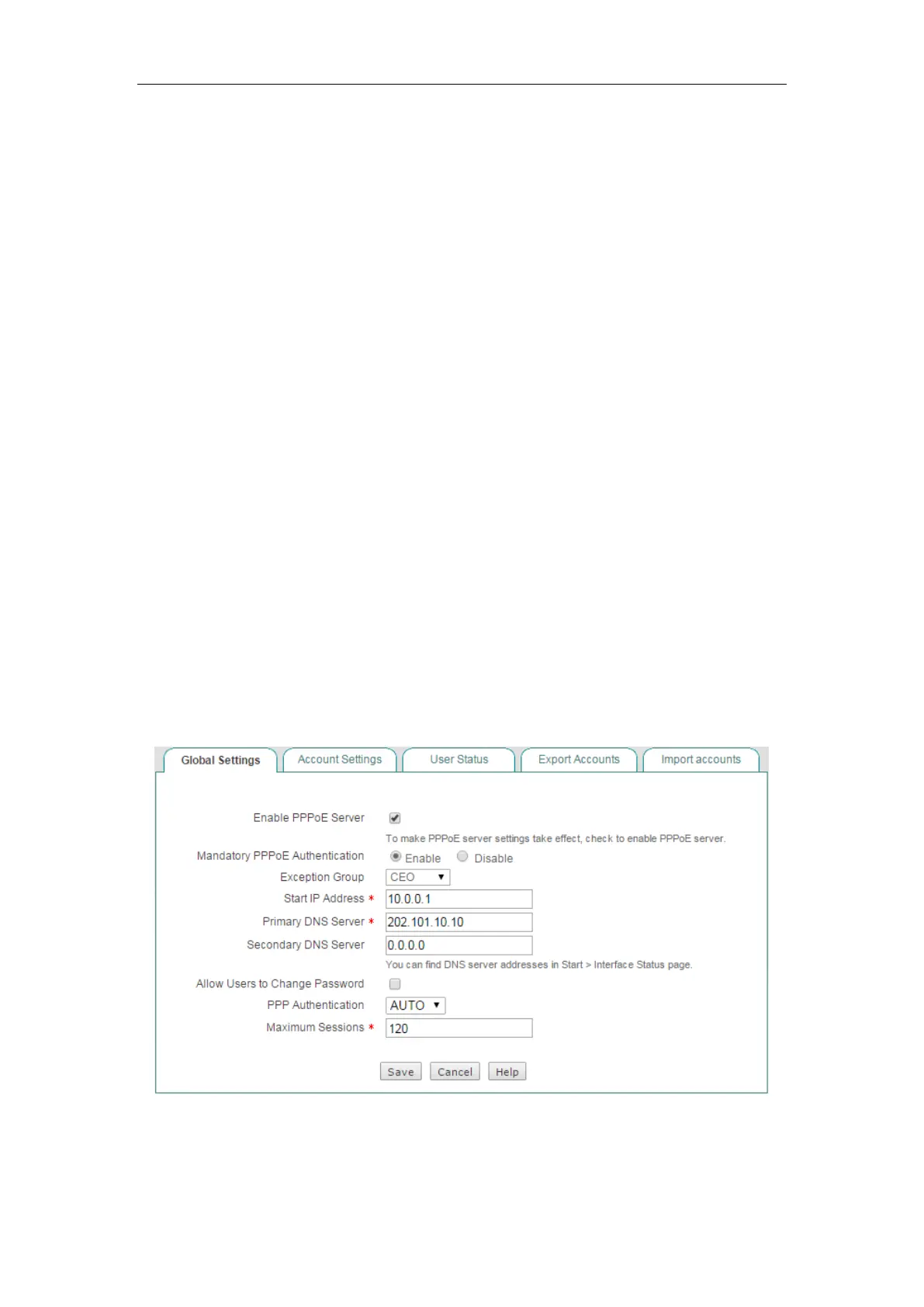
Go to the PPPoE > Global Settings page. Select the Enable PPPoE Server check box,
select the
Mandatory PPPoE Authentication check box, and select CEO from the
Exception Group drop-down list. The CEO address group only includes one IP
address: 192.168.16.2, which is configured in the
User Management > User Group
page. Enter 10.0.0.1 in the Start IP Address, enter 202.101.10.10 in the Primary DNS
Server, and enter 100 in the Max. Sessions text box. Leave the default values for the
other parameters. Then click the
Save button to save the settings.
Figure 9-18 PPPoE Server Global Settings - Example
(2) Configuring PPPoE Accounts



 To Next Page