UTT Technologies Network Menu
http://www.uttglobal.com Page 39
So far, UTT Technologies Co., Ltd. only supports two DDNS service providers by
no-ip.com and dyndns.org. It will successively support other DDNS service providers
in the future.
4.5.1 DDNS Service provided by no-ip.com
1) Register a Domain Name with no-ip.com
Please login to
http://www.noip.com/
to register a domain name with the suffix of
no-ip.com.
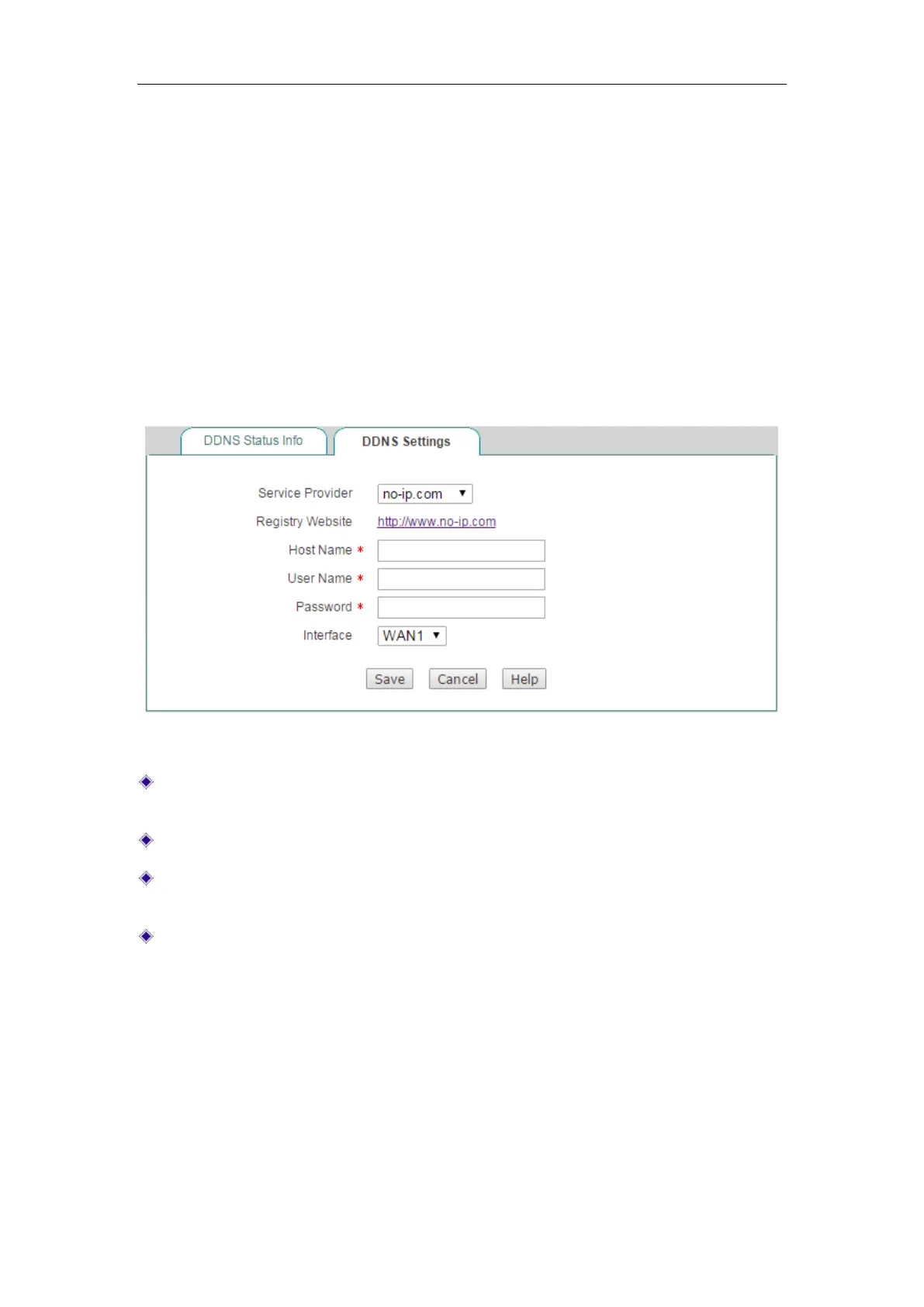
2) DDNS Settings – no-ip.com
Figure 4-23 DDNS_no-ip.com
Service Provider: Select the DDNS service provider who offers services to the
Device. Here please select
no-ip.com.
Host Name: Specify the host name of the Device.
User Name: Enter the username of the account. It should be the same with the
username that you entered when registering the DDNS account.
Password: Enter the key that you got when registering the DDNS account.
4.5.2 DDNS Service provided by dyndns.org
1) Register a Domain Name with no-ip.com
Please login to
http://www.dyndns.org
to register a domain name with the suffix of
dyndns.org.
2) DDNS Settings –dyndns.org



 To Next Page