UTT Technologies Advanced Menu
http://www.uttglobal.com Page 74
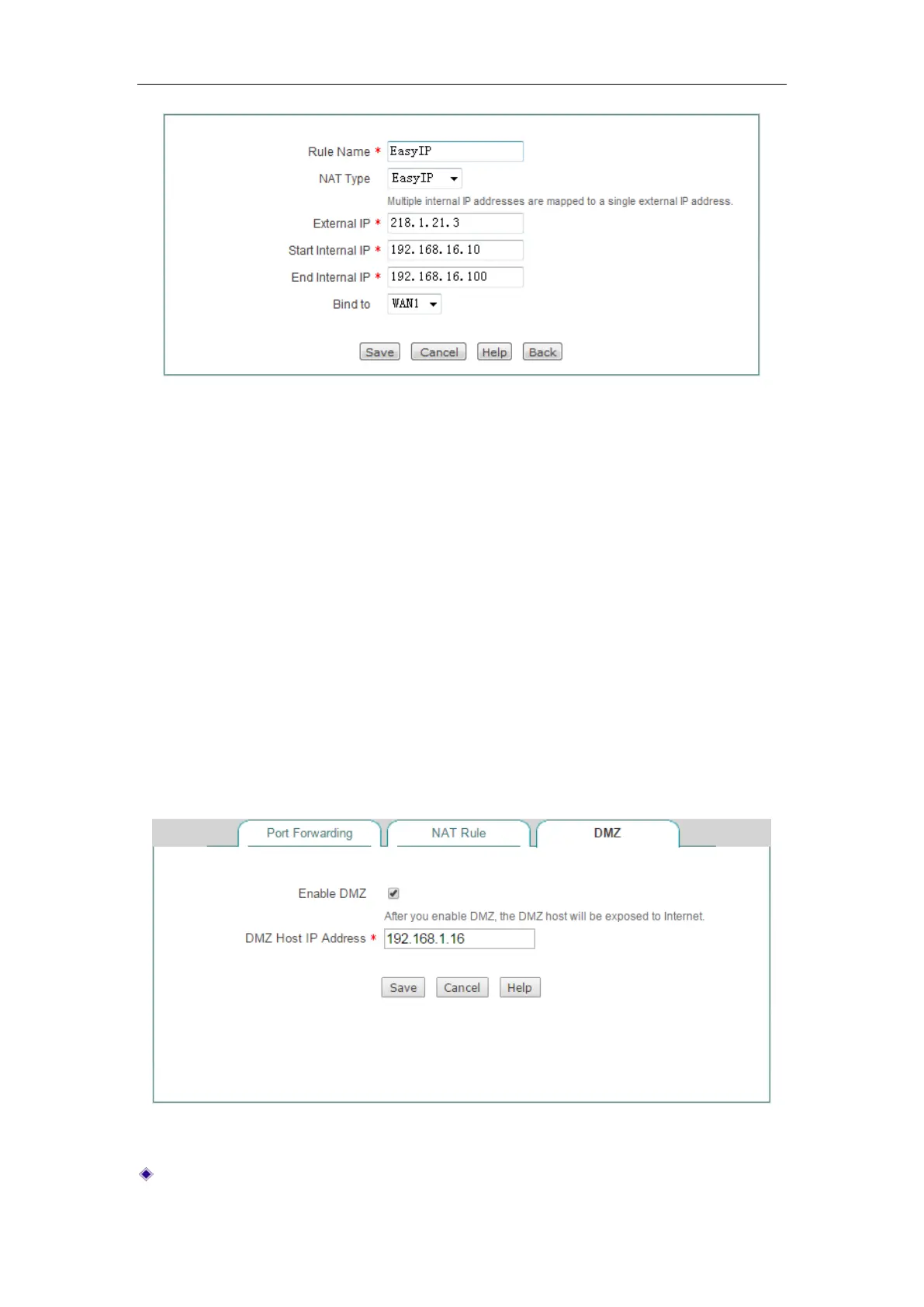
Figure 7-11 EasyIP NAT Rule Settings - Example
Step 3 Enter 218.1.21.3 in the External IP text box, enter 192.168.16.10 in the Start
Internal IP text box and enter 192.168.16.100 in the End Internal IP text box.
Step 4 Select WAN1 from the Bind to drop-down list.
Step 5 Click the Save button to save the settings. Till now you have finished
configuring the NAT rule, and then you can view its configuration in the
NAT
Rule List.
7.1.3 DMZ
The DMZ (Demilitarized Zone) feature allows one local computer to be exposed to the
Internet for the use of a special service such as an online game or video conferencing.
When receiving the requests initiated by outside users, the Device will directly forward
these requests to the specified DMZ host.
Figure 7-12 DMZ
Enable DMZ: Select to enable DMZ Host.



 To Next Page