UTT Technologies Network Menu
http://www.uttglobal.com Page 37
4.4.5 Example of DHCP
1) Requirements
In this case, the DHCP function must be enabled on the Device, with the start IP
Address as 192.168.1.10, and a total of 50 addresses can be assigned; here, the host
with the MAC address of 00:21:85:9B:45:46 assigns the fixed IP address of
192.168.1.15, and the host with the MAC address of 00:1F:3C:0F:07:F4 assigns the
fixed IP address of 192.168.1.10.
2) Configuration Steps
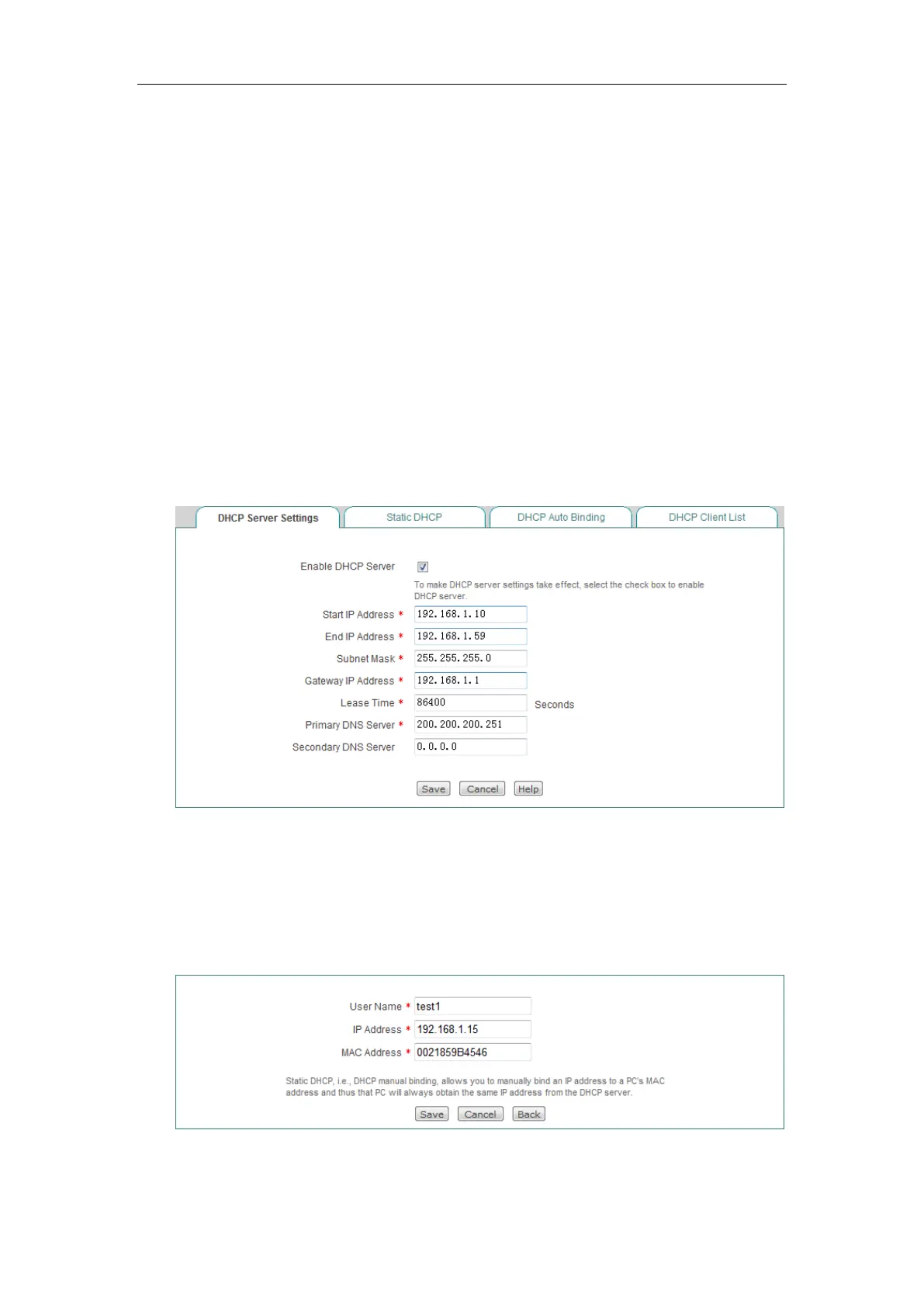
Step 1 Go to Network > DHCP Server > DHCP Server Settings page.
Step 2 Select Enable DHCP Server, enter 192.168.1.10 and 192.168.1.59 in the
Start IP Address and End IP Address text box, configure other parameters as
required, and click the
Save button at the end of configuration.
Figure 4-19 DHCP Server Settings_Example
Step 3 Go to Network > DHCP Server > Static DHCP page and click the Add
button.
Step 4 Configure the two static DHCP instances in the request, as shown the
following two figures.
Figure 4-20 Static DHCP Settings_Example A



 To Next Page