UTT Technologies Advanced Menu
http://www.uttglobal.com Page 67
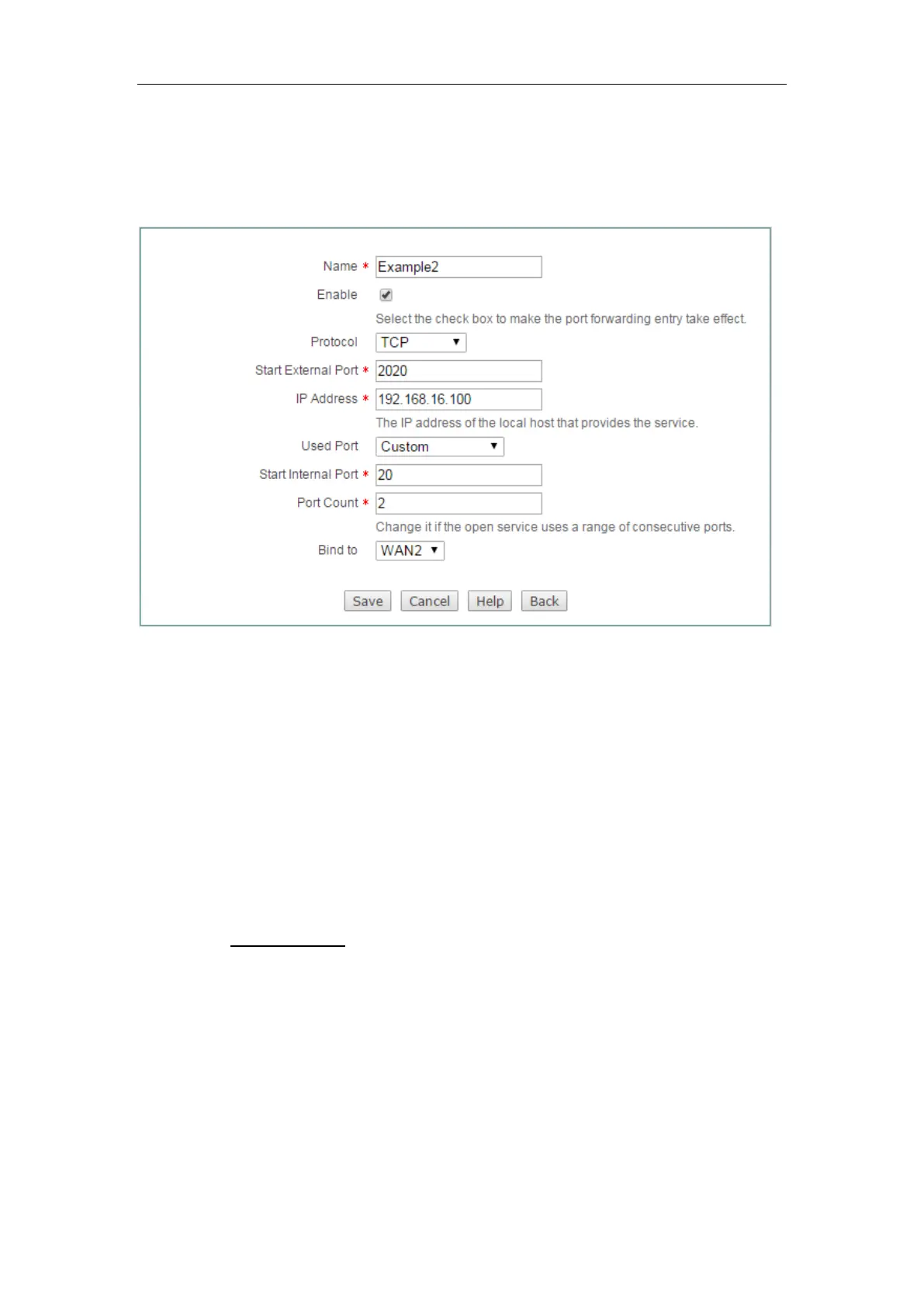
Port Count to 2. Then all the requests for ftp from outside users to
200.200.201.18:2020 or 200.200.201.18:2021 will be forwarded to 192.168.16.100:20
or 192.168.16.100:21.
The following figure shows the detailed settings.
Figure 7-4 Port Forwarding Settings - Example Two
7.1.1.3.3 Example Three
An organization obtains eight public IP addresses (from 218.1.21.0/29 to
218.1.21.7/29) from the ISP. Therein, 218.1.21.1/29 is used as the Internet
connection’s gateway IP address, 218.1.21.2/29 is used as the Device’s WAN1
interface’s IP address.
The organization wants a LAN server (IP Address: 192.168.16.88) to open SMTP
service (Protocol: TCP; Port: 25) to the outside users. And the Device will use 2025 as
the external port and 218.1.21.3 as the external IP address.
Firstly, we need to create an NAT rule, and set its External IP Address to 218.1.21.3,
see section
7.1.2 NAT Rule for detailed information. Then we need to create the port
forwarding rule.
The following figure shows the detailed settings.



 To Next Page