EasyManua.ls Logo

Yamaha XVS650 - Checking of Connections

Yamaha XVS650
360 pages
Print Icon
To Next Page IconTo Next Page
To Previous Page IconTo Previous Page
Loading...
CHECKING OF CONNECTIONS I
~~~
I
~
I
EB801000
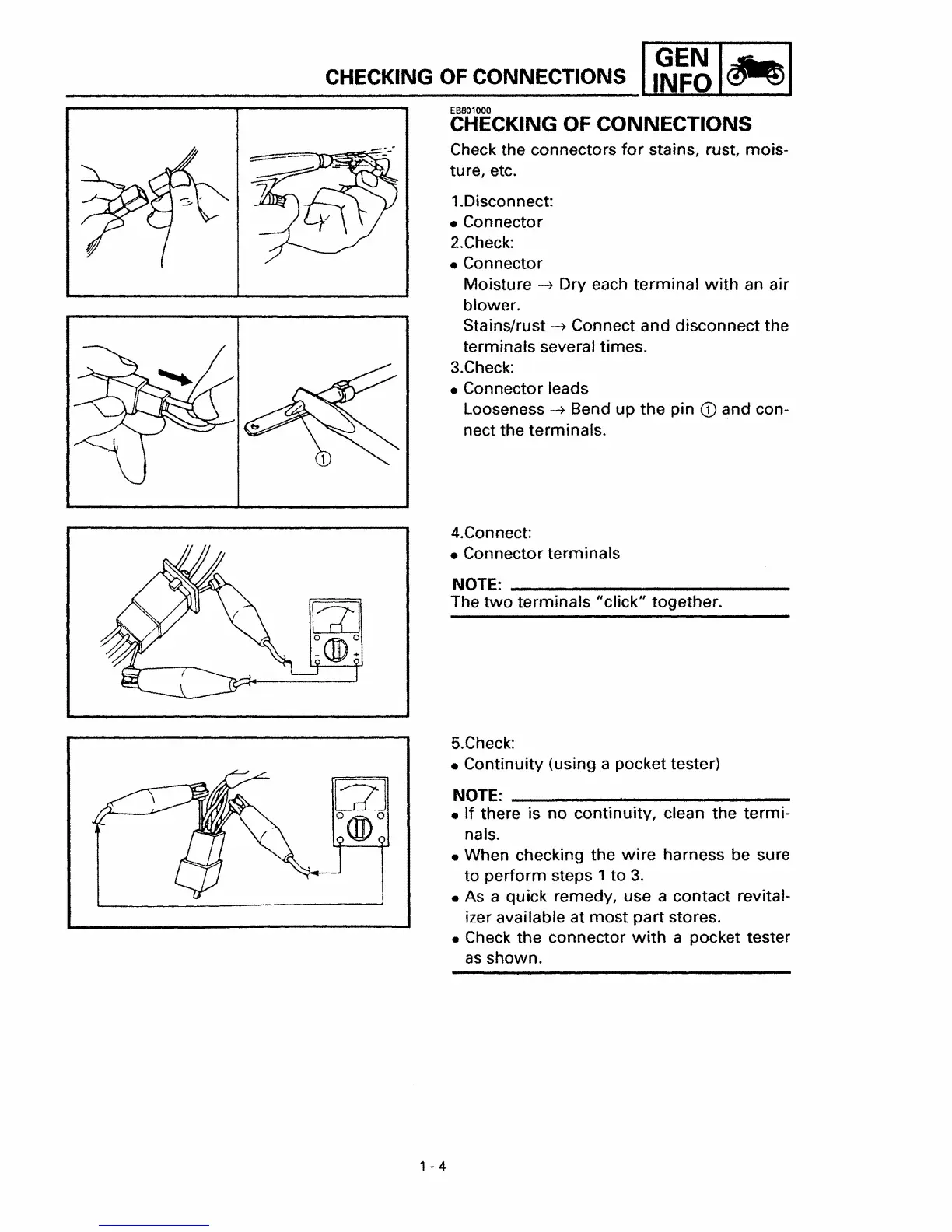
CHECKING OF CONNECTIONS
Check the connectors
for
stains, rust, mois-
ture, etc.
1.Disconnect:
Connector
2.Check:
Connector
Moisture
-?
Dry each
terminal
with
an air
blower.
Stains/rust
-?
Connect and disconnect the
terminals several times.
3.Check:
Connector leads
Looseness......,
Bend up the pin
CD
and con-
nect the terminals.
4.Connect:
Connector terminals
NOTE:
_
The
two
terminals
"click"
together.
5.Check:
Continuity (using a pocket tester)
NOTE:
_
If there is no continuity, clean the
termi-
nals.
When checking the
wire
harness be sure
to perform steps 1
to
3.
As a quick remedy, use a contact revital-
izer available at
most
part
stores.
Check the connector
with
a pocket tester
as
shown.
1-4

Table of Contents

Other manuals for Yamaha XVS650

Related product manuals