As Needed Maintenance
AEROSET
®
Customer Training Guide 10-19
94858-103 — July 2003
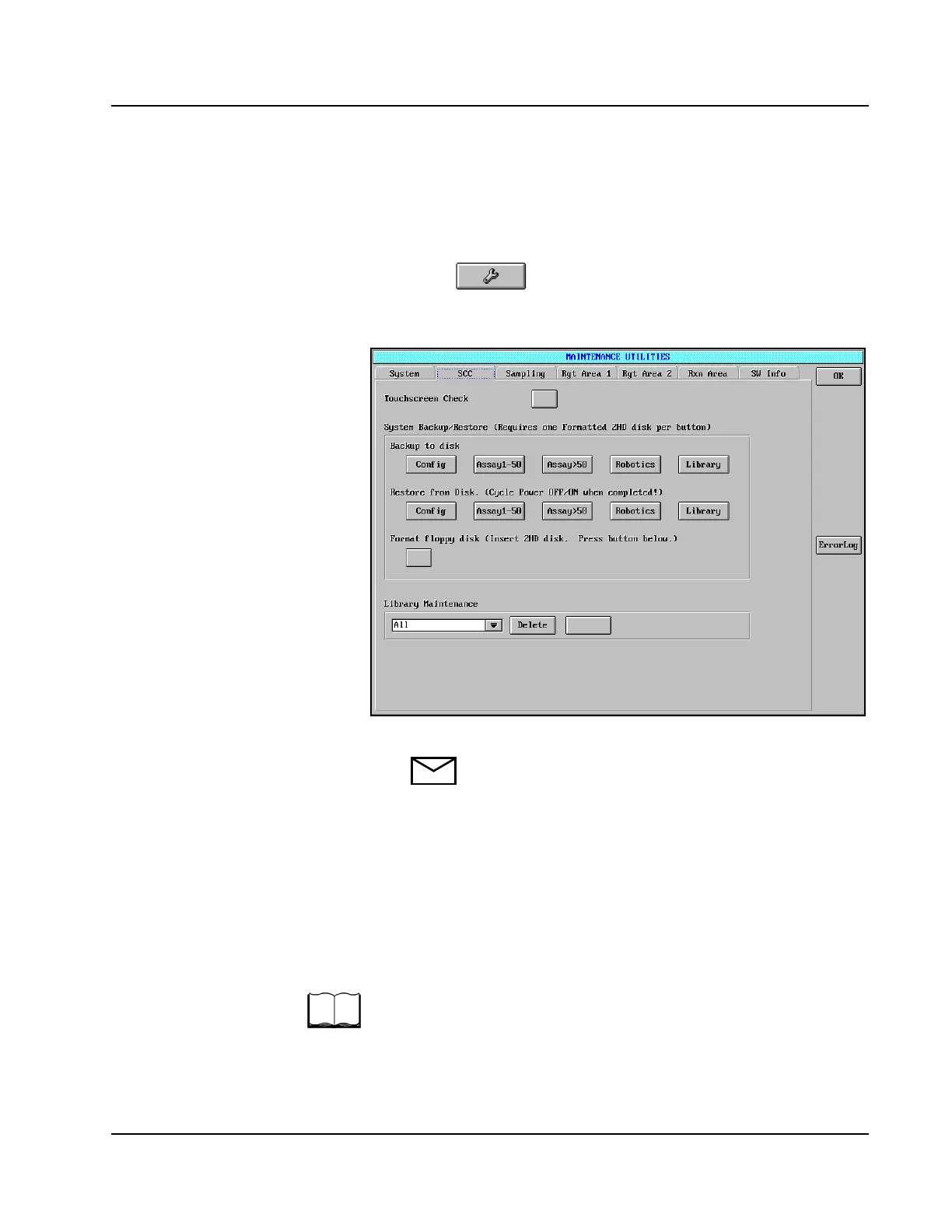
To access the System Backup and Restore options:
1. Ensure that the AEROSET System status is READY. Exit all open
screens displayed in the Display Area.
2. Select in the Action Area. The MAINTENANCE
UTILITIES screen is displayed.
3. Select the SCC tab to access the SCC page.
Figure 10.1: MAINTENANCE UTILITIES Screen, SCC Page
NOTE: A backup process has the following approximate
durations:
• Config = 3 minutes
• Assay 1-50 = less than 15 minutes
• Assay > 50 = less than 15 minutes
• Robotics = less than 10 seconds
• Library = dependent upon the amount of data
stored in the library
For further information and details about using the System Backup and
Restore options, refer to As Needed Maintenance Procedures in
Section 9, Service and Maintenance of the AEROSET System
Operations Manual.
• Library Maintenance
• Where you delete files in the
library.
• Can hold up to 200 of each
type of file. (assays, reagents,
C/C, results, etc.)
• Print forms here-can also save
to disk.
• Print form files not displayed
separately here.
• Touch “Delete” when <ALL> is
selected, will clear all files.
• Select drop down box, if you
select a certain file type, then
touch select, you can see
individual files to delete.
• Shift + Ctrl selections are
active.



 To Next Page