66 EKI-7710 Series User Manual
Designated Bridge, Edge Port Conf/Oper, P2P MAC Conf/Oper, Port Role and Port
State.
4.5.10.9 STP Statistics
To access this page, click L2 Switching > Spanning Tree > STP Statistics.
The ensuing table for STP Statistics settings are informational only: Port, Configura-
tion BPDUs Received, TCN BPDUs Received, Configuration BPDUs Transmitted
and TCN BPDUs Transmitted.
4.5.11 X-Ring Elite
The X-Ring Elite function provides an improvement over Spanning Tree and Rapid
Spanning Tree and a rapid auto recovery in the event that the network suffers a cor-
rupt or broken link and prevents network loops.
4.5.11.1 X-Ring Elite Settings
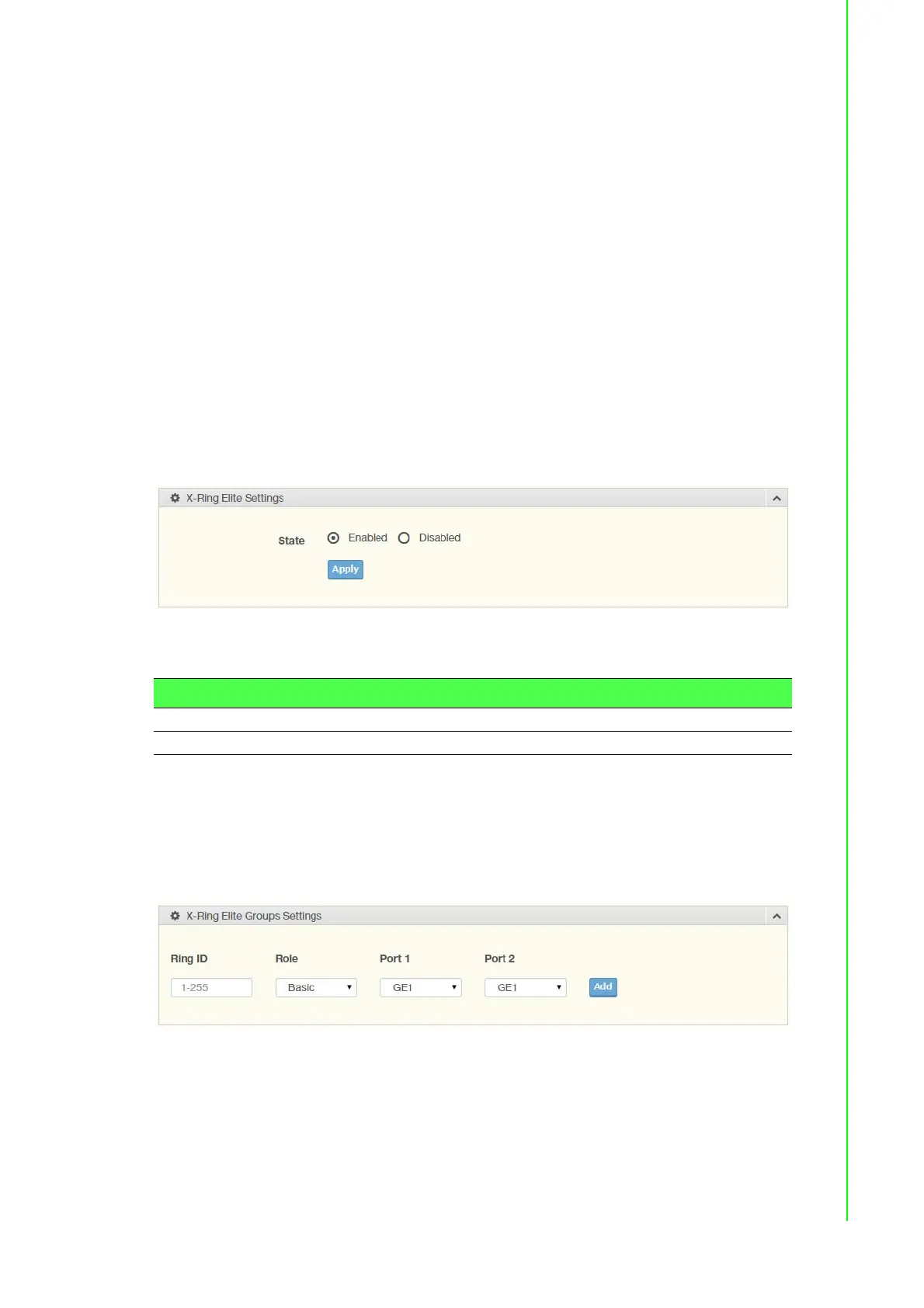
The X-Ring Elite Settings allows you to enable or disable the state of the X-Ring set-
tings.
To access this page, click L2 Switching > X-Ring Elite > X-Ring Elite Settings.
Figure 4.45 L2 Switching > X-Ring Elite > X-Ring Elite Settings
The following table describes the items in the previous figure.
The ensuing table for Information settings are informational only: X-Ring Elite State.
4.5.11.2 X-Ring Elite Groups
The X-Ring Elite Groups page allows you to select the function and role for each
device and the connected ports.
To access this page, click L2 Switching > X-Ring Elite > X-Ring Elite Groups.
Figure 4.46 L2 Switching > X-Ring Elite > X-Ring Elite Groups
Item Description
State Select Enabled or Disabled to setup the X-Ring Elite mode.
Apply Click Apply to save the values and update the screen.


 To Next Page