77
USE
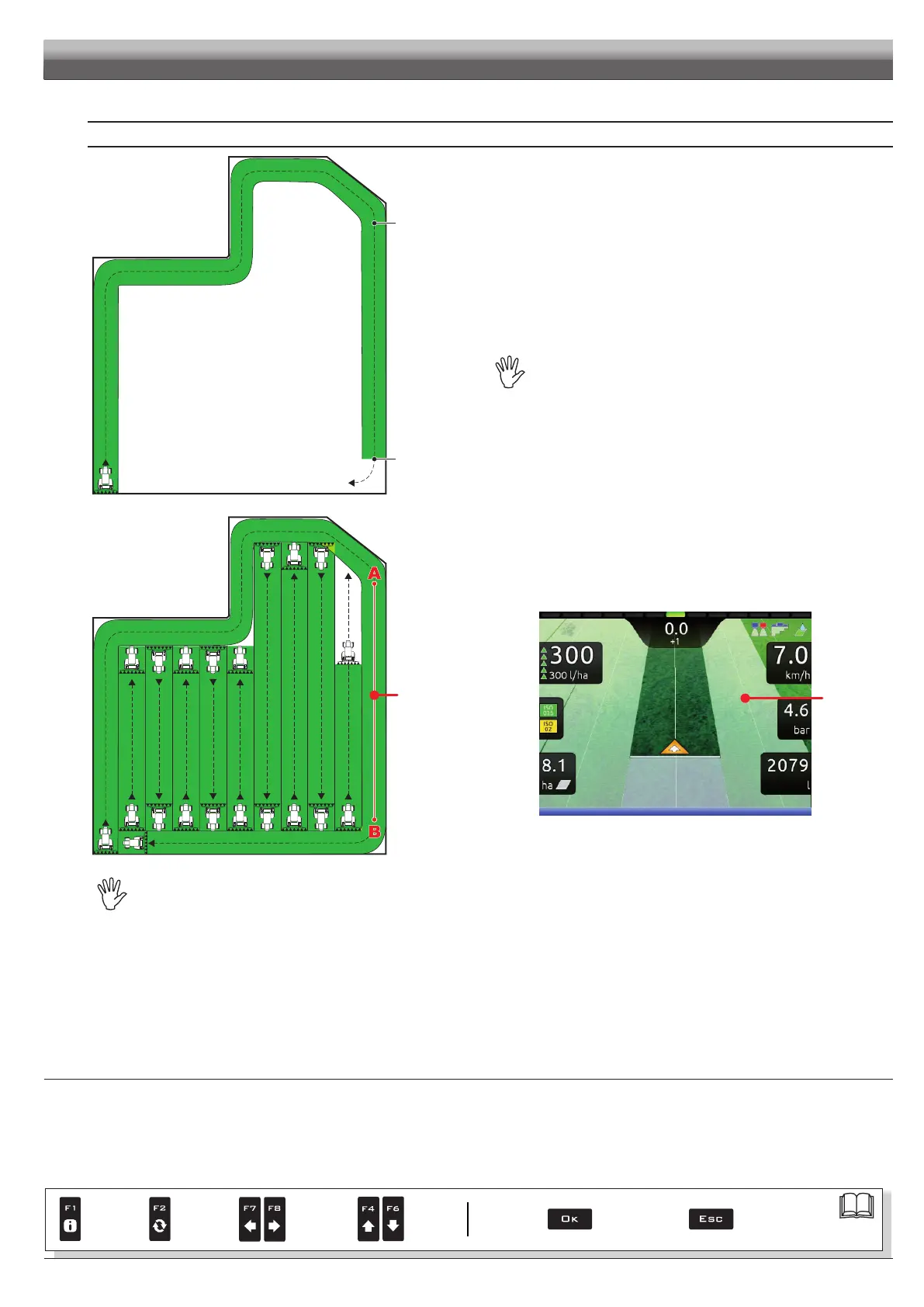
MARKING POINTS A AND B
Mark A ?
Mark B ?
Fig. 252
• While moving along the perimeter of the eld, you will mark points A and B
(as described in par. 16.7 F7 New AB).
This operation is fundamental for Delta 80 to guide you,
during spraying, along tracks parallel to the reference track obtained by
marking points A and B.
We recommend marking points A and B while the machine is
moving, at both ends of a straight line that is as long as possible:
the longer the line marked by points A and B, the lower the error
caused by any deviations of the machine itself.
T0
Fig. 253
• Once the line from A to B has been marked (T0), it will be possible to
spray the rest of the eld along parallel lines, (Fig. 253), by following the
reference tracks shown on the display (Fig. 254).
T0
Fig. 254
At the beginning of a new job Delta 80 gives driving directions in the "Straight parallel" mode.
To change guidance mode see function F2 Guidance mode (par. 16.2).
> > > 12.5 Spraying a eld
Par.
7. 4
Conrm access
or data change
Exit the function or
data change
Delete
selected
character
Scroll
(LEFT /
RIGHT)
Data
increase /
decrease
Scroll
(UP /
DOWN)
Enter
selected
character



 To Next Page