Overview of port trunking
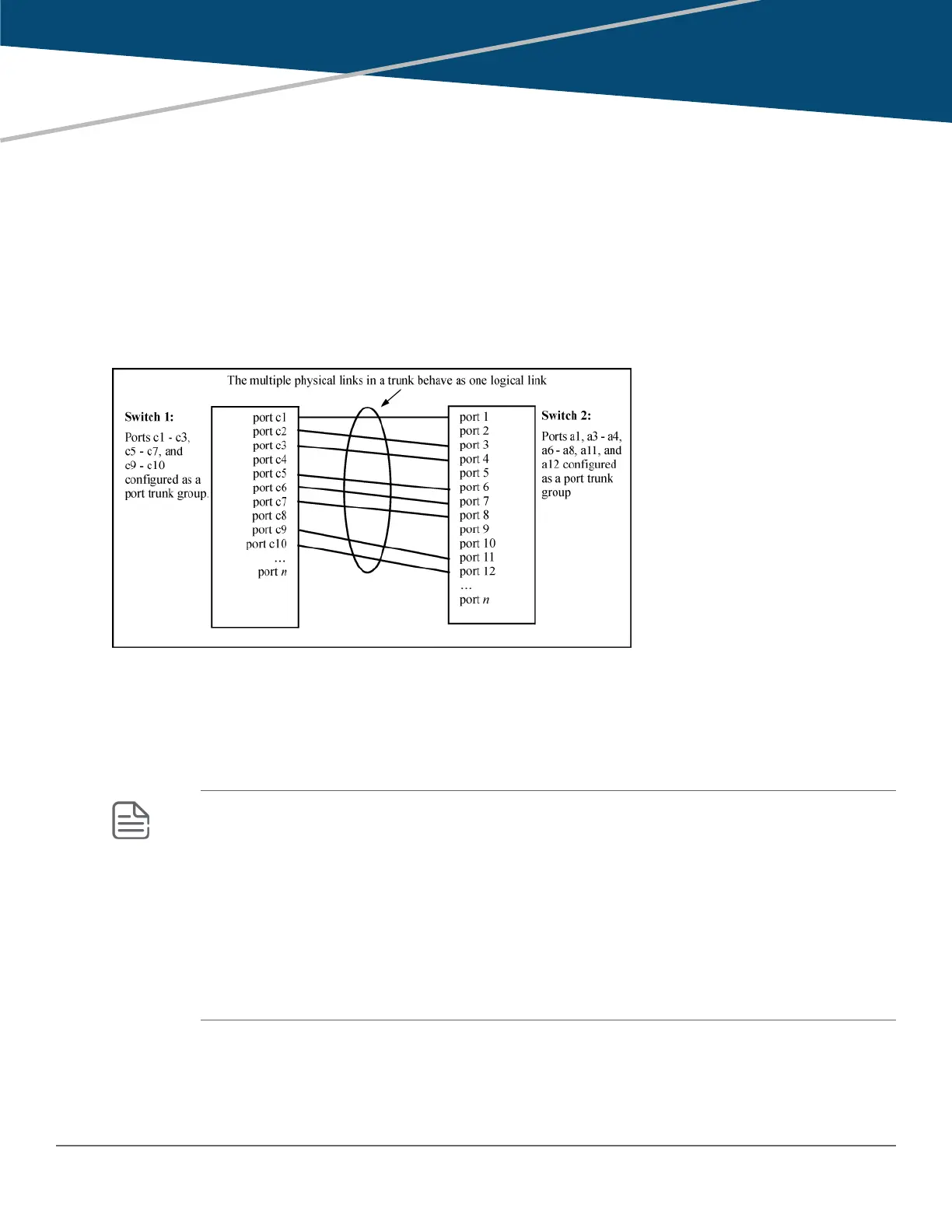
Port trunking allows you to assign up to eight physical links to one logical link (trunk) that functions as a single,
higher-speed link providing dramatically increased bandwidth. This capability applies to connections between
backbone devices as well as to connections in other network areas where traffic bottlenecks exist. A trunk group
is a set of up to eight ports configured as members of the same port trunk. The ports in a trunk group do not have
to be consecutive. For Example:
Figure 14: Conceptual Example: of port trunking
Port connections and configuration
All port trunk links must be point-to-point connections between a switch and another switch, router, server, or
workstation configured for port trunking. No intervening, non-trunking devices are allowed. It is important to note
that ports on both ends of a port trunk group must have the same mode (speed and duplex) and flow control
settings.
NOTE:
Link connections
The switch does not support port trunking through an intermediate, non-trunking device such as
a hub, or using more than onemedia type in a port trunk group. Similarly, for proper trunk
operation, all links in the same trunk group must have the samespeed, duplex, and flow control.
Port security restriction
Port security does not operate on a trunk group. If you configure port security on one or more
ports that are later added to a trunk group, the switch resets the port security parameters for
those ports to the factory-default configuration.
Chapter 5
Port Trunking
104 Aruba 2530 Management and Configuration Guide for
ArubaOS-Switch 16.05














 To Next Page