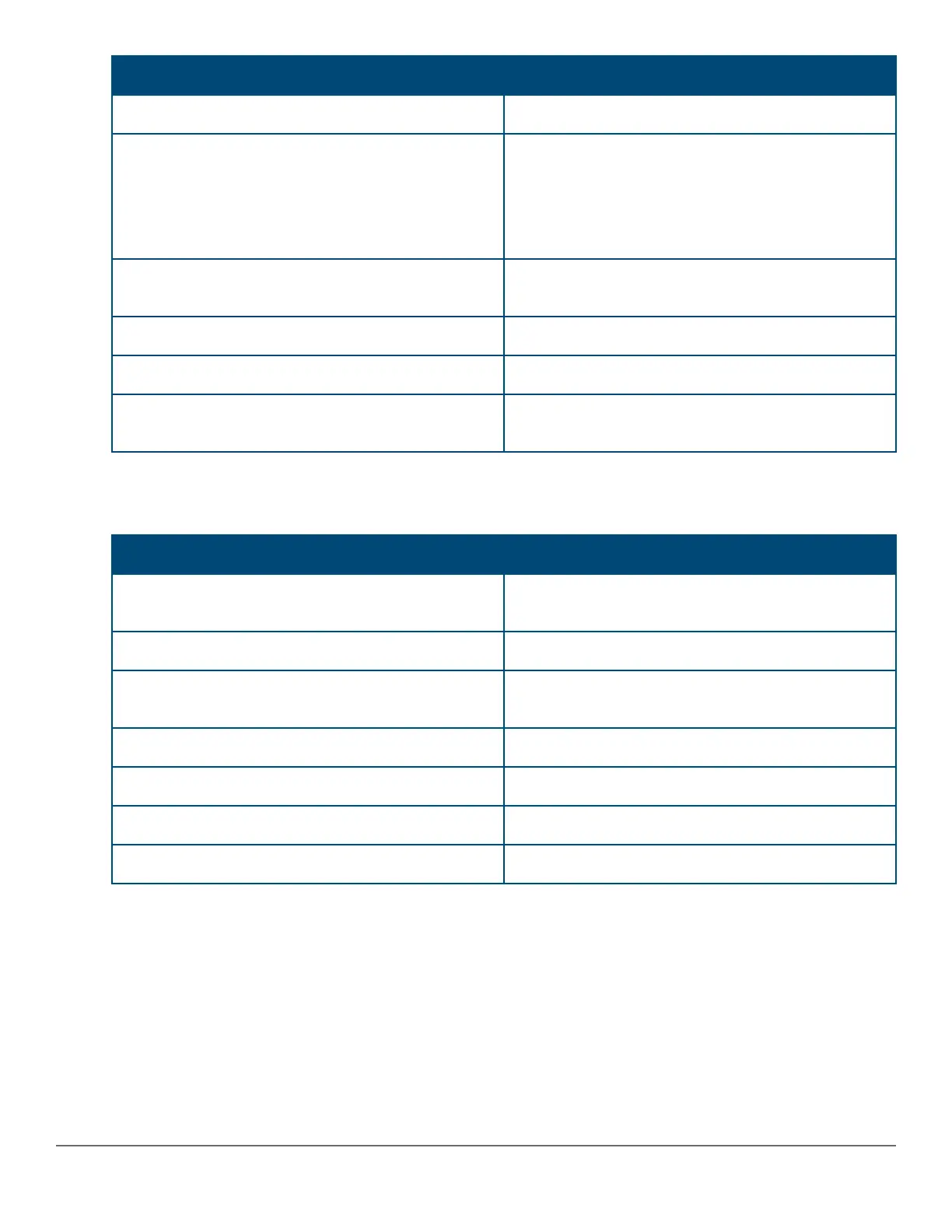
Command Description
show captive-portal
Captive portal configuration.
show port-access clients [port]
[detailed]
Consolidated client view; the detailed option shows
the Access Policy that is applied. The IP address is
only displayed if dhcp-snooping is enabled.
For the summary view (without the detailed option),
only the untagged VLAN is displayed.
show radius authentication
Displays NAS identifier and data on the configured
RADIUS server and switch interactions with this server.
show radius dyn-authorization
Statistics for Radius CoA and Disconnect.
show radius accounting
Statistics for Radius accounting.
show crypto pki local-certificate
[summary]
Installed certificates.
Debug command
Use the debug command to help you debug your issues.
Command Description
debug security captive-portal
Enables debug logging for the Captive Portal sub-
system.
debug security port-access mac-based
Enables debug logging for the MAC-auth sub-system.
debug security port-access authenticator
Enables debug logging for the 802.1X authenticator
sub-system.
debug security radius-server
Enables debug logging for the Radius sub-system.
debug destination session
Prints debug messages to terminal.
debug destination logging
Sends debug messages to the syslog server.
debug destination buffer
Prints debug messages to a buffer in memory.
220 Aruba 2530 Management and Configuration Guide for
ArubaOS-Switch 16.05














 To Next Page