Internet
WAN Router
WAN Router
Switch being
provisioned
Switch being
provisioned
Router/
Firewall
AirWave
Server
Activate
Secure IPSec
tunnel to AirWave
Secure IPSec tunnel
to AirWave
Corporate
HQ
Branch 2
Branch 1
Aruba
Controller
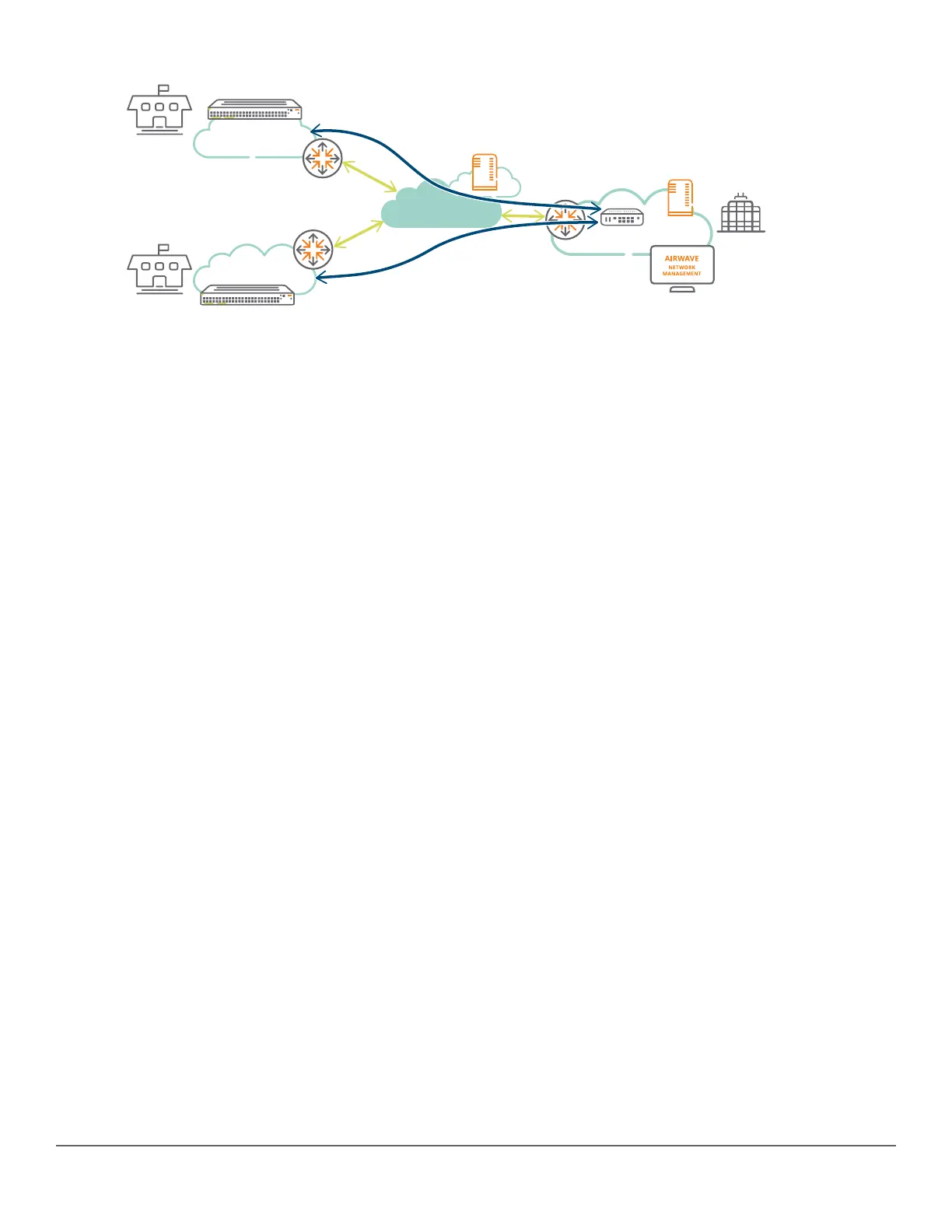
In the preceding illustration, the workflow is as follows:
1. The switches being provisioned in the branches are booted and connect to the Activate on the cloud.
2. Based on the administrator’s provisioning (folder, rule), the device is placed in the appropriate folder before
getting redirected to the AirWave server in the Corporate HQ.
3. The switches connect to the AirWave server, and the server pushes the configuration to the switches based on
the AirWave folder, switch model, and branch location.
4. Optionally, an IPsec tunnel to the Controller in the HQ can be constructed to secure the management traffic to
AirWave. This configuration can be set as part of the initial configuration push from Activate.
ZTP with Aruba Central
Aruba Central does not require any configuration of local DHCP server or other network components but requires
a switch with Internet access.
Users with access to Central cloud portal must provision their switches and assign licenses accordingly. Once
complete, Central will automatically program the Activate portal with the required switch details and the group to
which the switch must check in.
The following diagram illustrates the working of Central ZTP:
Chapter 10 Zero Touch Provisioning with AirWave and Central 239














 To Next Page