Listing of the startup-config file with a friendly port name configured (and saved)
switch(config)# int A1 name Print_Server@10.25.101.43
switch(config)# write mem
switch(config)# int A2 name Herbert's_PC
switch(config)# show config
Startup configuration:
; J9091A Configuration Editor; Created on release xx.15.05.xxxx
hostname "HPSwitch"
interface AQ
name "Print_Server@10.25.101.43
exit
snmp-server community "public" Unrestricted
.
.
.
Uni-directional link detection (UDLD)
Uni-directional link detection (UDLD) monitors a link between two switches and blocks the ports on both ends of
the link if the link fails at any point between the two devices. This feature is particularly useful for detecting failures
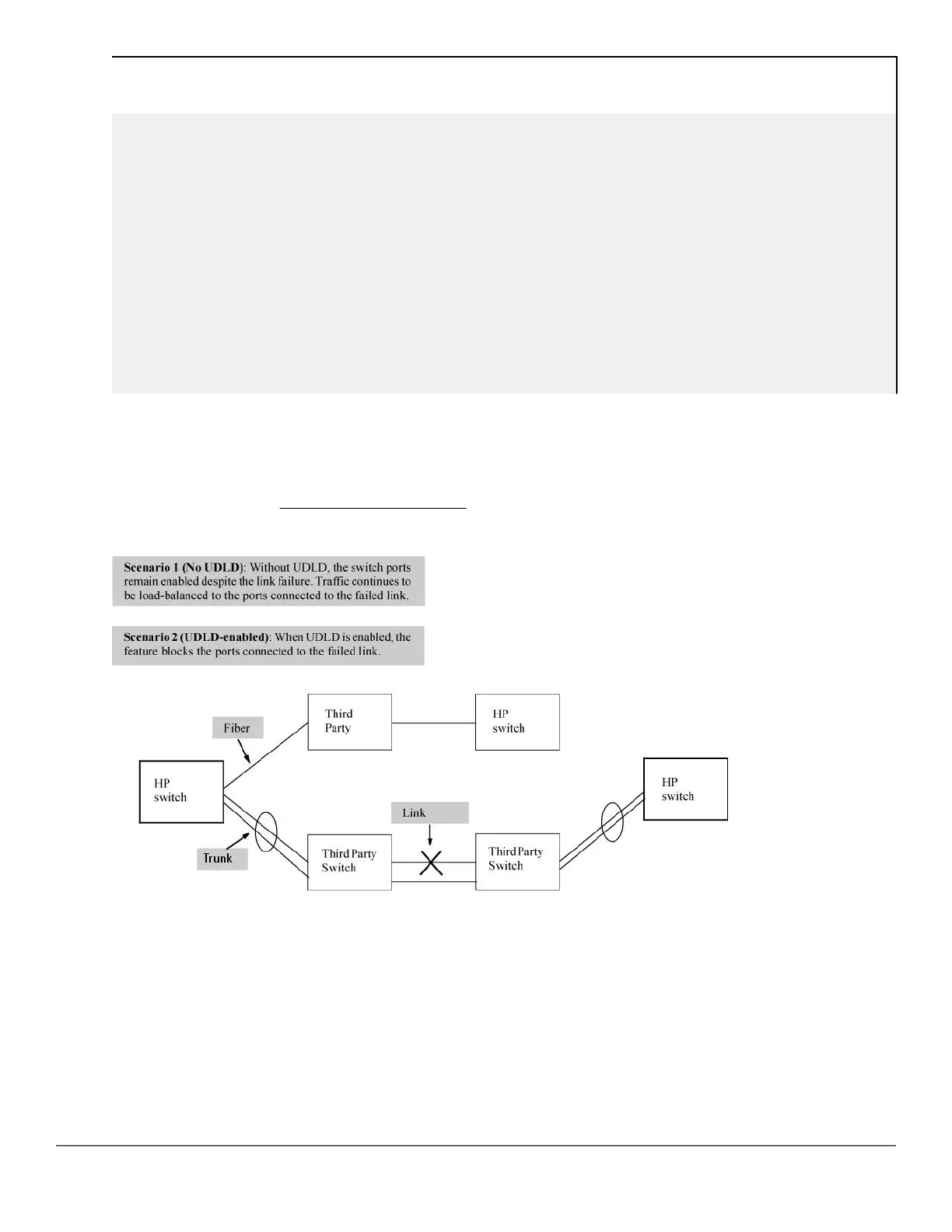
in fiber links and trunks. Figure 9: UDLD Example: on page 78 shows an Example:.
Figure 9: UDLD Example:
In this Example:, each switch load balances traffic across two ports in a trunk group. Without the UDLD feature, a
link failure on a link that is not directly attached to one of the HPE switches remains undetected. As a result, each
switch continue to send traffic on the ports connected to the failed link. When UDLD is enabled on the trunk ports
on each switch, the switches detect the failed link, block the ports connected to the failed link, and use the
remaining ports in the trunk group to forward the traffic.
Similarly, UDLD is effective for monitoring fiber optic links that use two uni-direction fibers to transmit and receive
packets. Without UDLD, if a fiber breaks in one direction, a fiber port may assume the link is still good (because
the other direction is operating normally) and continue to send traffic on the connected ports. UDLD-enabled
ports; however, will prevent traffic from being sent across a bad link by blocking the ports in the event that either
the individual transmitter or receiver for that connection fails.
78 Aruba 2530 Management and Configuration Guide for
ArubaOS-Switch 16.05














 To Next Page