CAUTION:
ICMP is necessary for routing, diagnostic, and error responses in an IP network. ICMP rate-limiting is
primarily used for throttling worm or virus-like behavior and should normally be configured to allow
one to five percent of available inbound bandwidth (at 10 Mbps or 100 Mbps speeds) or 100 to
10,000 kbps (1Gbps or 10 Gbps speeds) to be used for ICMP traffic. This feature should not be
used to remove all ICMP traffic from a network.
NOTE:
ICMP rate-limiting does not throttle non-ICMP traffic. In cases where you want to throttle both ICMP
traffic and all other inbound traffic on a given interface, you can separately configure both ICMP rate-
limiting and all-traffic rate-limiting.
The all-traffic rate-limiting command (rate-limit all) and the ICMP rate-limiting command
(rate-limit icmp) operate differently:
• All-traffic rate-limiting applies to both inbound and outbound traffic and can be specified either in
terms of a percentage of total bandwidth or in terms of bits per second;
• ICMP rate-limiting applies only to inbound traffic and can be specified as only a percentage of
total bandwidth.
Guidelines for configuring ICMP rate-limiting
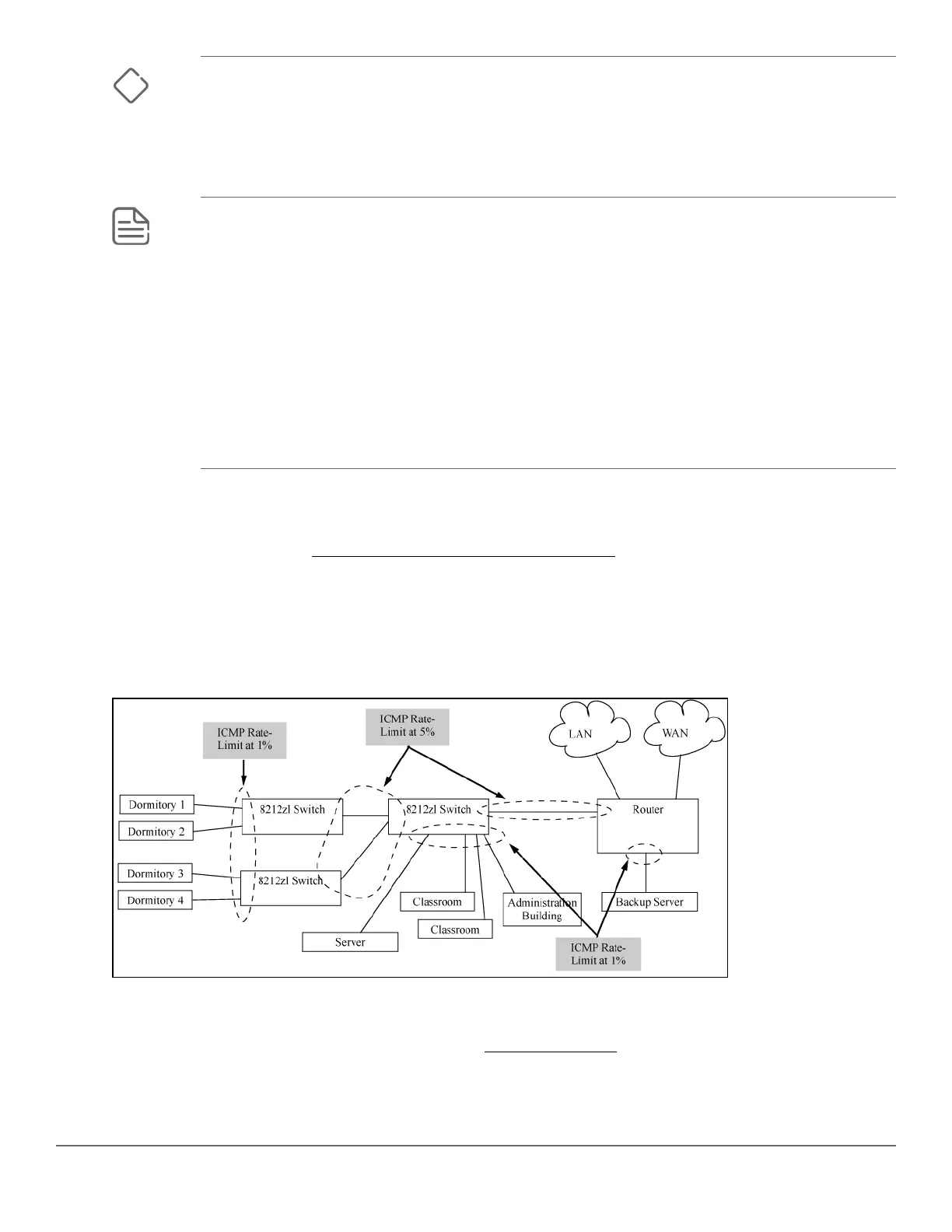
Apply ICMP rate-limiting on all connected interfaces on the switch to effectively throttle excessive ICMP
messaging from any source. Figure 21: Example: of ICMP rate-limiting on page 126 shows an Example: of
how to configure this for a small to mid-sized campus though similar rate-limit thresholds are applicable to other
network environments. On edge interfaces, where ICMP traffic should be minimal, a threshold of 1% of available
bandwidth should be sufficient for most applications. On core interfaces, such as switch-to-switch and switch-to-
router, a maximum threshold of 5% should be sufficient for normal ICMP traffic. ("Normal" ICMP traffic levels
should be the maximums that occur when the network is rebooting.)
Figure 21: Example: of ICMP rate-limiting
Configuring ICMP rate-limiting
For detailed information about ICMP rate-limiting, see ICMP rate-limiting on page 125.
The rate-limit icmp command controls inbound usage of a port by setting a limit on the bandwidth available
for inbound ICMP traffic.
126 Aruba 2530 Management and Configuration Guide for
ArubaOS-Switch 16.05














 To Next Page