Create enforcement profiles
NOTE: Create the HPE Bounce Host-Port profile and the Guest Login profile only if they do not
already exist.
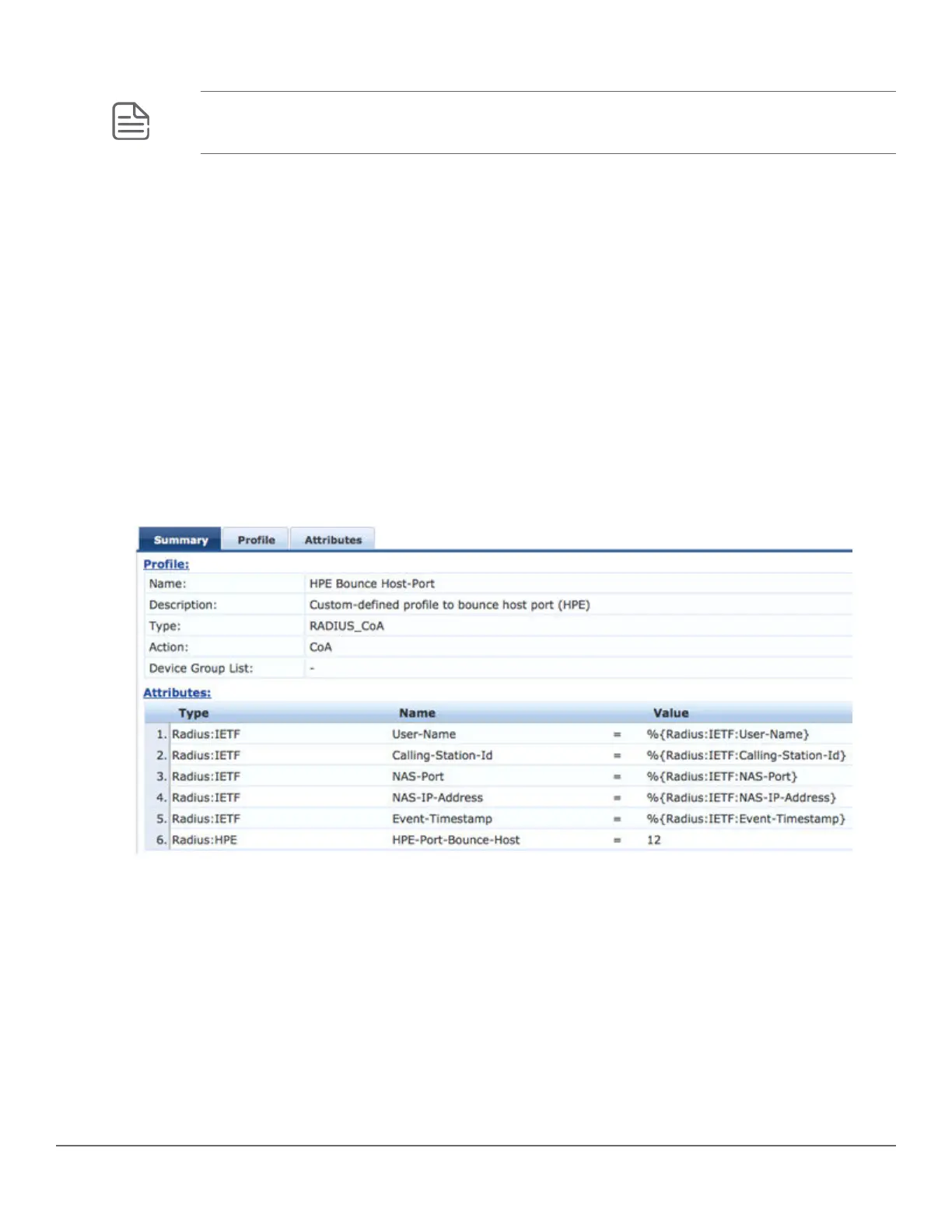
For the HPE Bounce Host-Port profile, configure Captive Portal so that the RADIUS CoA message that includes
the Port Bounce VSA is sent to force the second RADIUS re-authentication after the user registers their device
and makes it known.
Procedure
1. In CPPM, go to Configuration -> Enforcement -> Profiles
2. Click Add.
3. Enter the Profile Name: HPE Bounce Host-Port
4. Enter the Description: Custom-defined profile to bounce host port (HPE).
5. Select the type RADIUS_CoA.
6. Select the action CoA.
7. Add all of the attributes required for a CoA message, and specify the port bounce duration (valid values are
between 0 and 60). This is the amount of time in seconds the port will be held in the down state. The
recommended setting is 12 seconds.
8. Repeat Step 2 to Step 6 to configure the Guest Login profile that will be sent as part of the first RADIUS
Access-Accept and enforce the redirect to the Captive Portal on CPPM. For this profile, select RADIUS as the
type and Accept as the action.
9. Add all of the NAS-Filter-Rule attributes specified below, replacing the IP address in the first two NAS-Filter-
Rule attributes with your CPPM address. Add the HPE-Captive-Portal-URL attribute to specify the redirect
URL, replacing the IP address with your CPPM address. This will cause the client to be redirected to the
Captive Portal on CPPM. You can add other attributes, such as a VLAN to isolate onboarding clients, or a rate
limit to help prevent DoS attacks.
Chapter 9 Captive Portal for ClearPass 213














 To Next Page