2. The switch sends out a DHCP discovery from the primary VLAN interface.
a. The preferred configuration method uses DHCP option 43 value as a string to parse AirWave configuration.
Switch would expect a DHCP option 60 with value ArubaInstantAP along with DHCP option 43 to parse
AirWave details
b. The alternative configuration method supports both encapsulated values from option 43 and direct value
from option 43. Encapsulated vendor-specific sub options, with suboption code 146 is for AirWave details.
3. After the AirWave details are verified and configured, the switch initiates the check-in into the AirWave server
using the HTTPS communication.
NOTE: The AirWave configuration must be in the following format:
<Group>:<Topfolder>:<folder1>,<AMP IP >,<shared secret>
4. After a successful registration, AirWave can monitor, configure, and troubleshoot the switches. Refer to Aruba
Networks and AirWave Switch Configuration Guide.
5. Check-in failure retry is done every 60 seconds for 10 retries.
6. If DHCP does not provide Airwave details, the switch reaches out to Activate (Activate ZTP starts) for Airwave
or Central details. If the DHCP options are not configured for AirWave, the switch is left in its default state for
manual configuration.
Internet
WAN Router
WAN Router
Switch being
provisioned
Switch being
provisioned
DHCP
Server
Router/
Firewall
AirWave
Server
Corporate Network
Corporate
HQ
Branch 2
Branch 1
DHCP
Server
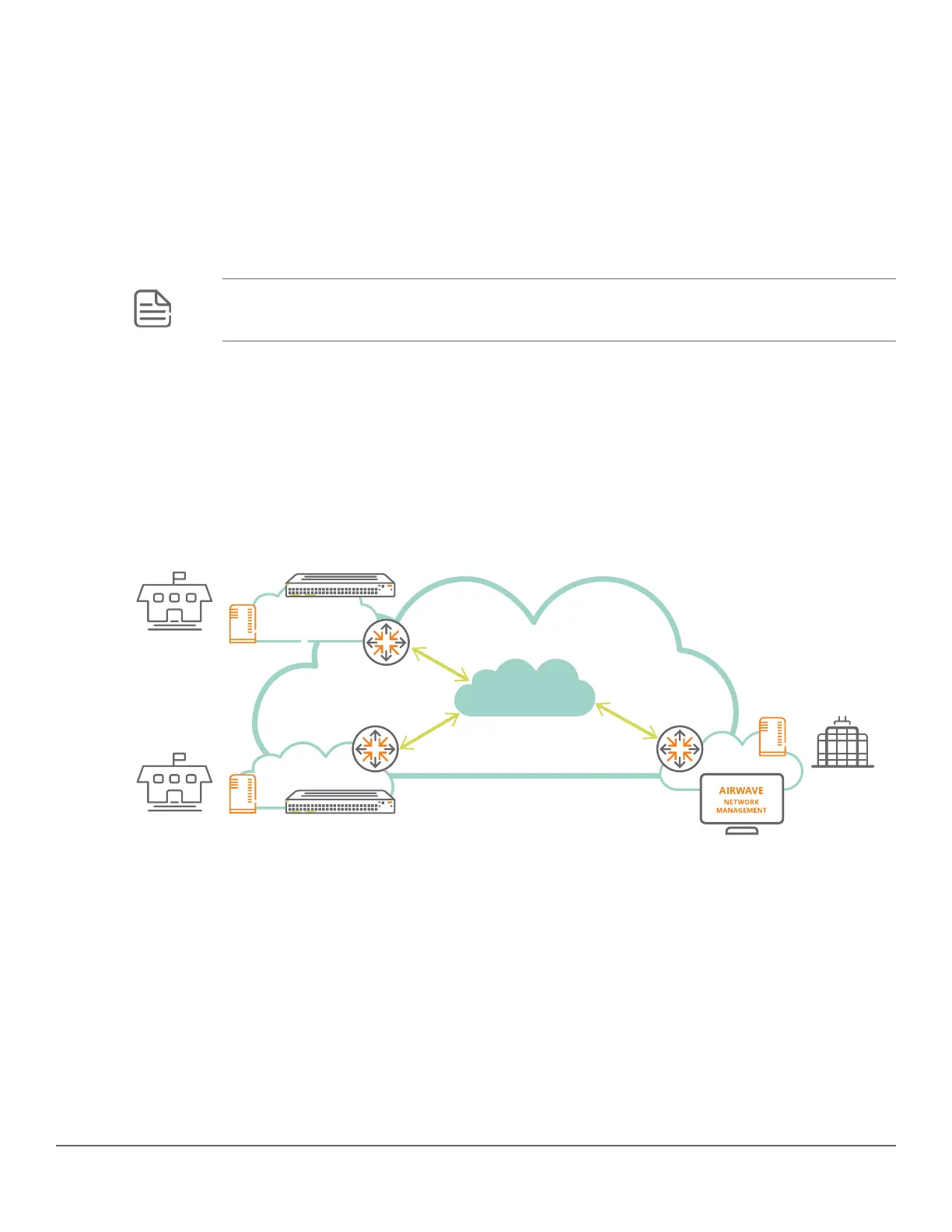
In the preceding illustration, the workflow is as follows:
1. The switches being provisioned in the branches are booted obtaining the IP address from the DHCP server.
2. The DHCP servers provide information about the AirWave server in the Corporate Head Quarters.
3. The switches connect to the AirWave server through the Corporate Network (MPLS VPN or equivalent).
4. The AirWave server pushes the configuration to the switches based on the AirWave folder, switch model, and
branch location.
5. An optional IPsec tunnel can be established between the branches and the Corporate HQ to secure the
management traffic. For more information, refer the Activate-based ZTP with AirWave.
222 Aruba 2530 Management and Configuration Guide for
ArubaOS-Switch 16.05














 To Next Page