Ping and traceroute execution for the network in Example: network domain
switch(config)# ping docservr
10.28.229.219 is alive, time = 1 ms
switch# traceroute docservr
traceroute to 10.28.229.219
1 hop min, 30 hops max, 5 sec. timeout, 3 probes
1 10.28.192.2
1
1 ms 0 ms 0 ms
2 10.28.229.219
2
0 ms 0 ms 0 ms
•
1
First-Hop Router (“B”)
•
2
Traceroute Target
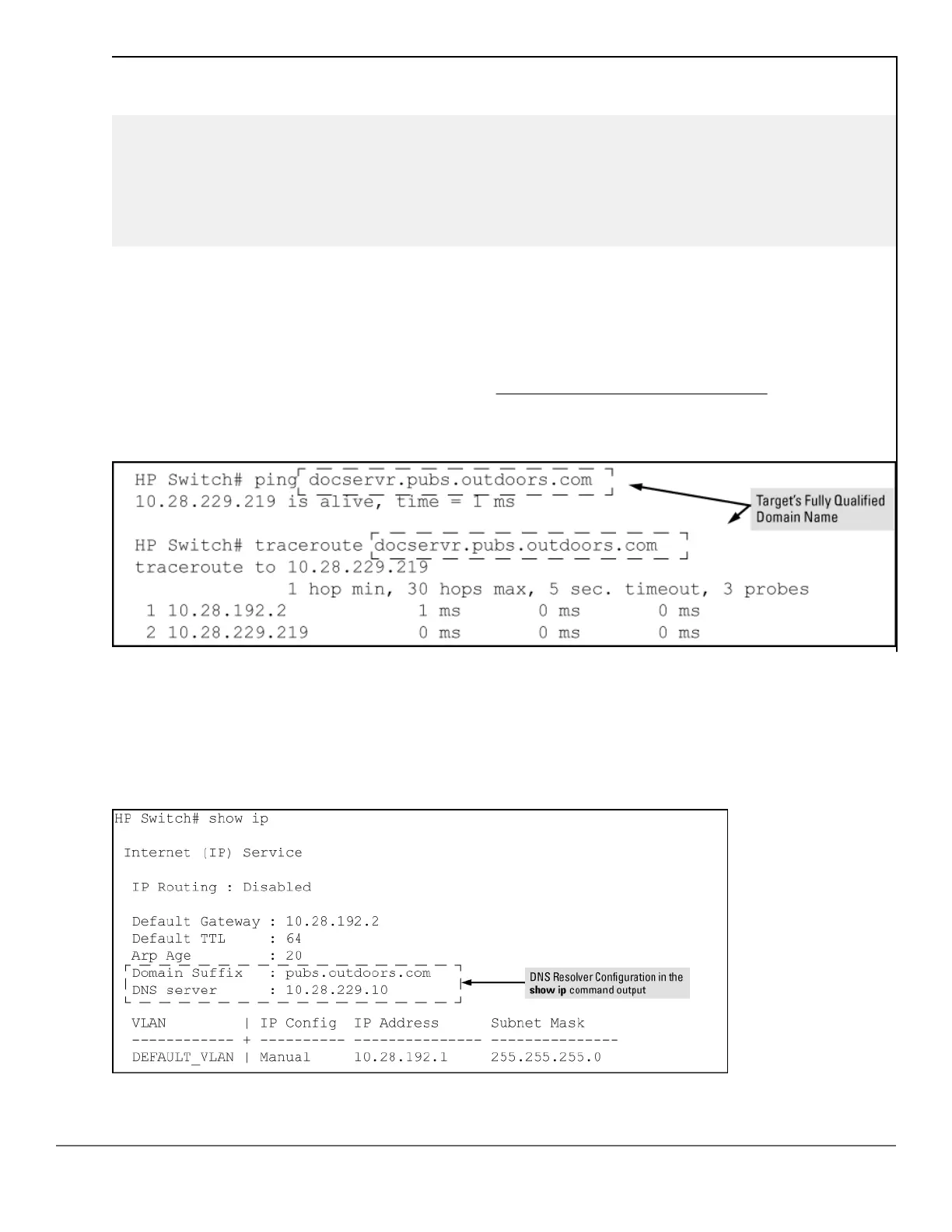
As mentioned under the following example, if the DNS entry configured in the switch does not include the domain
suffix for the desired target, you must use the target host's fully qualified domain name with DNS-compatible
commands. For example, using the document server in
Figure 75: Example: network domain on page 386 as a
target:
Figure 76: Example: of ping and traceroute execution when only the DNS server IP address is configured
Viewing the current DNS configuration
The show ip command displays the current domain suffix and the IP address of the highest priority DNS server
configured on the switch, along with other IP configuration information. If the switch configuration currently
includes a non-default (non-null) DNS entry, it will also appear in the show run command output.
Figure 77: Example: of viewing the current DNS configuration
Chapter 16 Troubleshooting 387














 To Next Page